IP Matrix operation with KBD-UXF Operation | en 7
Bosch Security Systems B.V.
Operation manual
2023-03 | V02 | DOC
4 Operation
After configuring the IPMatrix application using a PC with the Configuration Manager
program, the IPMatrix application operates as a stand-alone CCTV surveillance system. All
operations are carried out using the attached keyboard.
Notice!
Refer to the instruction manual delivered with your keyboard. The manual is also available on
the online product catalog.
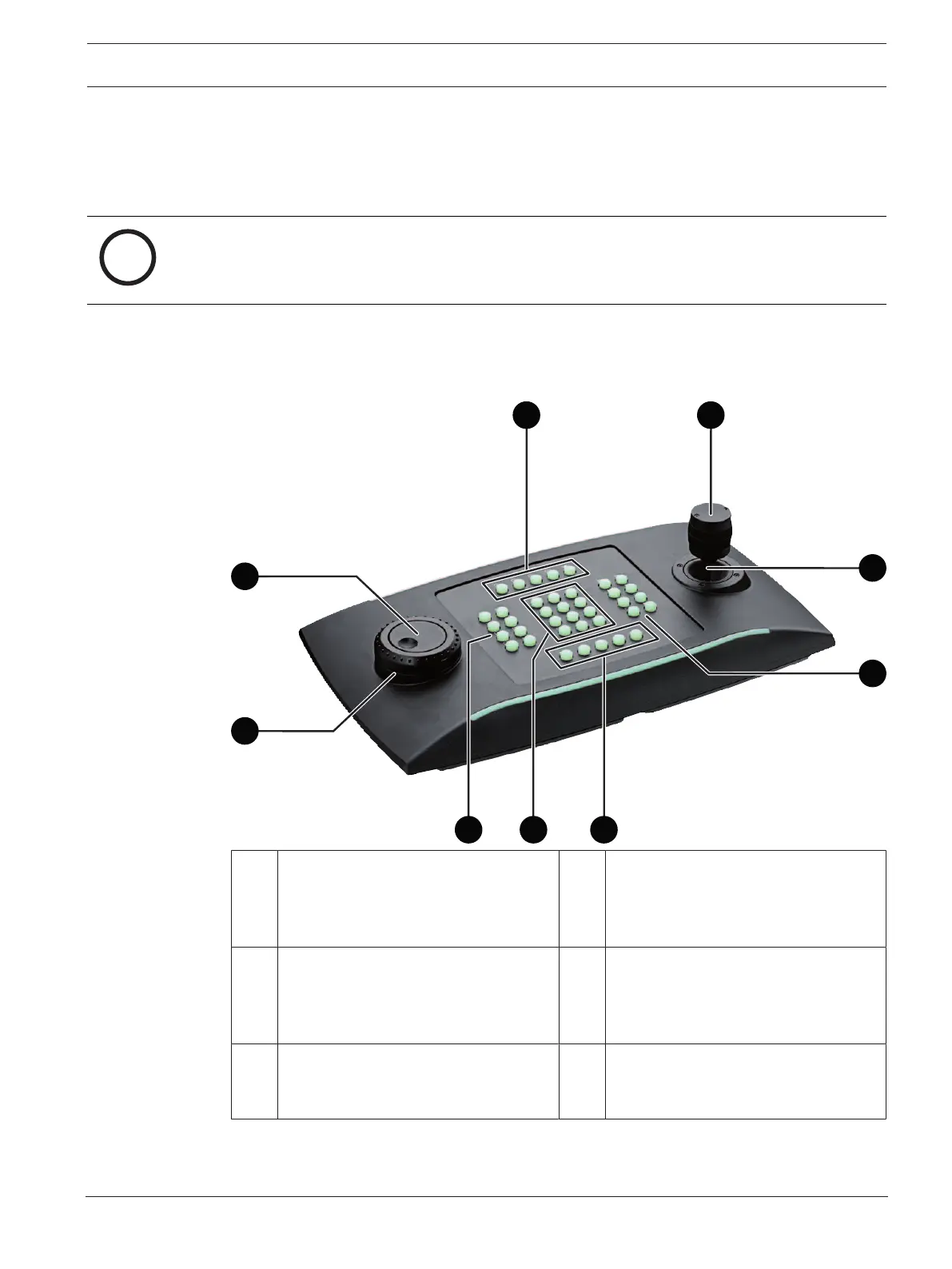
4.1 Keyboard layout
The following graphic illustrates the different groups of keys on the keyboard, shown in the
right-hand version.
1 Numbered function keys and audio. 2 Rotatable knob
Use to control the zoom function of a
device or the built-in digital zoom
factor.
3 Joystick
Use to pan or tilt a PTZ device.
Use to move the field of view in a
digitally zoomed viewing pane.
4 Client control keys
These keys are shortcuts to certain
client functions.
5 Playback controls
In playback mode: Use to control the
playback speed of recorded tracks.
6 Number keys
Use to select favorite views, sequences
or single devices.




 To Next Page