18
Setting functions
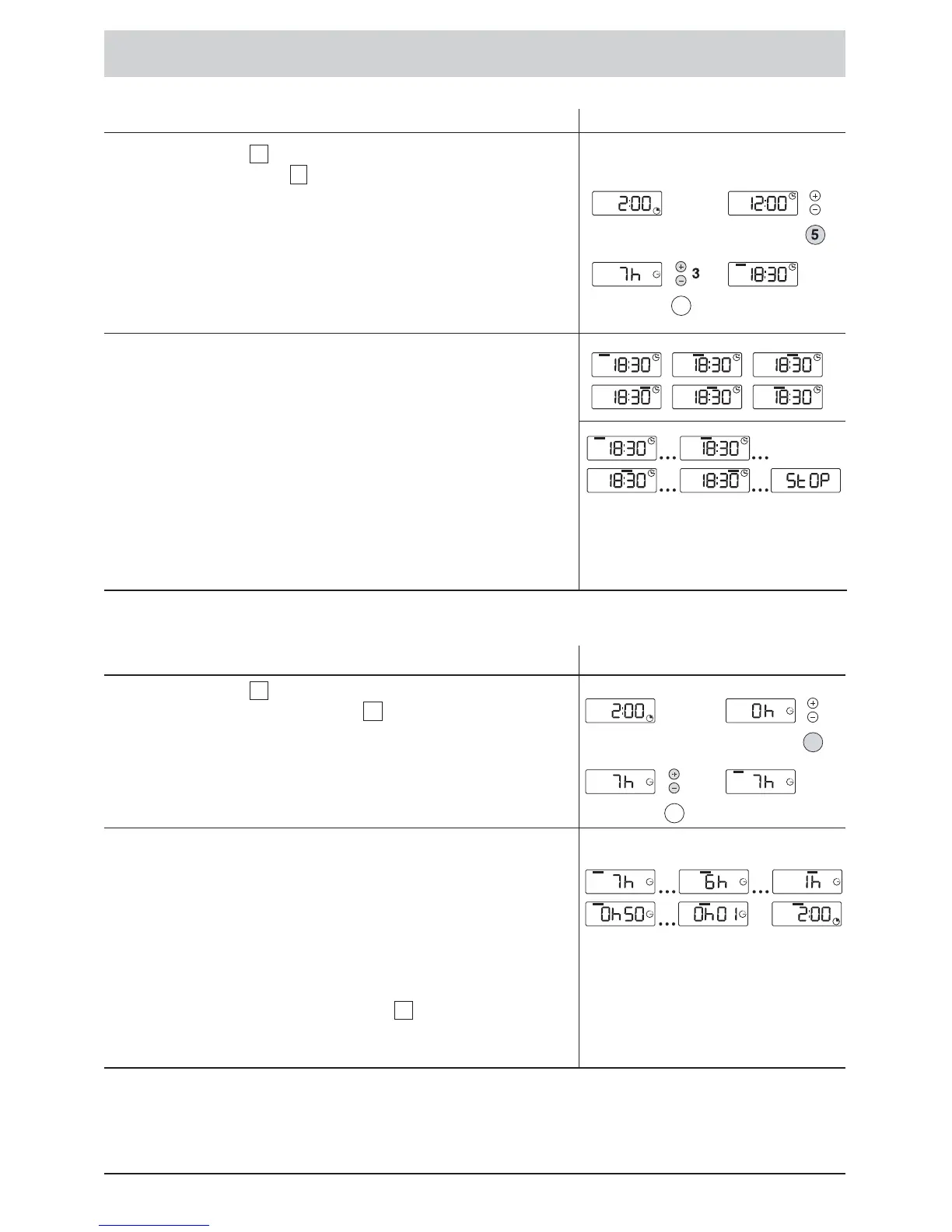
Setting the ENDING TIME
Display
Using pushbutton , select the ENDING TIME function
and using pushbuttons , set the ENDING TIME. The
display can be set in steps of 15 minutes with a maximum
value of 24 hours.
The length of the programme determines the earliest
possible Ending Time. The programme length is added
to the current time and the sum is rounded to the next
¼ hour.
Until the programme ends:
•
The programmed ENDING TIME remains fixed in the
display (without flashing and counting down).
•
The four upper bars flash one after the other until the
programme starts.
•
During the programme, the upper bars display the
programme sequence.
•
The programme has ended when STOP appears in the
display panel.
The duration of the programme can depend upon
imbalance and foam detection.
3
5
Setting DELAYED START
Display
Using pushbutton , select the DELAYED START
function, and using pushbuttons , set the duration of the
DELAYED START by the hour, from 24 hours to 1 hour.
DELAYED START countdown:
•
The DELAYED START is displayed by the hour from
24 hours to 1 hour, and then by the minute from 59 min
to 1 min.
•
The four upper bars flash one after the other until the end
of the DELAYED START.
•
The programme starts. The programme length is
displayed.
By using the pushbutton marked , you may select
between displaying the ENDING TIME or the DELAYED
START.
5
3
5







 To Next Page