Repairs
2017-05-22 / DIS 113_58300000186503_ara_en_c Copyright by BSH Hausgeräte GmbH Page 77 of 85
6.18 Removing/installing front panel
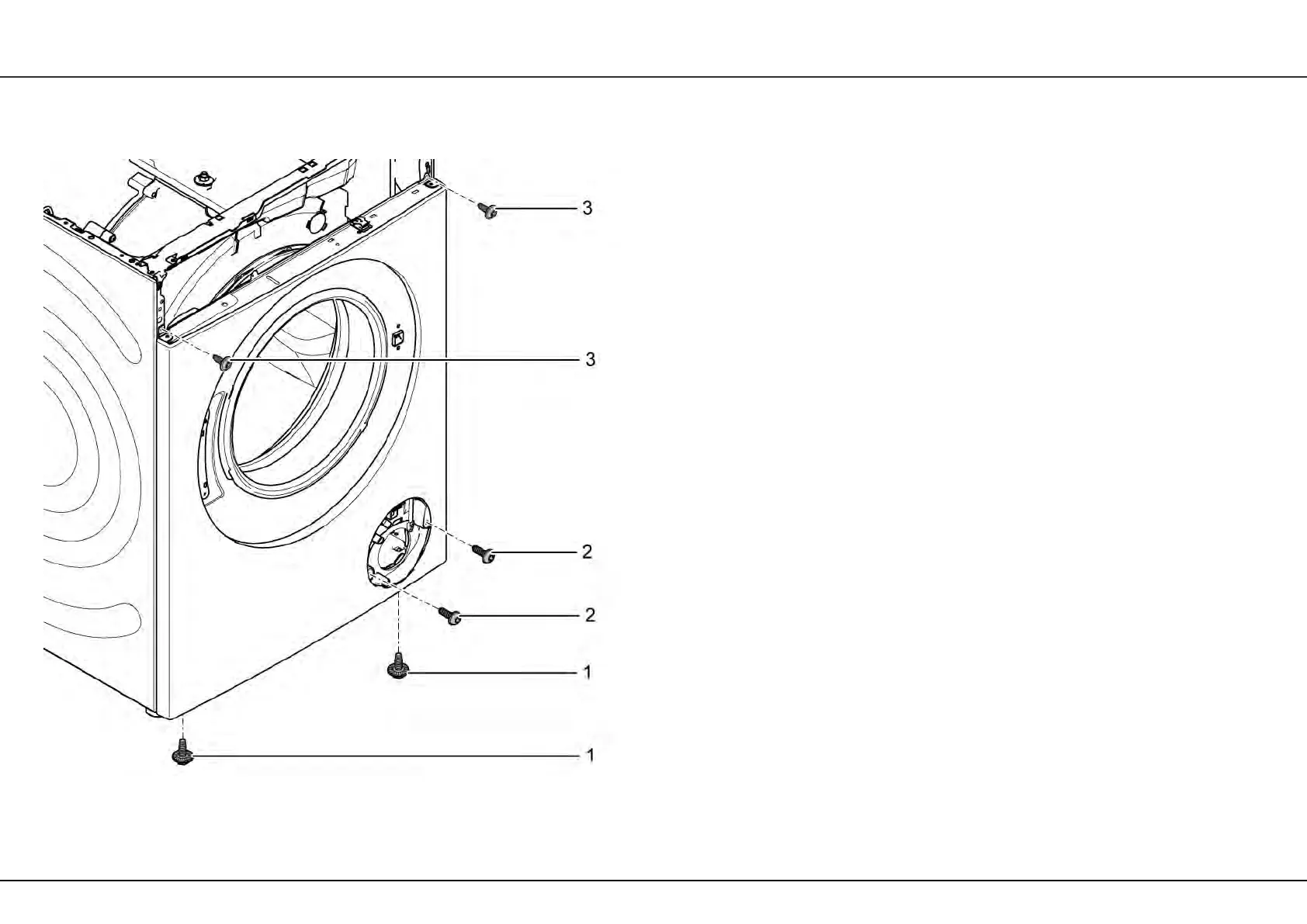
Fig. 34: Attachment of the front panel
1 Screw 3 Screw
2 Screw
Prerequisite:
• Worktop has been removed.
• Control panel has been removed.
• Door has been removed.
6.18.1 Removing front panel
1. Unhook and remove cover flap from the fluff trap.
2. Detach the door seal.
3. Remove screws (1) with ratchet spanner.
4. Remove screws (2).
5. Remove screws (3).
6. Detach front panel on the left side.
7. Unhook front panel on the right side and remove.
6.18.2 Installing the front panel
► Install front panel in reverse sequence.


 To Next Page