13
Operating Instructions
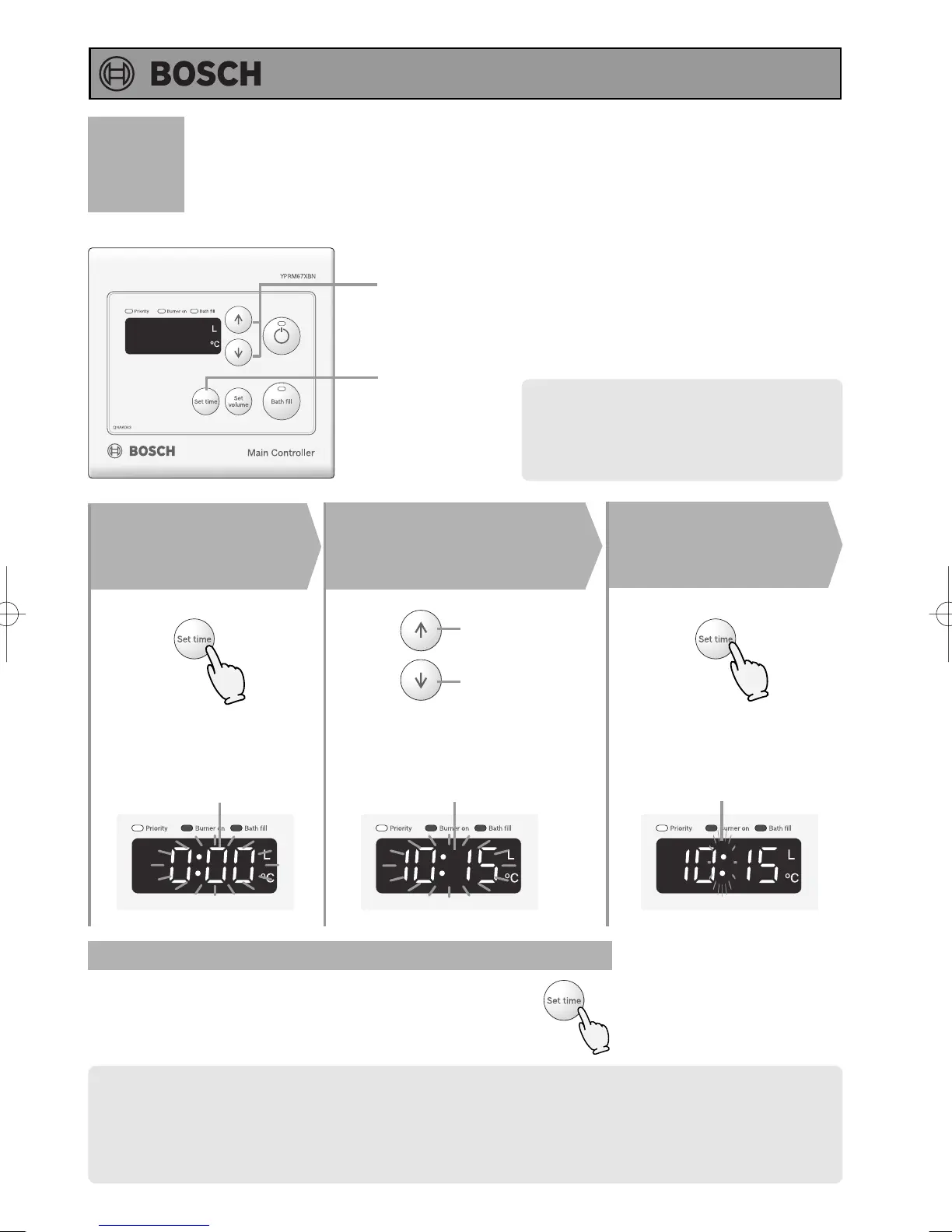
Clock Adjustment
1, 3
2
Adjust the clock
The time changes in 1-minute increments
with each press on the button, and
then in 10-minute increments if the
button is kept pressed down.
2
3
(Eg.: 10:15)
(Main Controller)
Press the Set
Time Button
1
Press the Set
Time Button
Note: Only the main controller has a clock
function.
Increase
Decrease
Flashing
Flashing
The flashing changes to
constant illumination when the
clock has been set.
Flashing
• The clock display will disappear if hot water is used or the temperature of the hot water is changed during
the clock display.
• If the Time set button is pushed when the hot water is being used or a high temperature (60°C) is set, the
clock is displayed for 10 seconds and will return to the original screen display after that.
• In the event of a power cut or after disconnecting the power supply, the clock on the display screen will
show 0:00 when the power is restored. In this case the clock will need to be reset.
Clock setting and the clock can be dis-
played regardless of “ON or OFF" of
the operation button.
(The illustration is in a state of "OFF".)
(Until “0:00” is flashing)
Display the clock
Press the set time button.
The clock display will then return to the original screen display.




 To Next Page