9
Operating Instructions
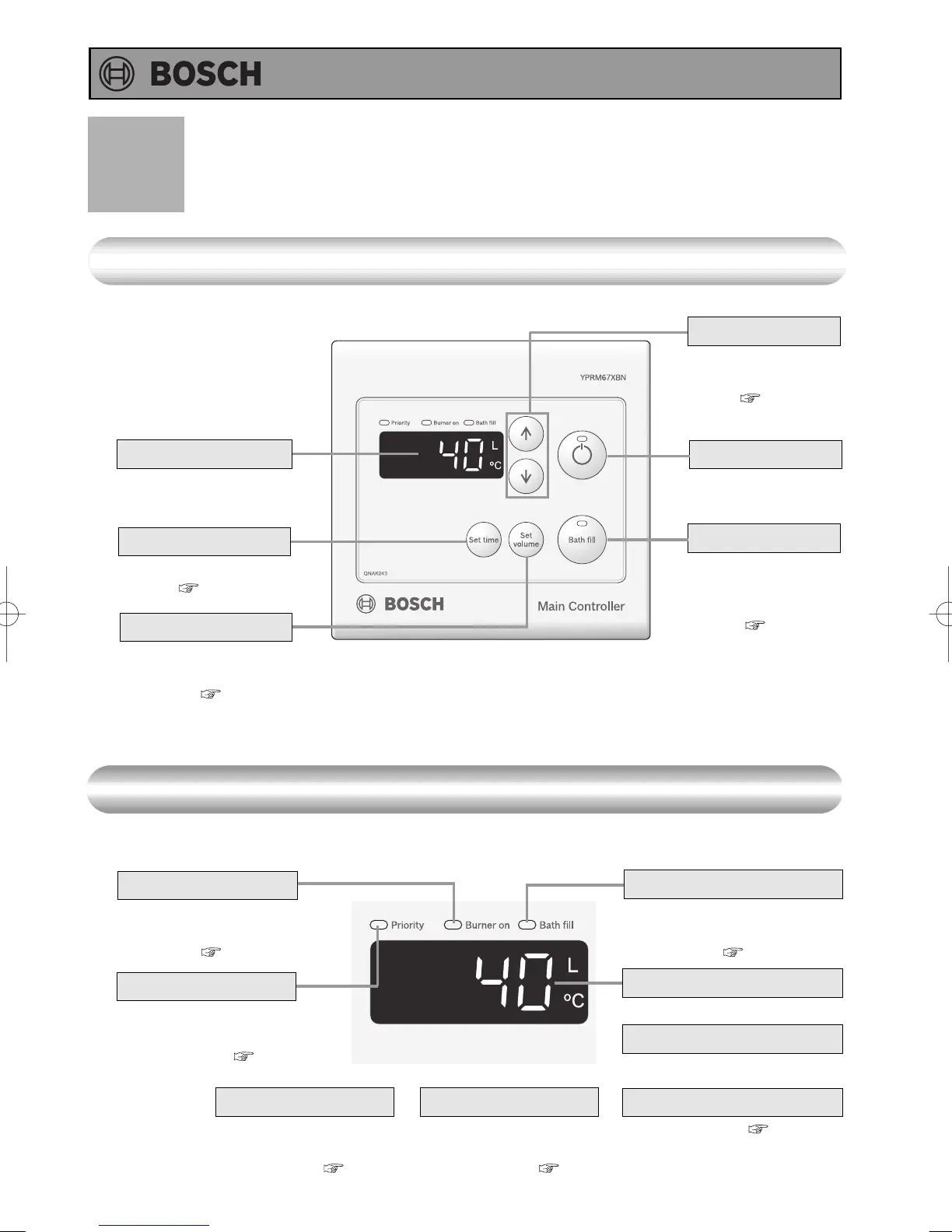
Main Controller (YPRM67XBN) <Optional>
* Before use, remove the protective sheet from the remote controller surface.
What is actually displayed depends on how the water heater is set.
Names and Functions of Controllers
Error Code
A number will flash if
a failure occurs.
( p.28)
Burner On Indicator
When this indicator is lit,
the hot water temperature
can be set. ( p.16)
Priority Indicator
When burning, the
indicator is lit.
( p.15, 19)
Clock
When Time Set button
is pushed, the clock is
displayed. ( p.13)
Setting Buttons
For setting the hot
water temperature
( p.14 -15)
For other settings.
Operation Button
For turning the water
heater on or off.
Bath Fill Button
To activate Bath Fill.
To set Bath Fill
temperature.
( p.18 -20)
For setting the amount
of water that is delivered.
( p.18 -20)
Bath Fill Temperature Indicator
When this indicator is lit,
bath fill temperature is
displayed. ( p.18 -20)
Temperature setting
(Eg.: 40°C)
Bath Fill Temperature setting
(Eg.: 40°C)
( p.18 -21)
Bath Fill Volume setting
Display
The illustration below shows the remote controller display.
What is actually displayed depends on how the water heater is set.
Display
Time Set Button
To set or lndicate Time
of day. ( p.13)
Bath Fill Volume Button




 To Next Page