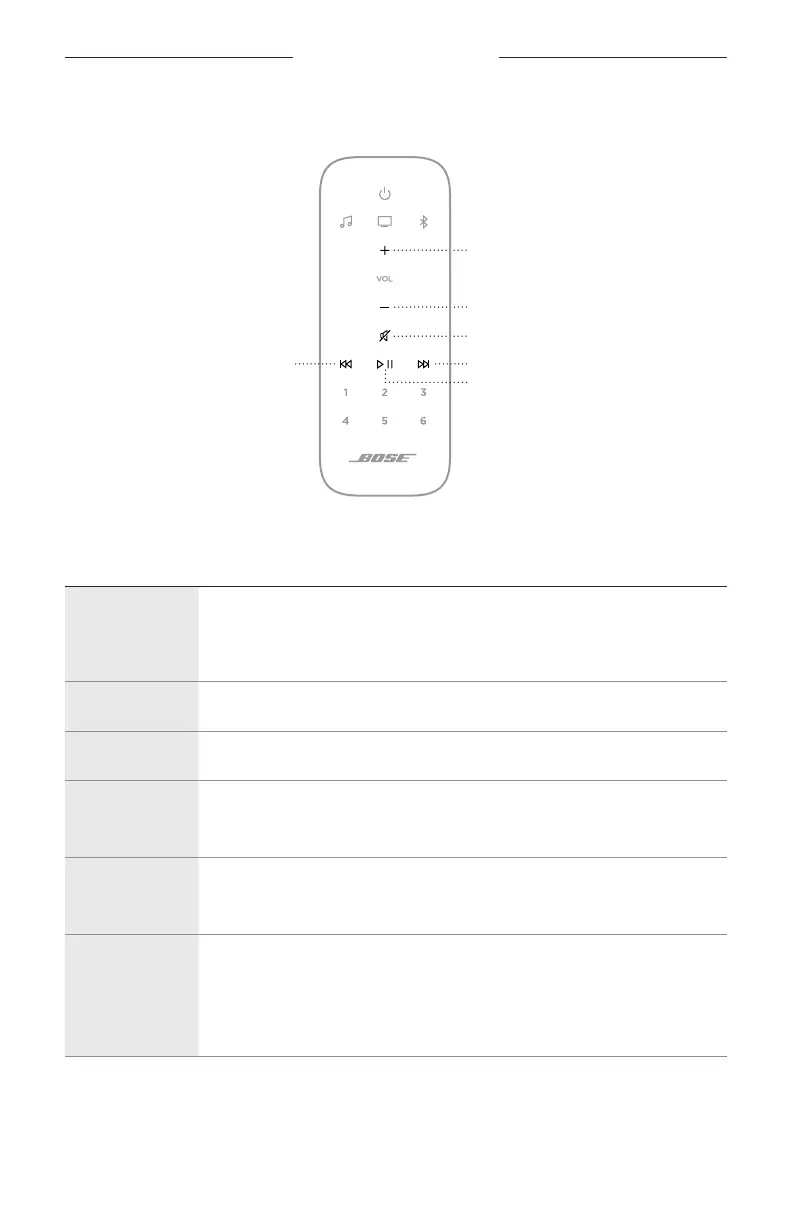
SOUNDBAR CONTROLS
24
|
ENG
Media playback and volume
Volume up
Volume down
Mute/Unmute
Skip forwardSkip backward
Play/Pause
FUNCTION WHAT TO DO
Play/Pause
Press F.
When audio is paused, two lights in the center of the light bar glow solid
white until audio resumes.
Skip backward Press J.
Skip forward Press v.
Volume up
Press H.
NOTE: To quickly increase the volume, press and hold H.
Volume down
Press z.
NOTE: To quickly decrease the volume, press and hold z.
Mute/Unmute
Press A.
When audio is muted, the left side of the light bar glows solid white until
audio resumes.
NOTE: You can also press H to resume audio.





 To Next Page