54
|
ENG
APPENDIX SETUP REFERENCE
Option 2: Optical
If your TV doesn’t have an HDMI eARC or ARC connector, use the optical cable to
connect the soundbar to your TV.
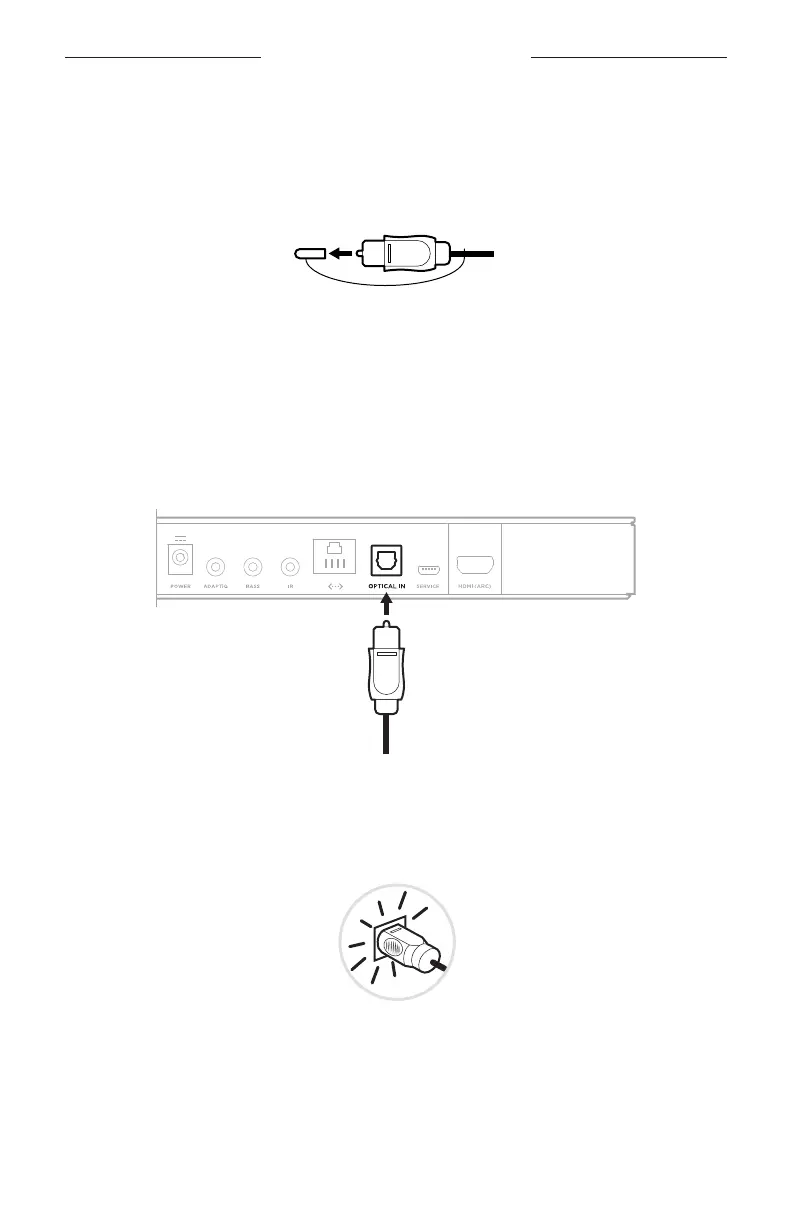
1. Remove the protective cap from both ends of the optical cable.
CAUTION: Inserting the plug in the wrong orientation can damage the plug
and/or the connector.
2. Insert one end of the optical cable into your TV’s Optical OUT connector.
3. Hold the plug at the other end of the optical cable.
4. Align the plug with the soundbar’s OPTICAL IN connector, and insert the
plug carefully.
NOTE: The connector has a hinged door that swings inward when inserting
the plug.
5. Firmly push the plug into the connector until you hear or feel a click.





 To Next Page