EasyManua.ls Logo

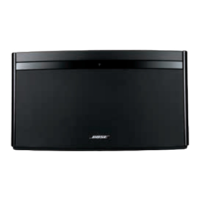
Bose SoundLink Air - User Manual

Bose SoundLink Air
40 pages
Print Icon
To Next Page IconTo Next Page
Loading...
SoundLink
®
Air
digital music system
Owner’s Guide

Questions and Answers

  • R
    Ryan HenryJul 31, 2025
    Why does my Bose Docking Station audio keep dropping out?
    • H
      Henry WalkerAug 1, 2025
      If the audio from your Bose Docking Station is cutting out, try these steps: Point the system in a different direction, or move it a few feet to a new location. Move the system away from potential interference sources like microwaves and cordless phones. Also, try moving the system closer to your wireless router and stop any other audio or video streaming.
  • G
    ginawrightAug 8, 2025
    What to do if there is no sound from my Bose Docking Station?
    • L
      lutzvictoriaAug 8, 2025
      If your Bose Docking Station has no sound, ensure it's powered via AC or battery, connected to Wi-Fi, and that your AirPlay device is on the same network, playing with the volume up. Also, check that the system isn't muted and the volume is at an audible level. Try removing and reapplying power, ensuring the battery is charged if in use. As a last resort, perform a factory reset.
  • S
    Sarah CamachoAug 16, 2025
    How to fix Bose Docking Station cannot connect to my network?
    • S
      spencerrichardAug 16, 2025
      If your Bose Docking Station is having trouble connecting to your network, first, double-check that you've entered the correct network password. Then, try moving the docking station closer to your wireless router. Also, try stopping any other audio or video streams that might be using bandwidth. If problems persist, close the setup application, disconnect the system from your computer and AC power, and start the setup again. If you continue to experience Wi-Fi connection problems, contact Bose customer service.
  • F
    fergusonmitchellAug 22, 2025
    What does it mean if the Wi-Fi indicator is flashing red on my Bose SoundLink Air?
    • S
      Stanley FullerAug 22, 2025
      The flashing red Wi-Fi indicator on your Bose Docking Station signals a system error. Contact Bose customer service for assistance.

Summary

Safety Information

Please Read This Owners Guide

Encourages careful reading of the guide for proper setup and enjoyment.

Important Safety Instructions

Information About Products That Generate Electrical Noise

Details FCC compliance and measures for handling radio frequency interference.

FCC Warning

Names and Contents of Toxic or Hazardous Substances or Elements

Lists hazardous substances in product components according to SJ/T 11363-2006.

Introduction

Overview

Introduces the SoundLink Air system and its capabilities.

Unpacking

Guides users on how to unpack the system and check for all parts.

Getting Started

Connecting the System to Power

Step-by-step instructions for connecting the system to an AC power outlet.

System Setup

Moving the System After Wi-Fi Setup

Operation

Power On;Off

Explains how to turn the system on and off, including auto-off features.

Controlling the Volume

Details how to adjust the volume using the remote or device.

Listening to an AirPlay Compatible Device

Guides on streaming audio via AirPlay.

Listening to a Device Using AUX

Care and Maintenance

Troubleshooting

Provides solutions for common problems like connection issues or no sound.

Contacting Customer Service

Directs users to contact Bose dealer or customer service for help.

Replacing the Remote Battery

Alternate Setup Method

Configuring Your Network Manually

Turning On;Off Wi-Fi Capability

Updating System Software

Software Update Procedure

Guides on the preferred method for updating the system's software.

Alternate Update Method

Optional Battery (Not Included)

Battery Status Indicator

Explains how to interpret the battery status indicator lights.

Manual Battery Check

Charging the Battery

Instructions for charging the system's battery.

Performing a Factory Reset

Limited Warranty Information

Where to find warranty details and how to register the product.

Technical Information

Lists power supply ratings, size, and weight.

Please Read This First

Quick Start Guide

Troubleshooting

Technical Information

Details on product dimensions, weight, and power supply.

AirPlay

Information on compatibility with Apple devices and iTunes.

Register Your Product

Instructions on how to register the product for warranty.

Please Complete and Retain for Your Records

Prompts users to fill in serial and model numbers.

Important Safety Instructions

Information About Products That Generate Electrical Noise

FCC Warning

Warns that unauthorized modifications may void user authority.

Our Commitment to You

Please Complete for Your Records

Were Here to Help

Warranty Information Inside

Register Your Product: Learn About the Full Range of Services Your Warranty Provides.

Limited Warranty

Details the terms, coverage, and exclusions of the product's limited warranty.

Bose SoundLink Air Specifications

General IconGeneral
Number of drivers-
Speaker placementTabletop/bookshelf
Audio output channels- channels
Product colorBlack
LED indicatorsYes
Recommended usageOther
Frequency range- Hz
RMS rated power- W
AC adapter output voltage20 V
Connectivity technologyWireless
AC input voltage100 - 240 V
AC input frequency50 - 60 Hz
AC adapter output current2 A
Cables includedUSB
Weight and Dimensions IconWeight and Dimensions
Depth103 mm
Width307 mm
Height171 mm
Weight2100 g

Related product manuals