AUX
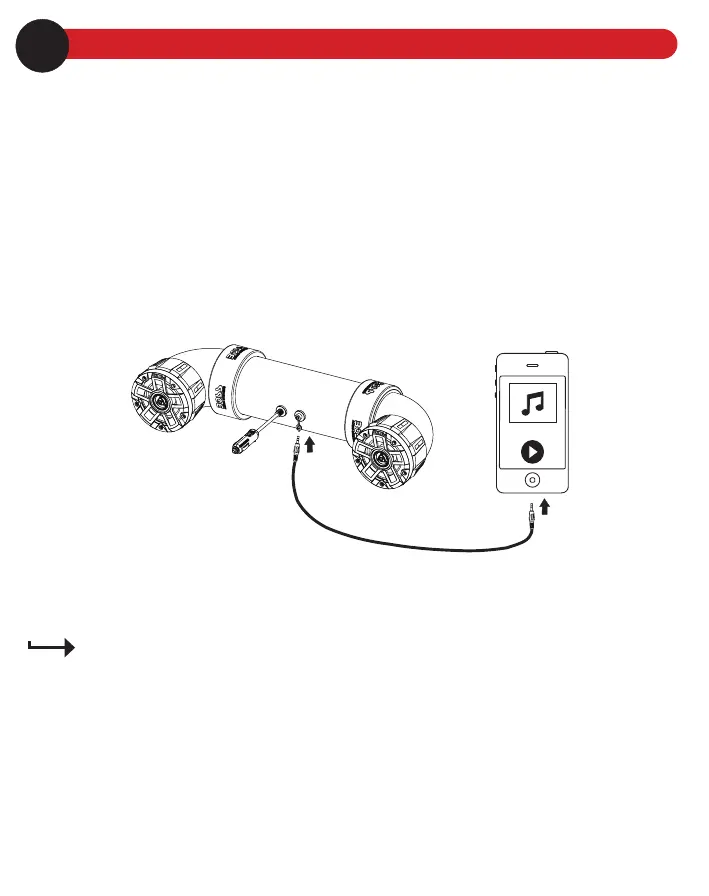
You can listen to an external audio device (e.g. MP3 player or a mobile phone) through this sound system.
1. Connect the AUX input (3.5mm) from the sound system to the audio output jack on your mobile phone, using
the following audio cable.
• For a mobile phone with 3.5mm headphone jack, use the supplied 3.5mm audio cable.
• For a mobile phone with USB-C port, use USB-C to 3.5mm cable (not included).
• For an iPhone with lightning connector, use lightning to 3.5mm cable (not included).
If the sound system is currently connected to a mobile device through Bluetooth, Bluetooth connection will
be automatically disconnected.
2. Select and play audio les on your audio device. Audio from the connected device will be played on this
sound system.
3.5 mm audio cable
7Playback control
Use the controls on the connected device to control play (e.g. play/pause, volume and track selection).
To maximize audio performance, set the volume of the connected device to a minimum of 75% before
connection to the audio device.
To resume Bluetooth connection, you must disconnect the AUX cable from the sound system.
Operating the sound system consumes the vehicle battery. To avoid battery exhaustion, make sure to
run the vehicle engine when operating the sound system.
8





 To Next Page