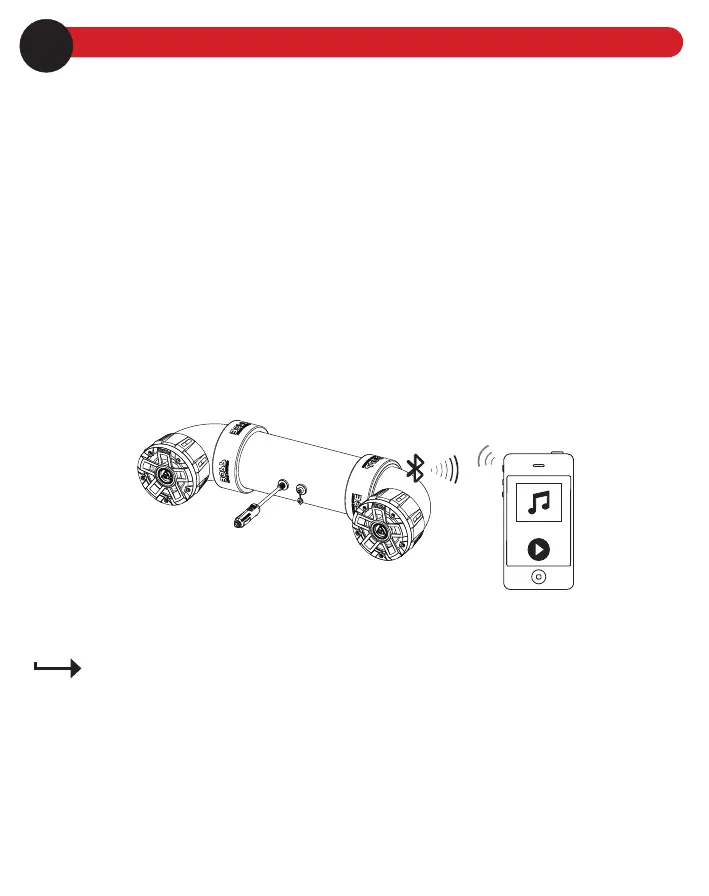
Bluetooth
Before you can stream music from your mobile device (iOS device or Android device) to this sound system
through Bluetooth, pair the sound system with your mobile device.
1. Make sure the AUX cable is not connected to the sound system, and connect to power supply.
The power LED indicator illuminates on the power port plug, and the sound system will automatically enter
pairing mode.
2. On your mobile device, enable Bluetooth function and select the device name (“Boss Audio UTV4B”) to pair
the sound system with the mobile device.
If prompted for password input on your mobile device, input “0000”.
Note: Only one device can be paired at a time.
3. When successfully paired/connected, conrmation tone can be heard. Play audio on your mobile device,
and audio will be streamed to the sound system. Use the volume control on the connected device to adjust
volume.
After pairing, the sound system will be automatically connected to your mobile device each time the two are
turned on. To change Bluetooth source, disconnect the current Bluetooth connection then repeat the steps
above to connect/pair with another mobile device.
6Playback control
Use the controls on the connected device to control play (e.g. play/pause, volume and track selection).
To maximize audio performance, set the volume of the connected device to a minimum of 75%.
Ideally, on the highest volume setting you can get without distortion.
Operating the sound system consumes the vehicle battery. To avoid battery exhaustion, make sure to
run the vehicle engine when operating the sound system.
Operational range can be reduced by any obstacle between the sound system and the device.
If the connected device is out of the effective range from the sound system, the device will be
automatically disconnected. The device will be automatically re-connected if it is back to the operational
range within three minutes.
7





 To Next Page