2
Getting Ready
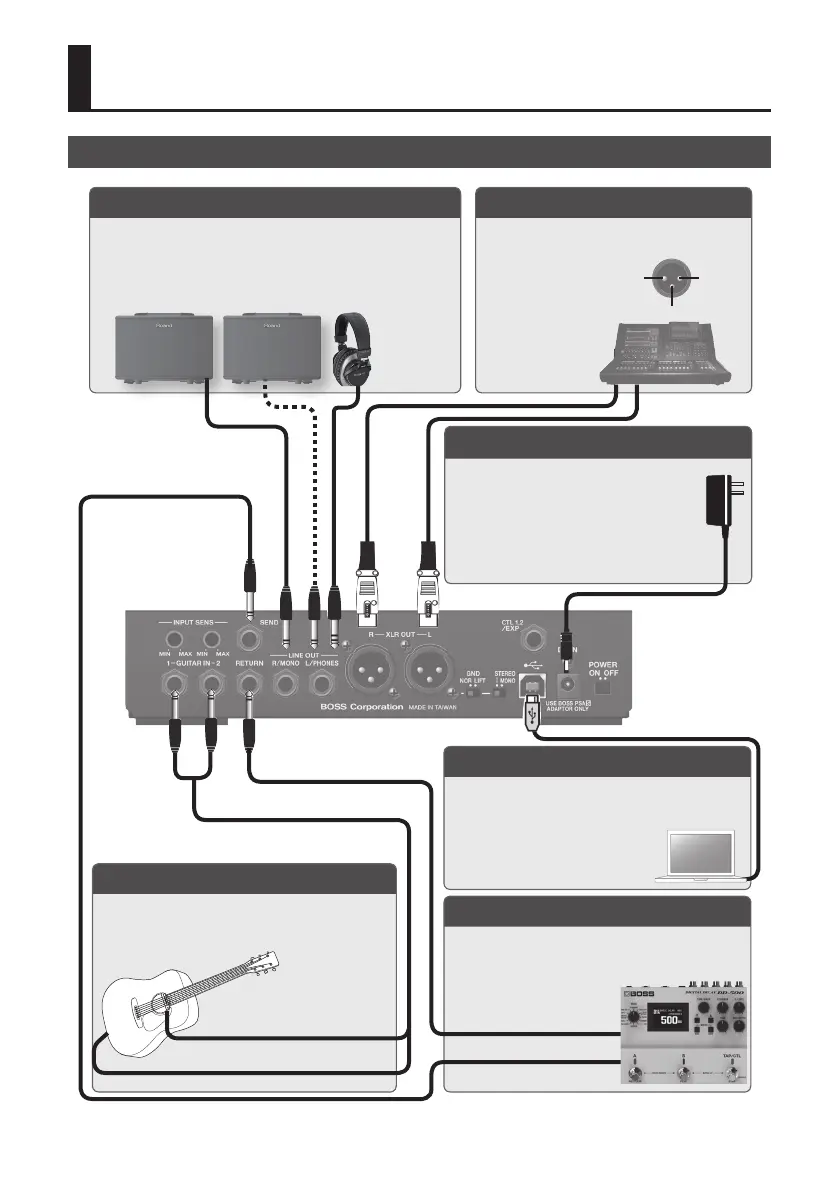
Connecting the Equipment
* To prevent malfunction and equipment failure, always turn down the volume, and turn o all the units before making any connections.
Rear Panel
USB COMPUTER port
Use a commercially available USB 2.0 cable to connect
this port to your computer so that audio can be sent and
received between the AD-10 and the computer. You can
record the AD-10’s sound into your
computer, or output sound from your
computer via the AD-10’s output jacks.
SEND, RETURN jacks
Connect an external eect device (mono).
Connect the SEND jack to the input of your external eect
device, and connect the output of your external eect
device to the RETURN jack.
LINE OUT (L/PHONES, R/MONO) jacks
Connect these jacks to your guitar amp or headphones.
* Connect your headphones to the L/PHONES jack.
* If using a mono connection, use only the R/MONO jack.
XLR OUT (L, R) jacks
Connect to the PA etc.
* Pin assignment of XLR OUT (L, R) jack.
1 GND 2 HOT
3 COLD
DC IN jack
Connect the included AC adaptor here.
* We recommend that you keep batteries
installed in the unit even though you’ll be
powering it with the AC adaptor. That way,
you’ll be able to continue a performance even
if the cord of the AC adaptor gets accidentally
disconnected from the unit.
GUITAR IN (1, 2) jacks
Connect your guitar.
You can use the two jacks to blend two dierent types of
pickups, or to connect two guitars.
Subsequently attached pickup
Built-in pickup
SEND
0
INPUT
RETURN
1
OUTPUT



 To Next Page