7
Basic Operation
Switching Banks/Patches
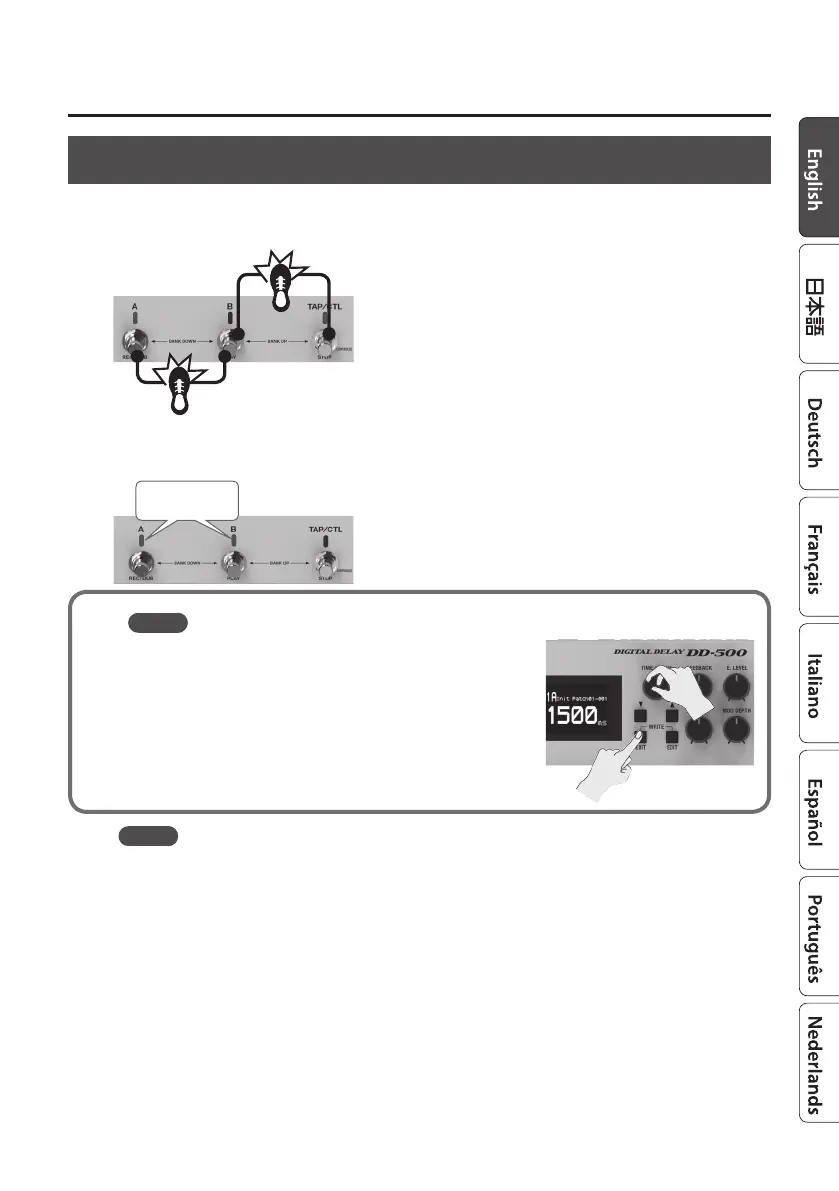
1. Switch banks (01–99).
Bank down (press the [A] and [B] switches simultaneously)
Bank up (press the [B] and [TAP/CTL] switches simultaneously)
2. Press a blinking switch ([A] or [B]) to switch patches.
Blinking blue
MEMO
You can recall a dierent patch by turning the [TIME/VALUE]
knob while you hold down the [EXIT] button.
MEMO
You can use the following functions to switch patches/banks.
5 “Assigning the Functions of the [A], [B], and [TAP/CTL] Switches” (p. 19)
5 “Specifying Whether to Carry-Over the Delay Sound” (p. 19)



 To Next Page