5
Function of indicator
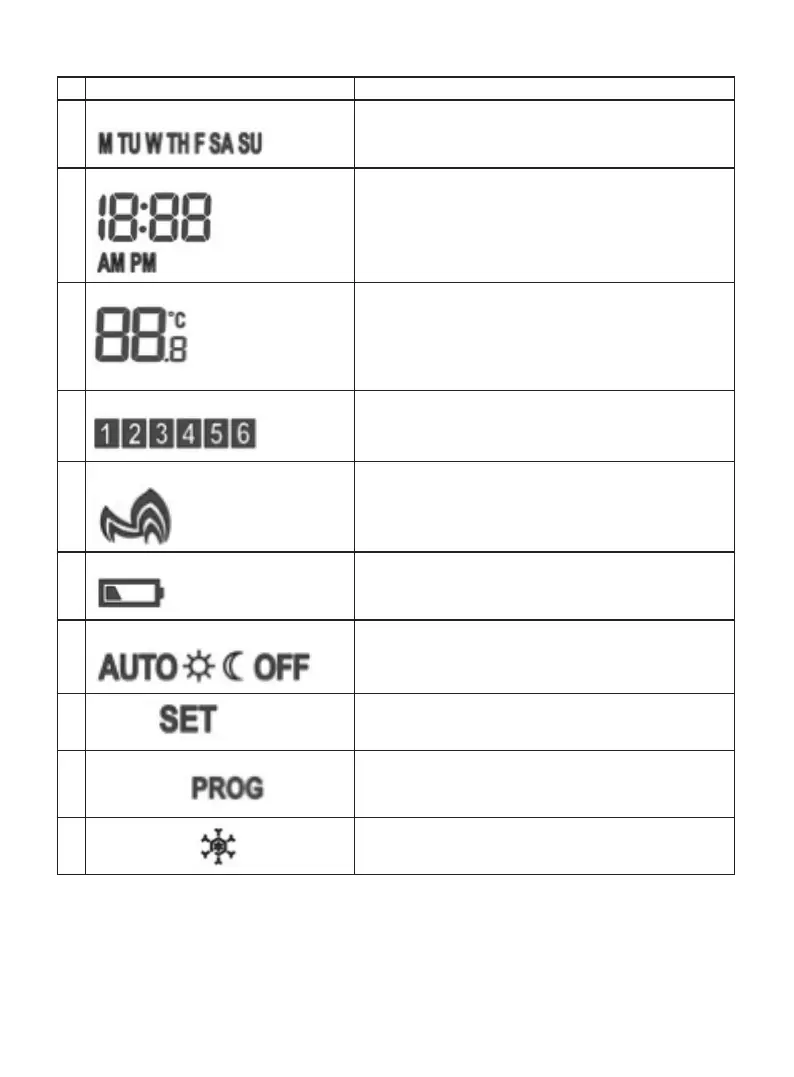
Indicator Function
1
Day of week indicator
1. show the current day in normal mode
2. show the program day in program mode
2
Real time clock
1. show the current time
2. show the set time during program mode
3
Temperature
1. show the room temperature in the resolution
of 0.5°C
2. show the set temperature during program mode
in the resolution of 0.5°C
4
Program No. indicator
Show the current program number
5
Heat indicator
Indicates the channel is turned on for heating
6
Low-batt indicator
Indicates battery replacement is required
7
Auto/Comf/Econ/Off mode indicator
Indicates current mode: Auto/Comfort/Economy/Off
8
Set icon
Indicates unit in setting mode
9
Program icon
Indicates unit in programming mode.
Both SET and PROG are shown at the same time as
SET PROG
10
Snowflake icon
Indicates when unit is in OFF mode
Initial Power Up:
• After power up or Reset is pressed, the thermostat is reset.
• During system reset, all LCD segments are turned on for 2 seconds or until any key is pressed.
After 2 seconds and all keys are released, the thermostat is initialized. The typical reset display
is shown below.


 To Next Page