User Manual DR-512
4 Control and Functions
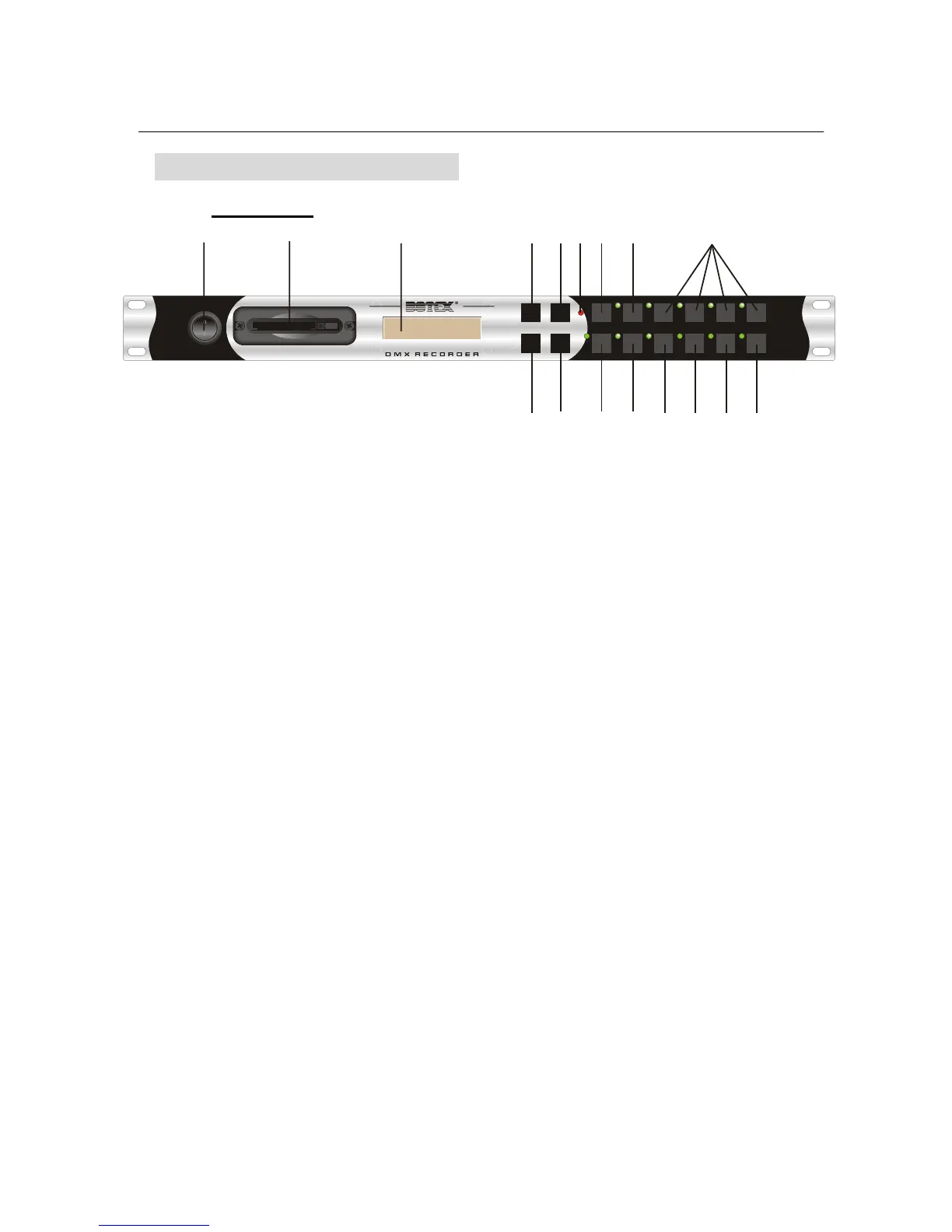
4.1 Front panel
POWER
SEQ 1 SEQ 2 SEQ 3 SEQ 4
START-UP
SHUT-DOWN RECORD PLAY PAUSE STOP CARD
MODE
CF CARD
NEXT
ENTER
UP
DOWN
DMX
DR-512
1
23 45678
9
10
11
12
13
14
16
15
17
1. Power Switch:
to switch on or off the main power.
2. CF card port :
this port is for CF card usage.
3. LCD-display :
to display relevant menus, settings and values depending on the chosen function.
4. UP key
:
press this button to select relevant options or increase relative values.
5. NEXT key
:
Used to select internal sequences or help to change sequence names.
6. DMX indicator :
to indicate the state of DMX input. When the relevant LED is “on”, that means DMX input
is effective, while “off” means no signal input.
7. Mode key :
used to select different modes (
MANUAL, AUTOSTART, DMX MON, DMX TRIGGER,
PROGRAM
and SETUP modes available). Each tap will change the mode once.
8. STARTUP key :
to activate the STARTUP function. (read through the manual for details)
9. 1~4 sequence keys :
used to select one of the possible sequences (I
01~I04).
10. DOWN key
:
press this button to select relevant options or decrease relative values.
11. ENTER key :
press this key to confirm your operation or enter the relevant menu.
4


 To Next Page