10 11
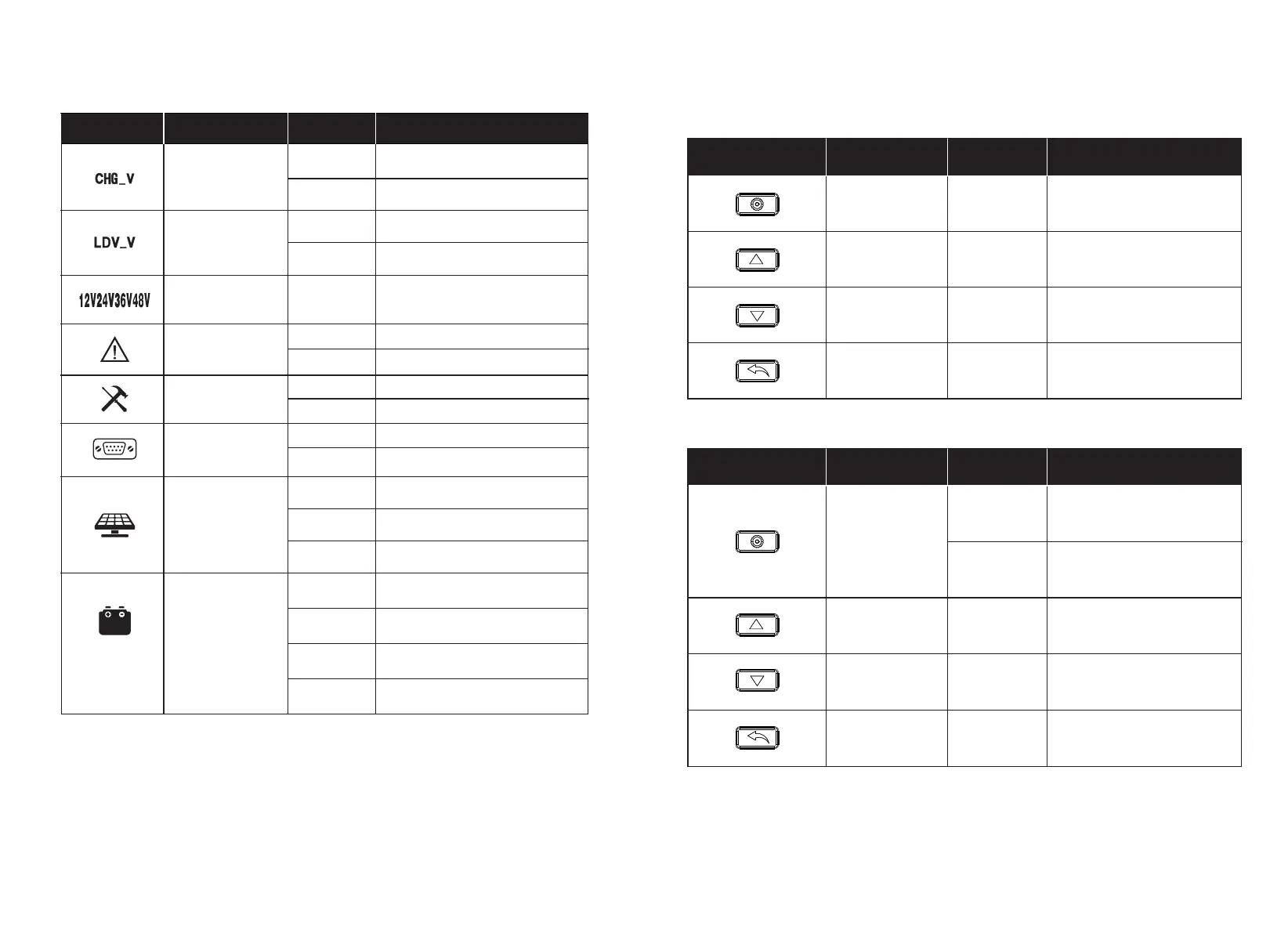
10. Key Functionality Chart
Function Key
System Mode
Input Input Function
View Mode
View Mode
View Mode
View Mode
Short Press
Short Press
Short Press
Enter SET mode
View Previous Page
View Next Page
Function Key
System Mode
Input Input Function
SET Mode
SET Mode
SET Mode
SET Mode
Long Press
Short Press
Short Press
Short Press
Short Press
Save Data & Exit SET Mode
Increase Parameter Value
Decrease Parameter Value
Exit SET Mode Without
Saving
Long Press
Next Setting Item
— — —
Volt Settings
System Volt
One of 12V/
ON
Warning
On
Off
System failure occur
No System failure
Setting
On
Off
View Mode
Setting Mode
On
Off
No communication
In the Modbus communication
communication
Status Icon
Indication
Status
Description
Voltage Setting
Over Discharge
24V/36V/48V
Solar Icon
Battery Icon
Steady On
Off
Fast Flash
Steady On
Off
Slow Flash
Reverse Connection
Daylight Detected
No Daylight Detected
Solar System Over Voltage
Battery Connected and
Functional
No Battery Connection
Battery Over-Discharged or
On
Off
On
Off
Setting Charge Voltage
Charge Voltage Has Been Set
Setting Discharge Voltage
Discharge Voltage Has Been Set
Fast Flash
Over Voltage
(Only for Li and User)
(Only for Li and User)
Current System Voltage
* There is no charge mode displayed in the controller screen when it’s in equalize charge mode.


 To Next Page