5. EMI (Electromagnetic Interference)
The searchcoil produces a magnetic field and then detects changes in that
magnetic field caused by the presence of metal objects. This magnetic
field that the detector creates is also susceptible to the electromagnetic
energy produced by other electronic devices. Cell phones, cell phone
towers, power lines, microwave ovens, lighting fixtures, TVs, computers,
motors, etc… all produce EMI which can interfere with the detector and
cause it to beep when no metal is present, and sometimes to beep
erratically.
The SENSITIVITY control lets you reduce the strength of this magnetic
field, and therefore lessen its susceptibility to EMI. You may want to
operate at maximum strength, but the presence of EMI may make this
impossible, so if you experience erratic behavior or “false” signals,
reduce
the sensitivity.
THE BASICS OF METAL DETECTING
9
HOW TO WORK THE CONTROLS
12
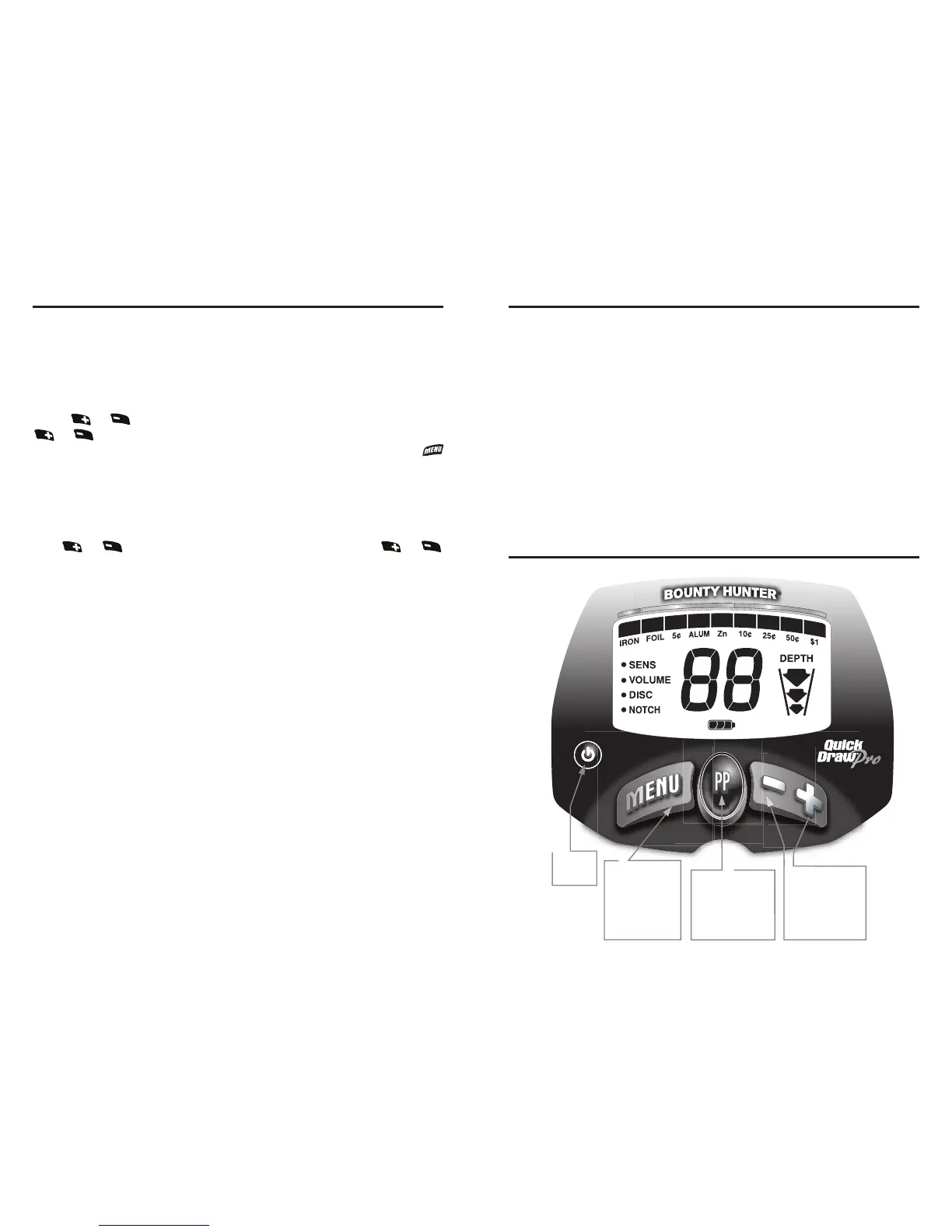
MENU
NOTCH
The
NOTCH
control is similar to Discrimination in that it allows you to accept
or reject different types of metals. While DISC works left to right, the NOTCH
control allows you to accept or reject individual categories.
Categories eligible for NOTCH are
FOIL
,
5¢
, ALUM, Zn.
Press or to program the NOTCH feature. Each press of
or cycles to a new category and that category icon will flash for
3 seconds. Then the category will reverse status. Alternatively, press
while the icon is flashing to accept the Notch. If the icon had previously
been illuminated it will now disappear indicating that the category has
been eliminated from detection. Likewise, an icon that is not visible on the
display will re-illuminate, indicating that that category is now notched in
(i.e. detected).
Use or to select
NOTCH
. Each time you press or
the category to be notched flashes on the screen. Any of the 4 eligible
categories can be “Notched” in or out. After the category icon flashes
and times out, the Notch status will change.





 To Next Page