POWER
ON/OFF
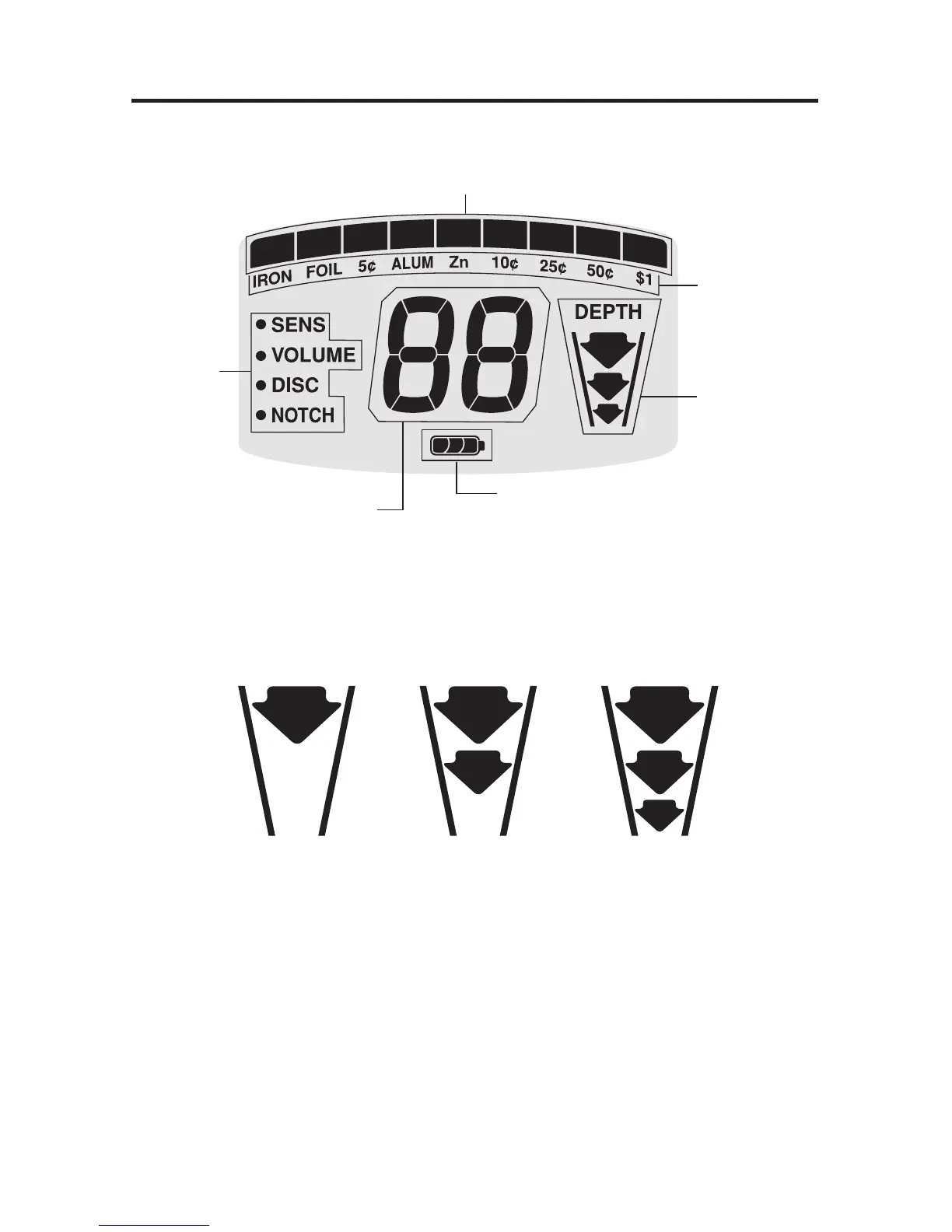
Target
Category
Icons
Menu
Target-ID
Target
Depth
Indicator
Battery Level
Indicator
Target Conductivity Arc
(Metal objects are classified by electrical conductivity,
the highest to the right)
DEPTH INDICATOR
Coin-sized objects will be detected up to 9” deep.
The 3-segment graphic indicator is calibrated to coin-sized objects.
Coin on Surface Coin is Shallow Coin is Very Deep
Objects other than coins will still register on the 3-segment depth scale, but the
depth indication will be relative. For example, all 3 segments illuminated could
indicate a coin buried 9” deep, but could also be a very large object several feet
deep. Use the Depth Indicator in conjunction with the Conductivity Arc to gain
more information.
OVERLOAD WARNING
If a metal object or highly magnetic soil are too close to the searchcoil, the
detector will overload and “
--
” will appear on the screen. The detector will
make a rapid, repeating mid-tone warning sound. Overload will not harm the
detector, but the detector will not function under these conditions. If overload
occurs, raise the searchcoil to detect the target from a greater distance, or
move to a different location.


 To Next Page