User’s Manual
18
PAUSE/STOP button
Pauses an active workout, ends a paused workout, or goes to the Power-Up Mode screen.
Add Time button
Increases the length of a workout by 2.5 minutes for non-Interval Workouts.
Note: Button is disabled during a Manual program.
Resistance Level buttons
Adjusts the resistance level of the workout, selects a workout program, or changes a displayed value.
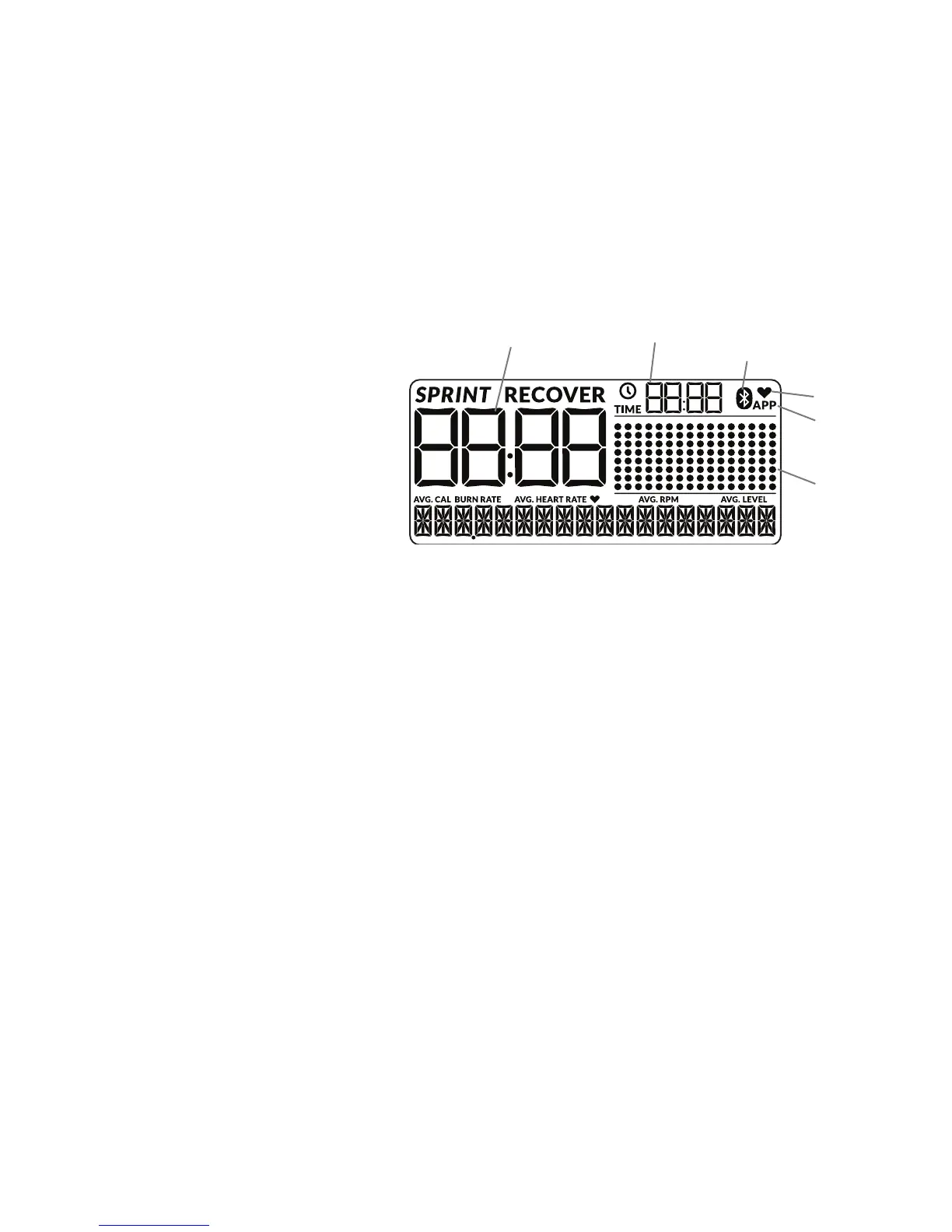
Workout
Prole
Display
Interval/Workout Time
Total Time Bluetooth
®
Synced Icon
App icon
Heart icon
Console Display
The console display shows the workout measurements
and current options.
SPRINT
The high Intensity segment of an Interval workout. During
an Interval workout, the active segment shifts between
the SPRINT and RECOVER segments with an audible
conrmation, counting the time down for the currently
active segment.
RECOVER
The reduced workout segment of an Interval workout, counting down until the next SPRINT segment.
Interval/Workout Time display
The Interval/Workout Time display shows the time count for the active segment (for an interval workout) or completed time of workout.
Total Time display
The Total Time display shows the time for the total workout.
Bluetooth
®
Connected display
Display shows when a device is paired through a Bluetooth
®
connection.
App icon
Display shows when the Console is paired with the App.
Note: When the App is paired, the Console display will be de-activated. The App will be used to display the workout values.
Heart icon
Display shows when the Console is paired with a Bluetooth
®
Heart Rate Strap.
Workout Prole display
The Workout Prole display area shows the course prole of the program. Each column in the prole shows one workout segment. The higher the
column, the higher the intensity of the workout.
During an interval Program, the Workout Prole shows the intensity of Burn Rate. During a resistance-based Program, the Workout Prole shows the
level of resistance. The Console will adjust the Resistance Level during the workout.
The ashing column shows the currently active segment.













 To Next Page