Assembly / Owner’s Manual
33
2014118532
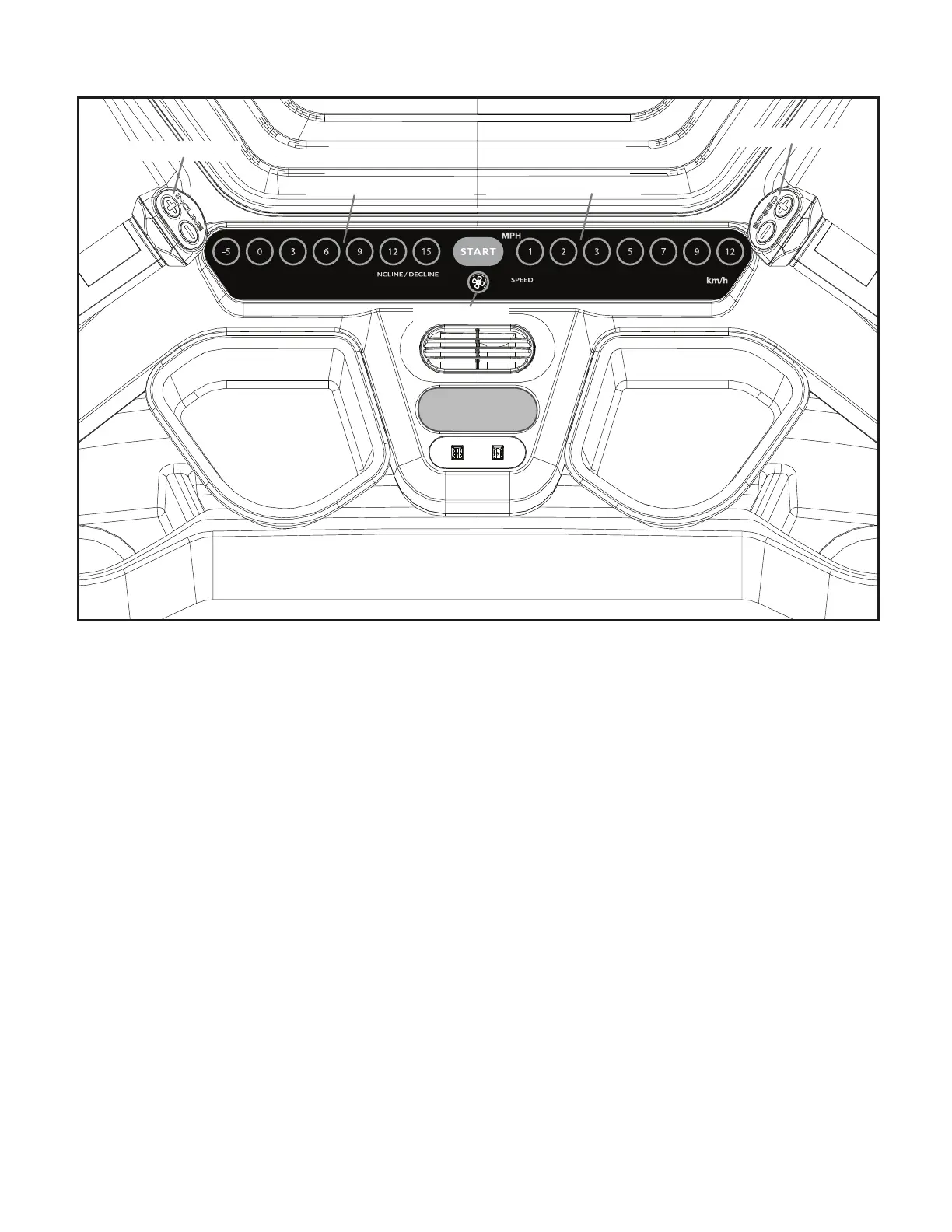
STOP/PAUSE
Pre-Set Incline buttons
Pre-Set Speed buttons
Speed Control buttons
Fan button
Incline Control buttons
Incline Control buttons
The Incline Control buttons are used to Increase (+ and) / Decrease (- and) the Incline value of the Walking Deck.
Note: The Incline Control buttons can provide a negative, or declined, level to the Walking Deck.
Pre-Set Incline buttons
Selects an incline setting for the Walking Deck.
Speed Control buttons
The Speed Control buttons are used to Increase (+ and) / Decrease (- and) the speed of the Walking Deck.
Pre-Set Speed buttons
Selects a speed setting for the Walking Belt.
START button
Push to start the currently selected workout Program, or resume a paused workout.
Fan button
Controls 4-speed fan (off, low, medium, high).
STOP/PAUSE button
Push to pause a workout or end a paused workout.











 To Next Page