19
Service Mode Procedures
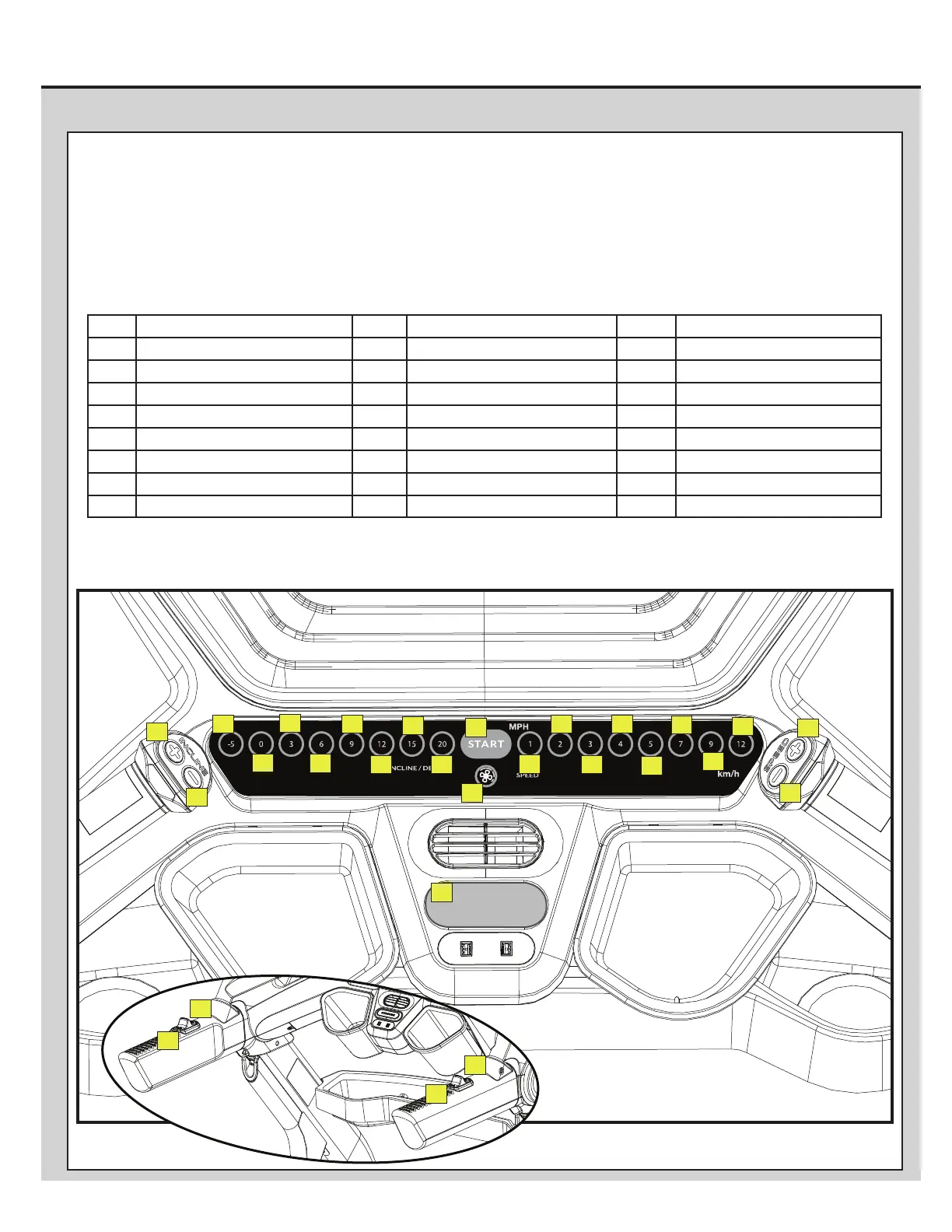
PROCEDURE 5: BUTTON (or KEY) TEST:
1. Tap on the upper-right corner of the Console Display 10 times. The Console will display the “Advanced User Actions “ menu.
2. From the “Advanced User Actions “ menu, tap EX_BUTTONS. The Console will display “EX_BUTTONS-START”, and starts the test.
3. Using the guide below, push the corresponding button in the order provided. Continue through all the buttons.
Note: If a faulted button is discovered, the Console may need to be powered down to exit the button test.
4. The button test will automatically complete with the correct sequence.
CONFIRM
SPEED
CONFIRM
INCLINE
STOP/PAUSE
2014118532 6
1 Incline +, Upper Handlebar 10 Start 19 Incline 20
2 Incline -, Upper Handlebar 11 Fan 20 Speed 1
3 Incline +, Side Handlebar 12 Incline -5 21 Speed 2
4 Incline -, Side Handlebar 13 Incline 0 22 Speed 3
5 Speed +, Side Handlebar 14 Incline 3 23 Speed 4
6 Speed -, Side Handlebar 15 Incline 6 24 Speed 5
7 Speed +, Upper Handlebar 16 Incline 9 25 Speed 7
8 Speed -, Upper Handlebar 17 Incline 12 26 Speed 9
9 Stop/Pause 18 Incline 15 27 Speed 12
24
23
22
21
20
19
18
25
17
16
15
14
13
12
11
10
9
8
1
2
7
27
26
5
6
3
4












 To Next Page