24
ENGLISH
PROGRAMMING
Default settings
• Flash detection mode: type approved.
• Programmed code for connection in
systems 300: 65535.
• Flash interception: disabled.
Entering and exiting the
programming functions
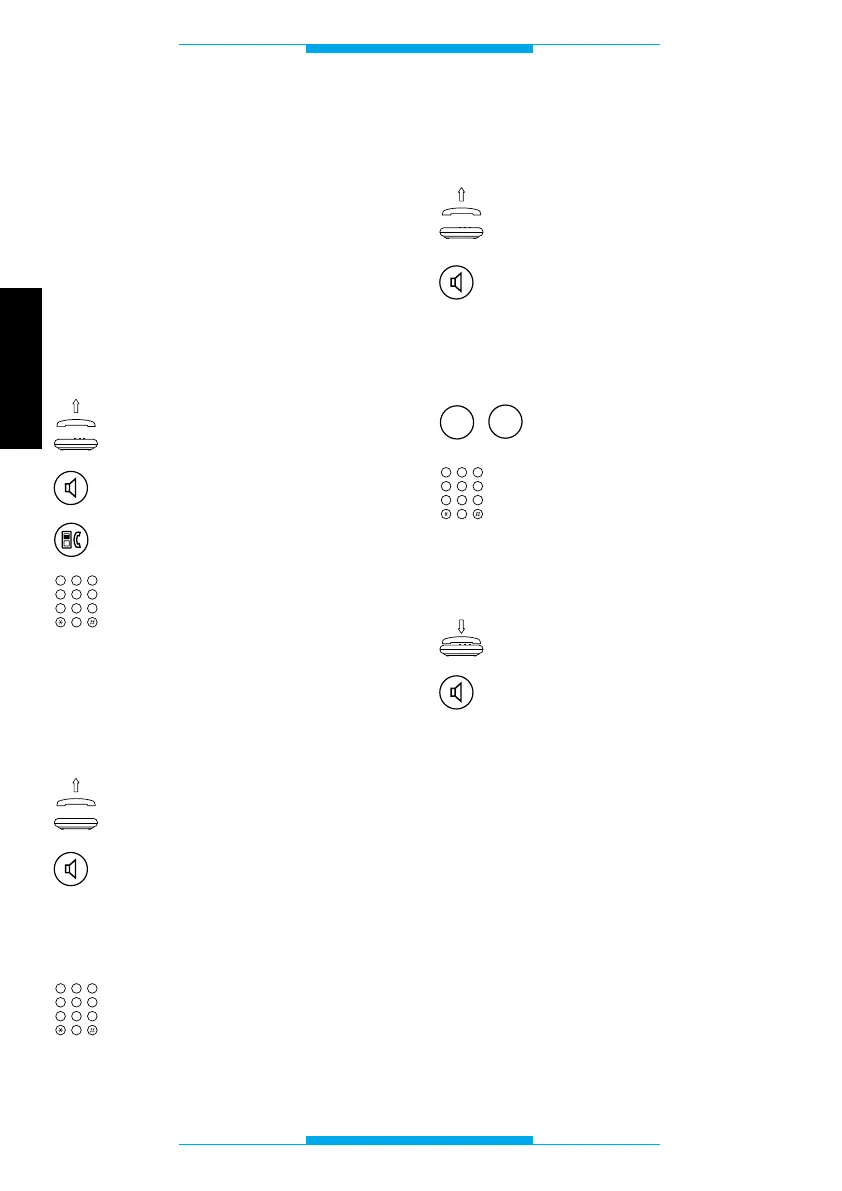
In order to enter programming mode via
the telephone connected to the telephone
interface:
Lift the receiver
or
press the hands-free key.
Press the entry hand-
set/telephone transfer key.
Key in 9999.
During this phase, one or more programming
procedures can be carried out in a row.
The programming codes must be entered
during the pause in the programming tone.
In order to exit programming mode:
Lift the receiver
or
press the hands-free key.
Following this operation, a double tone
should sound, prompting you to commence
programming.
Key in 9999.
Once finished, you should hear the local
line dial tone.
3
DEF
2
ABC
1
6
MNO
5
JKL
4
GHI
9
WXYZ
8
TUV
7
PQRS
0
3
DEF
2
ABC
1
6
MNO
5
JKL
4
GHI
9
WXYZ
8
TUV
7
PQRS
0
Programming the ID code
via the telephone
Lift the receiver
or
press the hands-free key.
Following this operation, a double tone
should sound, prompting you to commence
programming.
Key 60.
Key in the user code (in the
range 00000 to 65535).
Once finished, you should hear a triple tone
confirming the setting.
Replace the receiver
or
press the hands-free key.
3
DEF
2
ABC
1
6
MNO
5
JKL
4
GHI
9
WXYZ
8
TUV
7
PQRS
0



 To Next Page