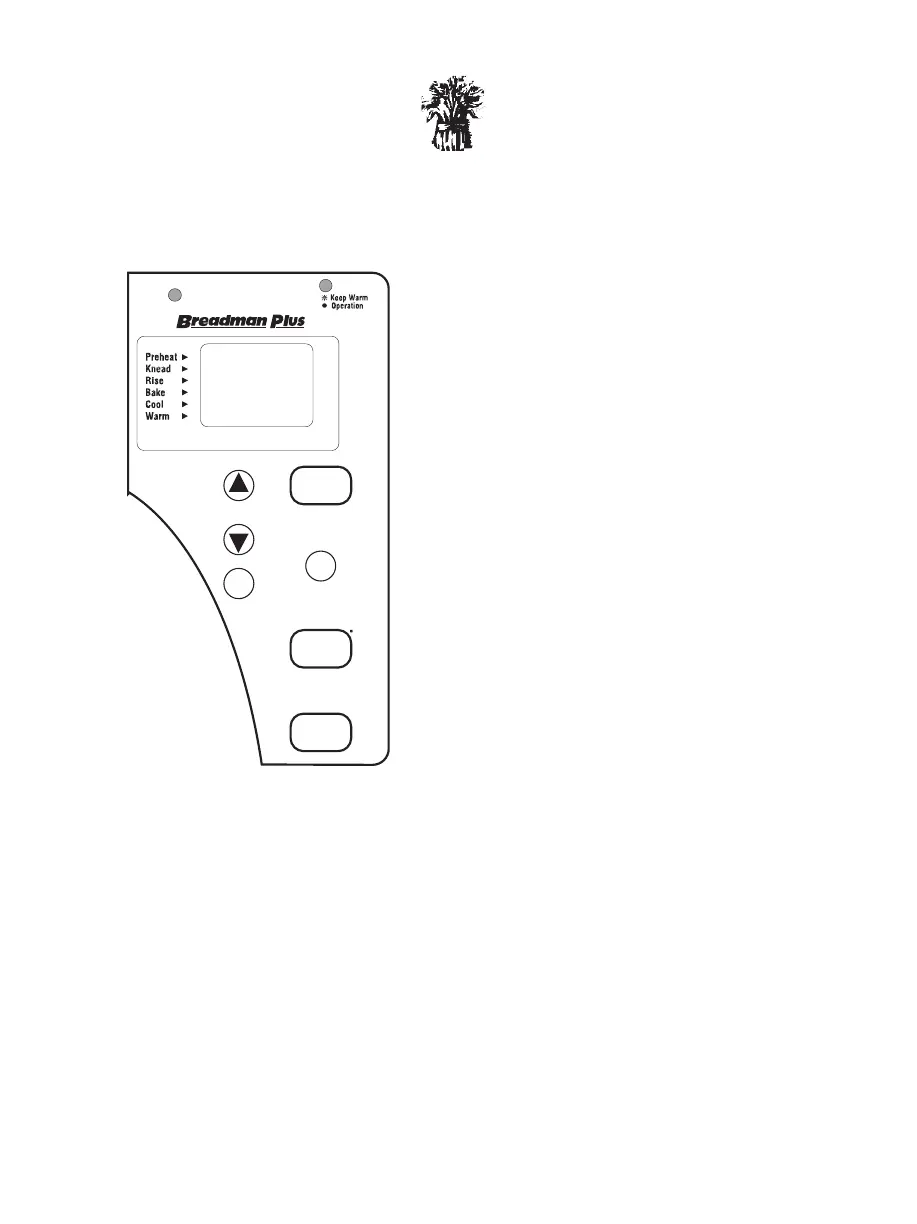
A. Display Window
Shows your selection and Timer setting.
B. Selection Options
Select from these choices:
1. White Medium
2. White Dark
3. White Rapid
4. Whole Wheat
5. Whole Wheat Rapid
6. Batter Bread™/ Cake
7. French Bread
8. Sweet Bread
9. Super Rapid
10. Pizza Dough
11. Dough
12. Jam
C. Select
Press this Button to select the Baking
Cycle you want. Each time the SELECT
Button is pressed, a new selection will
appear in the Display Window.
(The selections will be displayed in
the order listed.)
D. Start
Press this Button to start the Baking Cycle you choose.
E. Delay Bake Timer
Use this pair of Buttons to add or subtract time displayed in the Display Window.
Each time you press this Button, the Timer advances 10 minutes.
(Hint: Hold down the Button for fast forward.)
Each time you press this Button, the Timer is set back 10 minutes.
(Hint: Hold down the Button for fast reverse.)
F. Stop
Press this Button for a full second to clear the display, to reset the Baking Cycle or
Delay Bake Timer setting, or to simply stop baking.
When you press the or SELECT, START, or STOP Button, you should
hear a beep. This lets you know you’ve pressed hard enough and your selection
was made.


 To Next Page