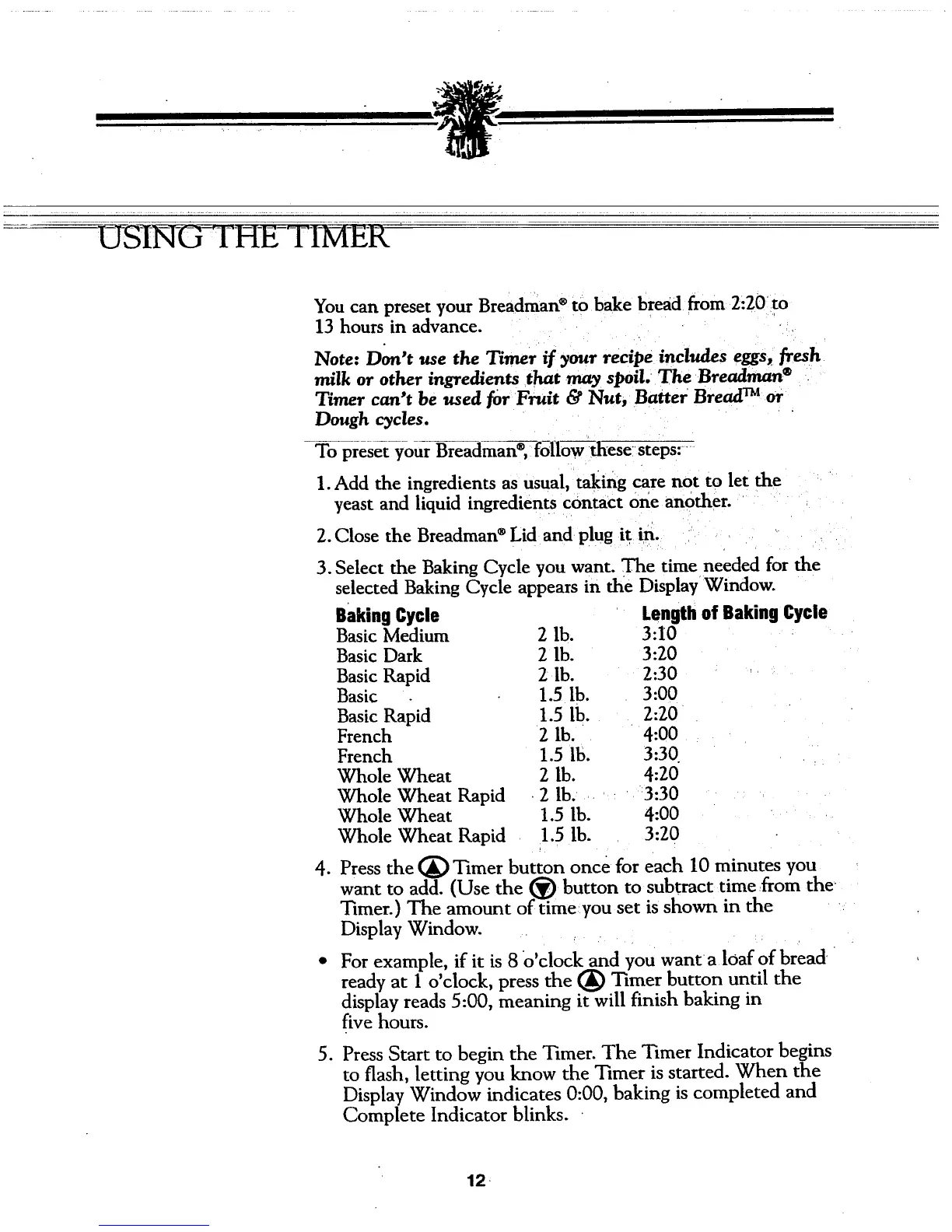
-iZ I 'HE-TI-I ER
You can preset your Breadman®to bake bread from 2:20 to
13 hours in advance.
Note: Don't use the Timer if your recipe includes eggs, flesh
milk or other ingredients that may slmil. The Breadman ®
Timer can't be used for Fruit & Nut, Batter Bread TM or
Dough cycles.
To preset your Breadman®_follo--ff--these;'steps:
1.Add the ingredients as usual, taking care not to let the
yeast and liquid ingredients contact one another.
2. Close the Breadman ®Lid and plug it in.
3. Select the Baking Cycle you want. The time needed for the
selected Baking Cycle appears in the Display Window.
.
Baking Cycle
Basic Medium
Basic Dark
Basic Rapid
Basic
Basic Rapid
French
French
Whole Wheat
Whole Wheat Rapid
Whole Wheat
Whole Wheat Rapid
2 lb.
2 lb.
2 lb.
1.5 lb.
1.5 lb.
2 lb.
1.5 lb.
2 lb.
2 lb. 3:30
1.5 lb. 4:00
1.5 lb. 3:20
Lengthof BakingCycle
3:I0
3:20
2:30
3:00
2:20
4:00
3:30
4:20
Press the (_ Timer button once for each 10 minutes you
want to add. (Use the _ button to subtract time from the
Timer.) The amount of timeyou set is shown in the
Display Window.
For example, if it is 8 o'clock and you want a loaf of bread
ready at 1 o'clock, press the (_ Timer button until the
display reads 5:00, meaning it will finish baking in
five hours.
.
Press Start to begin the Timer. The Timer Indicator begins
to flash, letting you know the Timer is started. When the
Display Window indicates 0:00, baking is completed and
Complete Indicator blinks.
12



 To Next Page