29
During auto-cycle mode, the " " icon will show on the channel section of the display. Press [ CHANNEL ]
key to stop auto cycle and display the current channel.
NOTE:
- Comfort indication can vary under the same temperature, depending on the humidity.
- There is no comfort Indication when temperature is below 0°C (32°F) or over 60°C (140°F).
OTHER OPTIONAL SENSOR
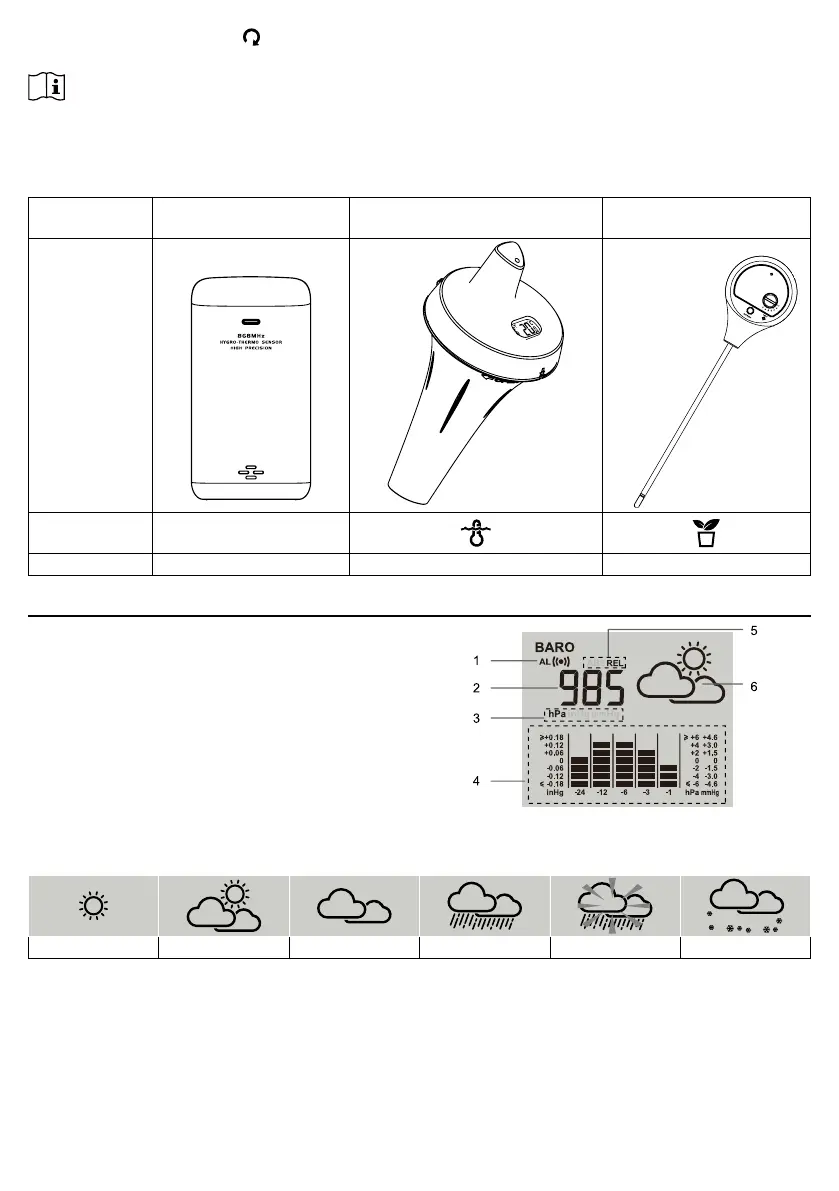
This console can also support the following optional sensors for channels 1 ~3.
SENSOR NAME Wireless thermo-hygro
sensor
Wireless oating pool & SPA
sensor
Wireless soil moisture &
temperature sensor
PHOTO
ICON IN
CHANNEL
DATA Temperature & Humidity Water temperature Temperature & soil moisture
BAROMETRIC PRESSURE & WEATHER FORECAST
1. Baro pressure alert indicator
2. Baro pressure reading
3. Unit of measure
4. Group of baro pressure
5. Absolute / Relative pressure indicator
6. Weather forecast icon
WEATHER FORECAST ICON
The device contains sensitive pressure sensor built-in with sophisticated and proven software that predicts
weather for the next 12 ~ 24 hours within a 30 to 50 km (19-31 miles) radius.
Sunny / Clear Slightly Cloudy Cloudy Rainy Rainy / Stormy Snowy




 To Next Page