15
PC Viewer Manager
7
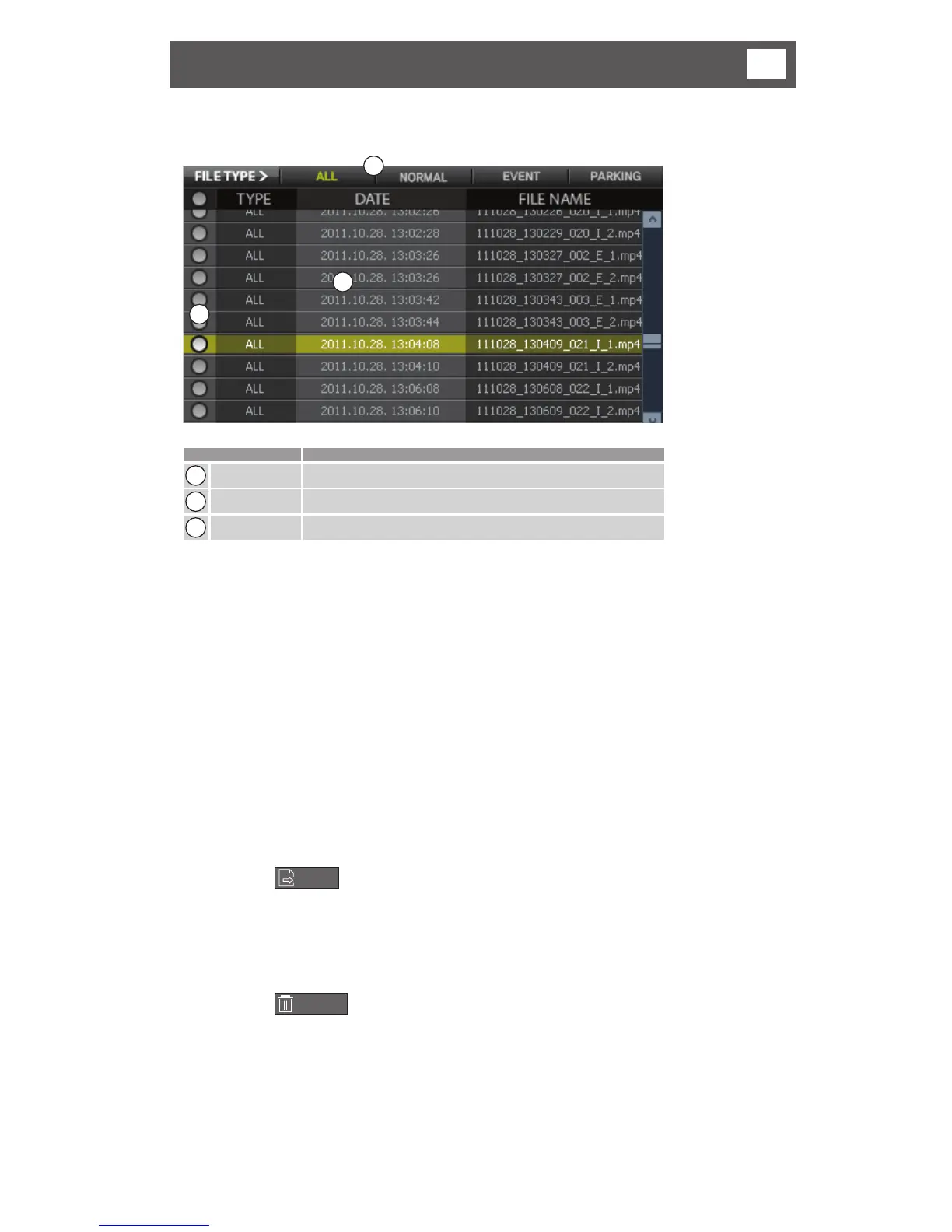
• Playback list
3
1
2
Function Description
1
File list Shows file on the micro SD Card
2
File Select Select the file/s to save or delete.
3
File Type Select files to be displayed ALL/EVENT/INFINITE
1) Files are arranged by Date/Time.
2) Files can be arranged by ALL / NORMAL / EVENT / PARKING
3) There is a select button to the left of each file.
4) When the select button is clicked, the file will be selected or cancelled.
(Multiple selection)
5) When the select button on the top is clicked, all of the files will be selected or
cancelled.
2 File Save (Save to hard disk drive)
1) Select the files that you want to save to a hard disk drive. (Multiple selection
possible)
2) Click the
SAVE
button, then select the folder on the PC to which you want
the files saved.
3 File Delete
4) Select the files that you want to delete. (Multiple selection).
5) Click the
DELETE
button, the selected files will be deleted from the micro
SD Card.
** Caution: Files not saved to the hard disk drive cannot be recovered.



 To Next Page