8
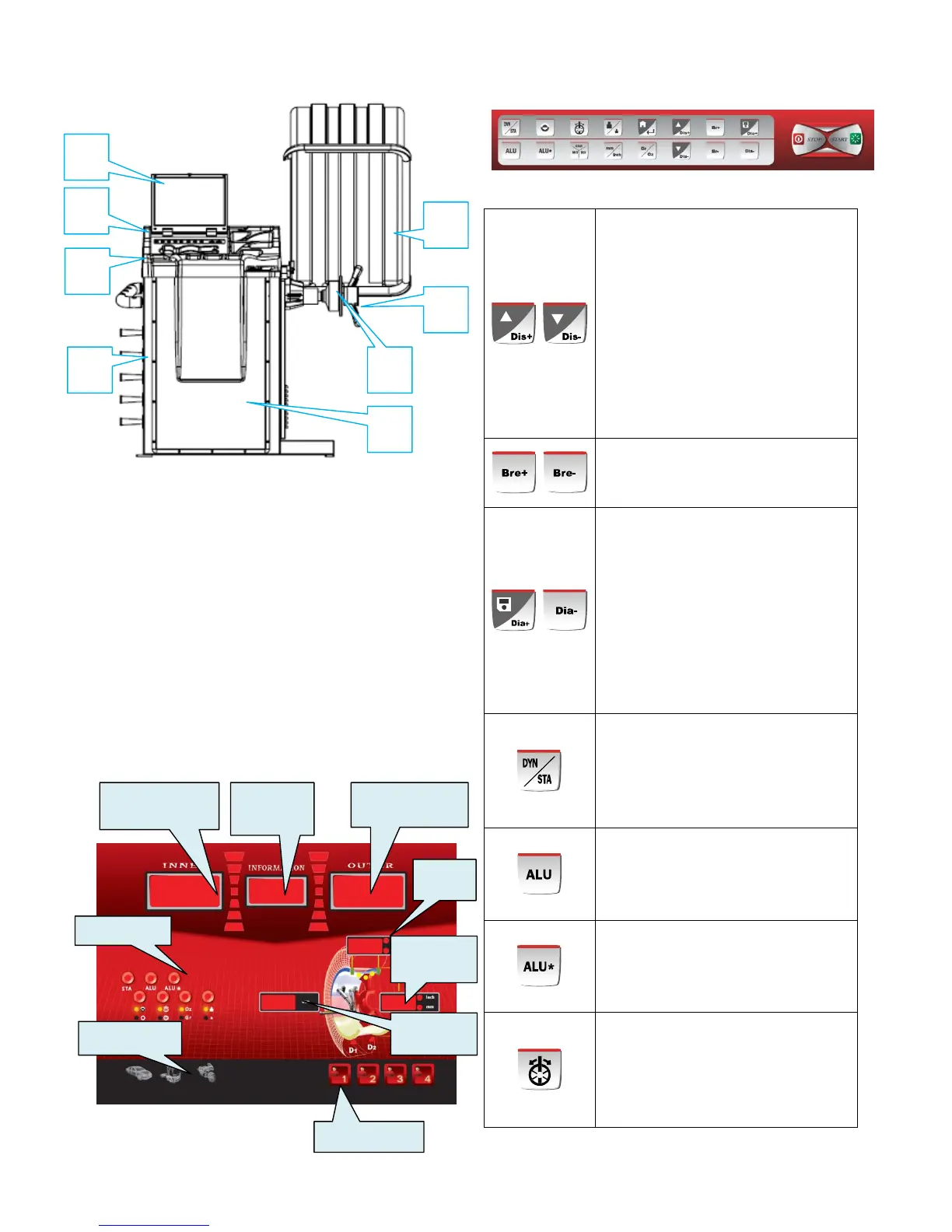
1. Power plug 2. Front Panel
3.A-sale 4.Control Panel
5.Weight Tray 6.Protective Cover
7. Quick Nut 8.Balance Shaft
9.Body 10. Power source switch
11. Hinging handle
6.2 DISPLAY PANEL & CONTROL PANEL
6.2.1 DISPLAY PANEL
In the state of parameter input, it is
input key for the distance from wheel
to the wheel balancer. You can change
the distance set value of the window
by press the up/down key. The default
unit is mm.
When use the automatic scale, it is no
need for you to use this key and the
machine will automatically access the
distance from the machine to the tire.
In the state of parameter input, it is the
input key of the breadth of the rim.
The default unit is inch
In the state of parameter input, it is the
diameter of the rim input key. You can
change the rim diameter set value of
the window by press the up/down key.
The default unit is inch.
When use the automatic scale, it is no
need for you to use this key and the
machine will automatically access the
diameter of the rim.
STA/DYN conversion key: The default
boot mode is the standard dynamic
balance. If you need to adopt the
static balance, you can press this key
to operate.
ALU mode. Press this key one by one
to realize the choice of the ALU1
\ALU2\ALU3 standard aluminum alloy
mode.
Self definite ALU mode. If cooperate
with the automatic measure scale,
you can realize the stick of the weight
to the self definite position.
Split weight: After you select the self
definite ALU mode, you can realize
the split of the weight. When the
position of the weight is between the
two spokes, you can hide the weight
Inside unbalance value
display
Inside unbalance
value
display
Outside unbalance value
display



 To Next Page