EasyManua.ls Logo

Brocade Communications Systems ICX 6430-C - User Manual

Brocade Communications Systems ICX 6430-C
64 pages
Print Icon
To Next Page IconTo Next Page
Loading...
53-1002817-02
24 June 2013
®
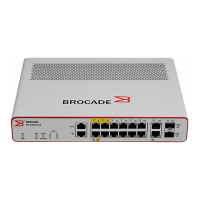
Brocade ICX 6430-C
Compact Switch
Hardware Installation Guide
Supporting software release 08.0.00a on device models ICX 6430-C12

Table of Contents

Other manuals for Brocade Communications Systems ICX 6430-C

Questions and Answers

  • M
    Mr. Jeffery AlvaradoJul 30, 2025
    What to do if Link LED is off on Brocade Communications Systems ICX 6430-C Switch?
    • M
      martinezjoseJul 30, 2025
      First, ensure that both the Brocade Communications Systems Switch and the connected device are powered on. Verify the cable is securely plugged into both devices and that you're using the correct cable type, ensuring it doesn't exceed the specified length limits. Finally, inspect the adapter and cable connections on the attached device for any defects, replacing them if necessary.
  • E
    erinmillerAug 3, 2025
    How to fix Power LED if it's off on Brocade Communications Systems ICX 6430-C Switch?
    • J
      John RamseyAug 3, 2025
      Check whether the internal power supply is disconnected. Also, check all connections between the Brocade Communications Systems Switch, the power cord, and the wall outlet.
  • X
    xhoganAug 8, 2025
    Why does Brocade Communications Systems ICX 6430-C power off after running for a while?
    • L
      lowerytinaAug 8, 2025
      Check for loose power connections, power losses or surges at the power outlet. Use the show chassis command to verify that the temperature is below the shutdown threshold. If the problem persists, the internal power supply may be defective.
  • E
    Eric HuntAug 12, 2025
    What to do if Diag LED is Amber on Brocade Communications Systems Switch?
    • C
      Carol SullivanAug 12, 2025
      Power cycle the Brocade Communications Systems Switch to try and clear the condition. If the amber Diag LED persists, there may be a fault detected by the device self-test.
  • O
    ortizjennyAug 16, 2025
    Why is cable diagnostics command rejected on Brocade Communications Systems ICX 6430-C?
    • D
      Dale CarrAug 16, 2025
      The port to which the cable is connected must be enabled when you issue the command to diagnose the cable on Brocade Communications Systems Switch.
  • A
    ashley05Aug 21, 2025
    Why is Power LED Amber on Brocade Communications Systems ICX 6430-C Switch?
    • C
      Crystal RogersAug 21, 2025
      The internal power supply of Brocade Communications Systems Switch has failed.
  • B
    Brianna FloresAug 25, 2025
    Why does TDR test fails on one pair on Brocade Communications Systems ICX 6430-C?
    • A
      Anita GilbertAug 26, 2025
      If the Brocade Communications Systems Switch port is operating at 100 Mbps half-duplex, the TDR test on one pair will fail.

Summary

Product Overview

Hardware Features

Details the physical characteristics and features of the ICX 6430-C device.

ICX 6430-C Models

Identifies the specific models within the ICX 6430-C series.

Network and Management Interfaces

Describes console, out-of-band ports, and reset button for device management.

Port, System, and Power Status LEDs

Explains the meaning of various LEDs for device status monitoring.

Power Supplies

Covers AC power connection details and power supply usage specifications.

ICX 6430-C Installation

Items Included with an ICX 6430-C Device

Lists all components shipped with the ICX 6430-C device.

Summary of Installation Tasks

Outlines the sequence of steps for installing the ICX 6430-C device.

Installation Precautions

Provides essential safety and handling guidelines including general, lifting, and power precautions.

Preparing the Installation Site

Details environmental and physical requirements for the installation location.

Installing the Device

Explains methods for desktop, rack, wall, and magnet mounting.

Powering on the System

Guides on how to safely connect and power on the ICX 6430-C device.

Configuring an ICX 6430-C Device

IP Address Configuration

Describes the process of setting up an IP address for device management.

Managing an ICX 6430-C Device

Temperature Settings

Explains device temperature monitoring, warning levels, shutdown thresholds, display, and adjustment.

Hardware Specifications

AC Power Supply Specifications

Lists input voltage range and power supply rating for the device.

Physical Dimensions and Weight

Provides the physical size and weight of the ICX 6430-C12 model.

Environmental Considerations

Outlines operating and storage conditions like temperature and humidity.

Pinouts and Signalling

Details the pin configuration for the console serial RJ45 management port.

Cable Specifications

Information on supported transceivers and cable types.

Power Cords

Recommendations for using appropriate power cords with the device.

Troubleshooting

Diagnosing Switch Indicators

Explains how to interpret LEDs and troubleshoot issues based on their status.

Regulatory Statements

USA (FCC CFR 47 Part 15 Warning)

FCC compliance statement and warning for Class A digital devices.

Industry Canada Statement

Industry Canada compliance statement for Class A digital apparatus.

Europe and Australia (CISPR 22 Class A Warning)

Compliance statement for Class A product in Europe and Australia.

Germany (Noise Warning)

Noise information regulation and sound pressure level for Germany.

Japan (VCCI)

VCCI compliance statement for Class A information technology equipment.

Japan Power Cord

Warning regarding the use of the supplied power cord in Japan.

Korea

EMC registration statement for Class A broadcasting communication devices.

China

China-CCC warning statements and altitude considerations.

BSMI Statement (Taiwan)

BSMI statement for Class A product and safety information for Taiwan.

Regulatory Compliance

Lists Electromagnetic Compatibility (EMC) and safety agency approvals.

Cautions and Danger Notices

Cautions

General warnings about potential equipment damage and safe operation.

Danger Notices

Warnings concerning hazards that could cause injury or death.

Brocade Communications Systems ICX 6430-C Specifications

General IconGeneral
ModelICX 6430-C
CategorySwitch
PoENo
Relative Humidity5% to 95% non-condensing
Uplink Ports4 x 10GbE SFP+
Power SupplyInternal power supply
MAC Address Table Size32, 000
Jumbo Frame SupportYes, up to 9216 bytes
Operating Temperature0°C to 50°C
Storage Temperature-40°C to 70°C
Ports24 x 10/100/1000Base-T ports
VLANs Supported4094

Related product manuals