BRONKHORST®
Page10FlowDDE 9.17.067
4 OPERATION
4.1 BASIC:COMMUNICATIONTOINSTRUMENTSANDSERVINGCLIENTAPPLICATIONS
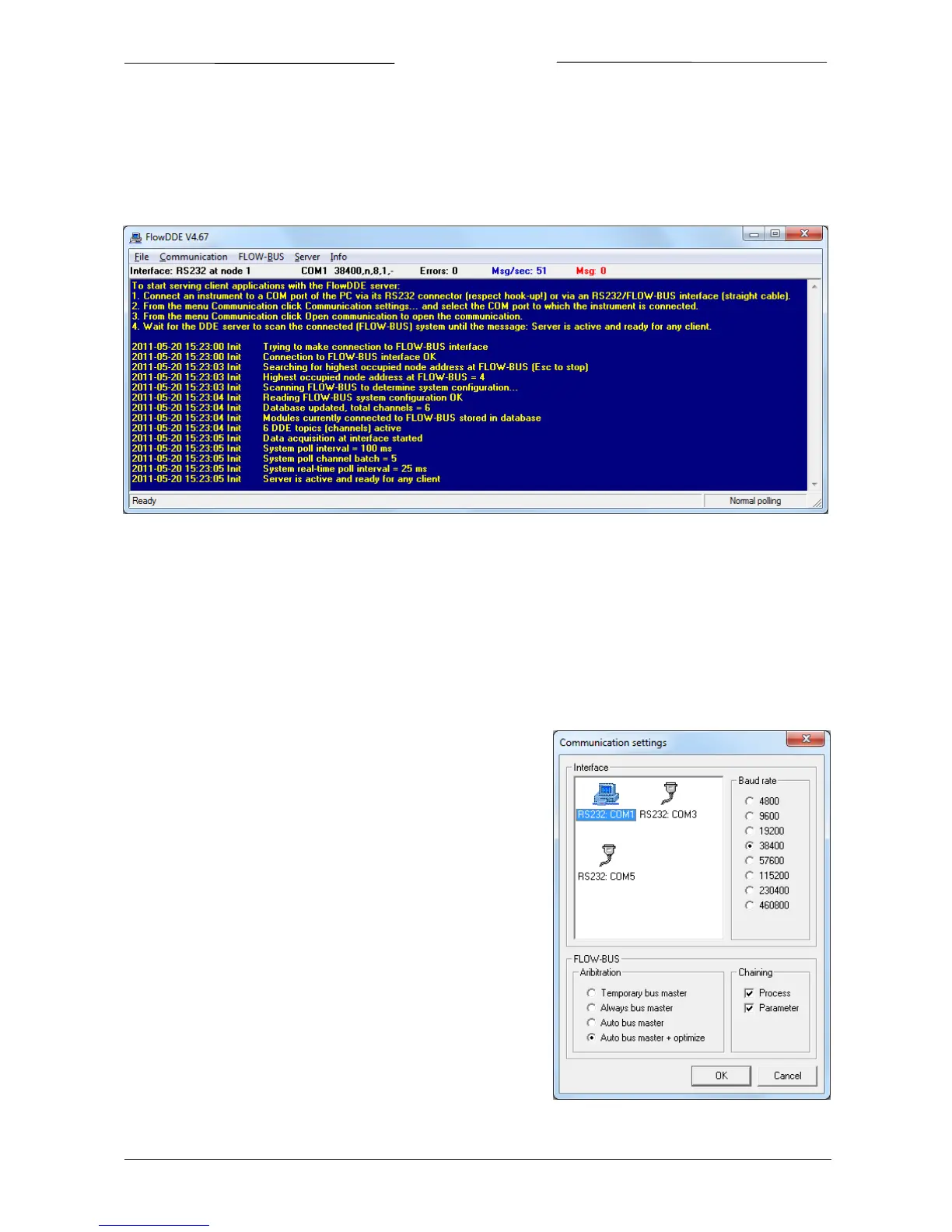
Once FlowDDEhas been started, the main window will appear. Itconsists of a menu bar, aninformation line and a
messagessection.
InthemessagessectionthegeneralproceduretostartservingclientapplicationswiththeFlowDDEserverisdescribed
infoursteps:
1. ConnectaninstrumenttoaCOMportofthePC
2. Setthecommunicationsettings
3. Startthecommunication
4. WaituntilFlowDDEisready
Usingthe
informationofchapter2and/orthehook‐updiagram,physicallyconnecttheinstrumenttotheCOMportof
thePC.
4.1.1 Communicationsettings
Before communication to the instrument(s) can be made, the
communicationsettingshavetobecorrectlyconfigured.
OpenthecommunicationsettingsfromthemenuCommunication>>
Communication settings… or by pressing F2. The window shown at
therighthandsidepopsup.
At Interface, the COM port and the baud
rate can be selected. For
mostinterfaces,thedefaultbaudrateis38400.
At FLOW‐BUS some settings for the FLOW‐BUS interface can be set.
Thedefaultvalues(Autobusmaster+optimizeandbothprocessand
parameter chaining enabled) should only be changed in case these
optionsarenot
supported,i.e.onlyforlegacyinterfaces.
OnOKthesettingsareaccepted,whereasonCancelFlowDDEretains
itssettings.
In the main window, the actual communication settings are shown
belowthemenubar,nexttotheinterfacestatus.



 To Next Page