BRONKHORST®
Page11FlowDDE 9.17.067
4.1.2 Opencommunication
Oncethecommunicationsettingsarecorrectlyconfigured,thecommunicationtotheinstrumentscanbestartedand
instrumentvaluescanbeusedbyclientapplications.
From the menu, click Communication >> Open communication or press F3. Now FlowDDE will try to make a
connection to the FLOW‐BUS interface. Once a
connection is established, FlowDDE willinitialize the interface when
needed and scan the connected FLOW‐BUS when present. When the FLOW‐BUS configuration is different than the
previousconfiguration,FlowDDEshowsawarning.Toallconnectedinstrumentsachannelnumberisassignedandfor
each channel theapplicable parameter DDE items
arecreated. These parameter DDE items areto be usedby client
applications.
AfterallDDEitemsarecreated,FlowDDEstartspollingseveralparametersfromallinstrumentsperiodically.TheDDE
valuesoftheseparametersareupdatedaftereachpoll,soclientsdon’tneedtoactivelyrefreshthesebeforeusing.
From
now on, FlowDDE is ready for any client. FlowDDE can be minimized and actsas silently as a server until the
communicationisclosed.
4.1.3 Closecommunication
Communicationtotheinstrumentcanbestoppedby,fromthemenu,Communication>>ClosecommunicationorF4.
Pollingisstopped,allDDEitemsareterminatedandclientscannolongersetorgetparametervalues.
4.2 CONFIGURATION
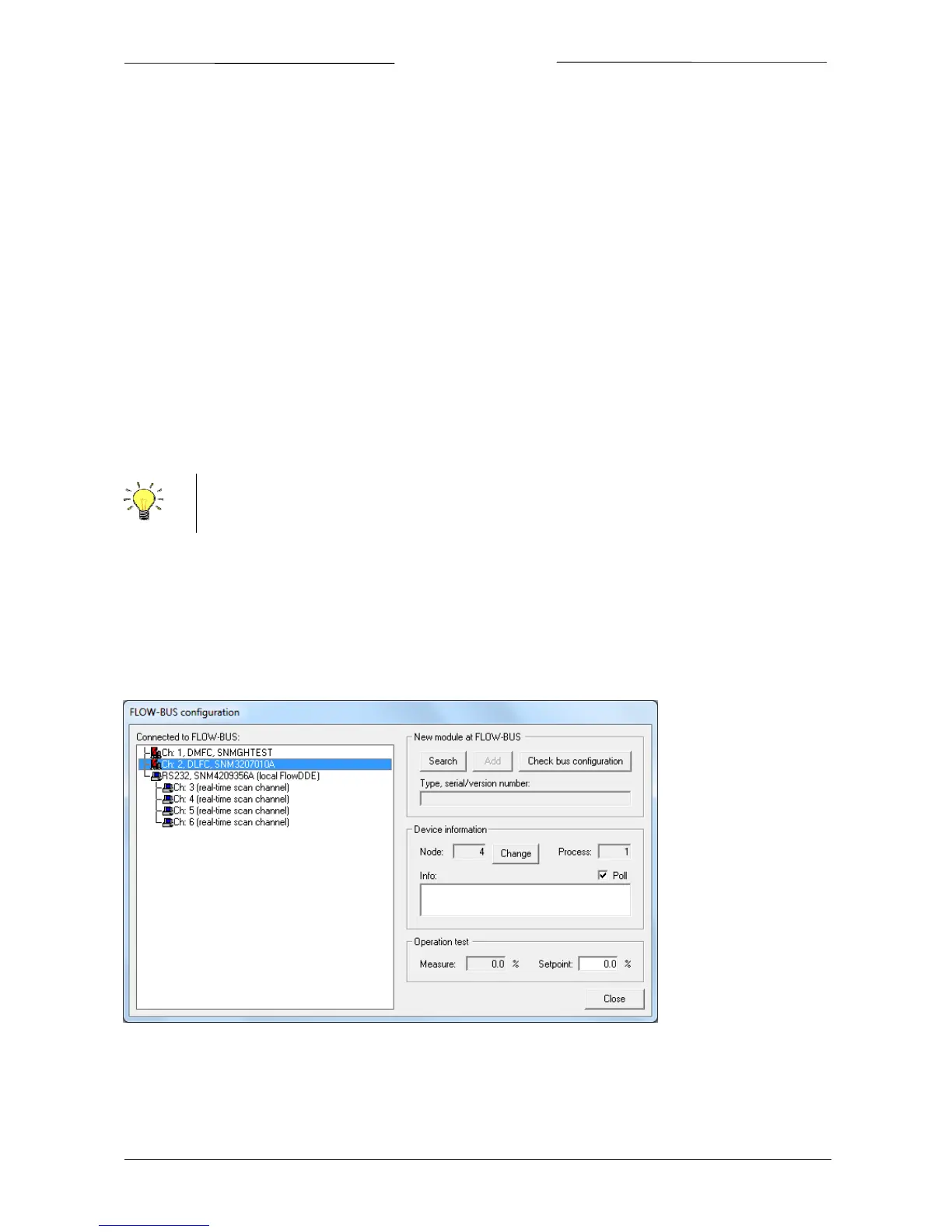
Whencommunication isopenedandFlowDDEhas scanned theFLOW‐BUSsystem,theFLOW‐BUSconfiguration can
beviewed:FLOW‐BUS>>ConfigurationorF5.
Thefollowingwindowisshown.
Onthelefthand side,allinstruments connectedtotheFLOW‐BUSareshown,orderedbytheir assigned channel.In
thisexample,twodigital controllers(channel1and2)andoneRS232/FLOW‐BUSinterfacewith4real‐timechannels
(channel3to6)areconnected.
On the right hand
side, the top frame is meant to add legacy modules to the FLOW‐BUS. To add such a module,
connectthemoduletotheFLOW‐BUS,pressSearchandfollowon‐screeninstructions.
CommunicationclosesautomaticallywhenFlowDDEisclosed.



 To Next Page