Endure Balanced Flue 19
Operating the Stove
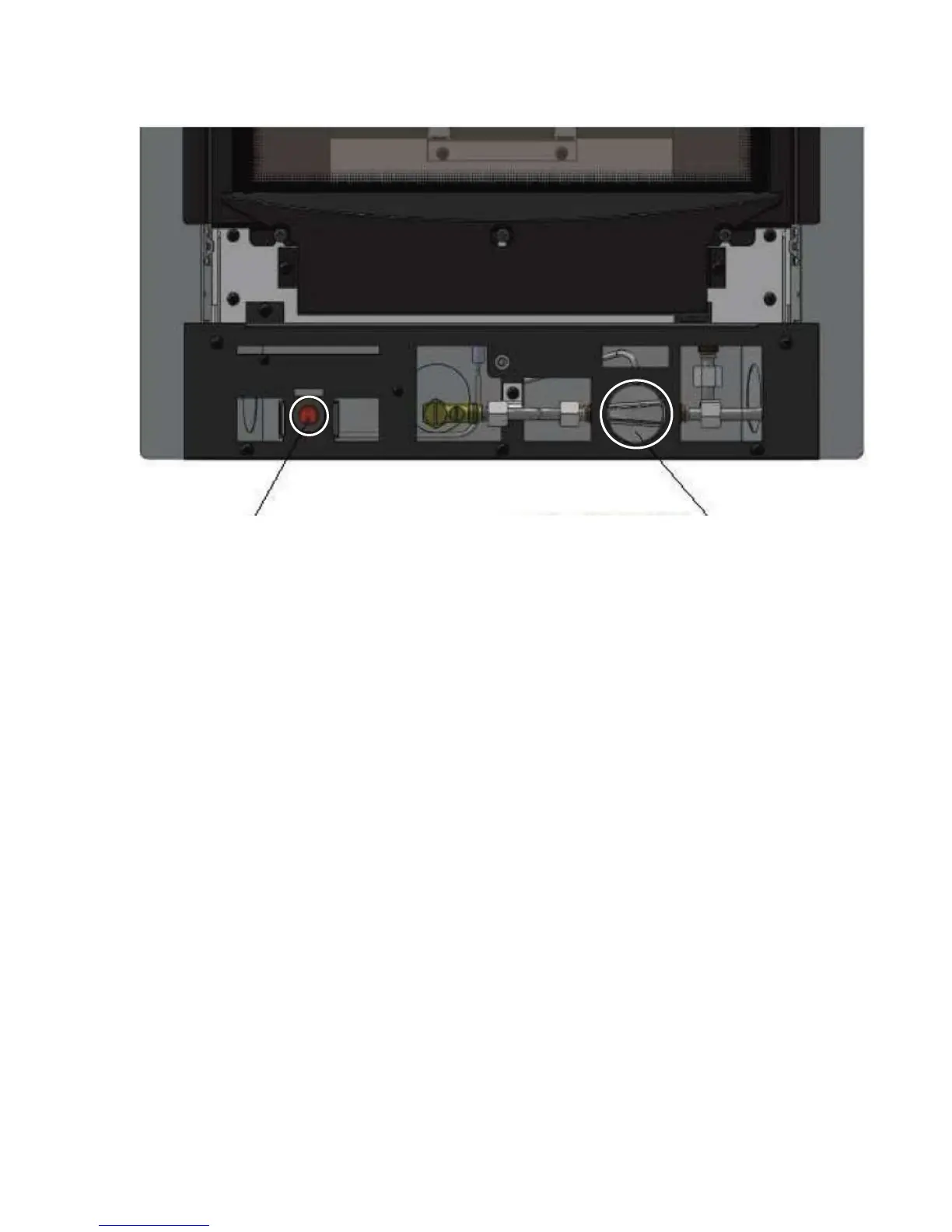
Push Button Electronic Igniter Control Valve Knob
1. Push the control valve knob in fully and rotate anti-clockwise to the (IGN)
position. Press the electronic ignitor (red button located bottom left). This will
create a spark at the pilot causing it to ignite. If the pilot does not light, rotate the
control knob to the (OFF) position and retry.If the pilot does not light on the
second attempt then turn the control kob back to the (OFF) position and wait 3
minutes before trying again.
2. Once the pilot is lit keep the control knob pushed in fully for up to 10 seconds.
3. Now release the control knob, the pilot should remain lit, if it goes out return the
knob to the (OFF) position and wait 3 minutes before starting again at step 1.
4. To turn the appliance to the (LOW) setting, turn the control knob anti clockwise
to the smaller 🔥 symbol.
5. To turn the appliance to the (HIGH) setting, turn the control knob anti clockwise
to the larger 🔥 symbol.
6. The output of the appliance is fully adjustable between the (HIGH) and (LOW)
settings.
7. To turn the fire to pilot only, press the control knob slightly and turn to the
(IGN). To fully extinguish the burner and pilot, turn the control to the (OFF)
position.



 To Next Page