5. PREPARATION BEFORE SEWING
26
BAS-342G
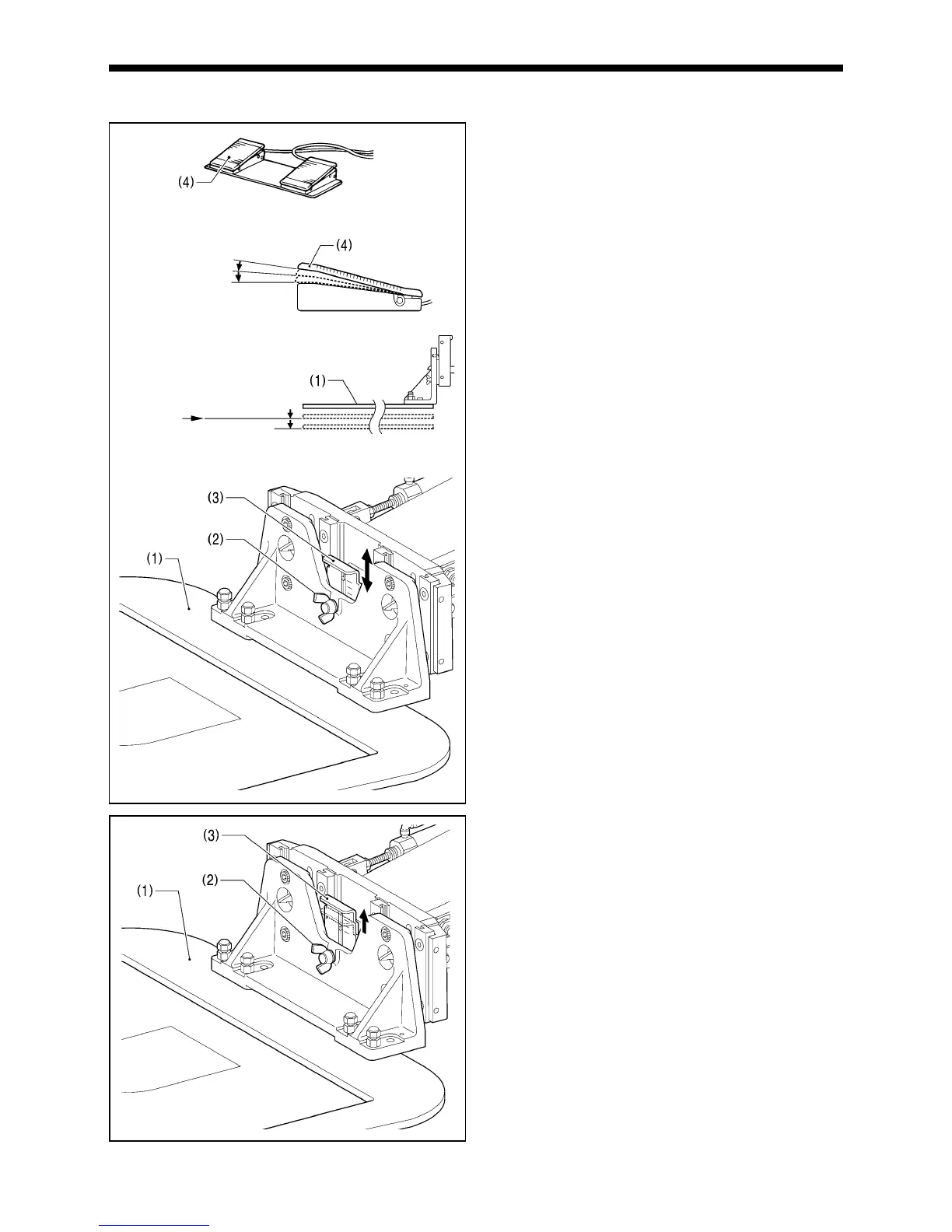
5-8. Setting 2-step operation for the work clamp
When these settings are made, the work clamp (1) can be
lowered in two steps.
1. Set memory switch No. 002 to "1".
(Refer to "7-2. Setting memory switches".)
2. With the work clamp (1) raised, loosen the wing screw
(2).
3. Move the work clamp stopper (3) up or down to determine
the intermediate position, and then tighten the wing screw
(2) to secure the work clamp stopper (3) in place.
4. Depress the work clamp switch (4) to the 1st step and
check the intermediate position for the work clamp.
5. Depress the work clamp switch (4) to the 2nd step to fully
lower the work clamp.
*
2-step work clamp operation is enabled when memory
switch No. 002 is set to "1".
*
Do not set memory switch No. 002 to "2".
<To return the work clamp to one-step operation>
1. Set memory switch No. 002 to "0".
(Refer to "7-2. Setting memory switches".)
2. With the work clamp (1) raised, loosen the wing screw (2).
3. Move the work clamp stopper (3) to its highest position,
and then tighten the wing screw (2) to secure the work
clamp stopper (3) in place.
1st step
2nd step
1st step
2nd step
Intermediate
position
4009M
4010M
4011M





 To Next Page