18
Macintosh
®
USB
16
Install MFL-Pro Suite
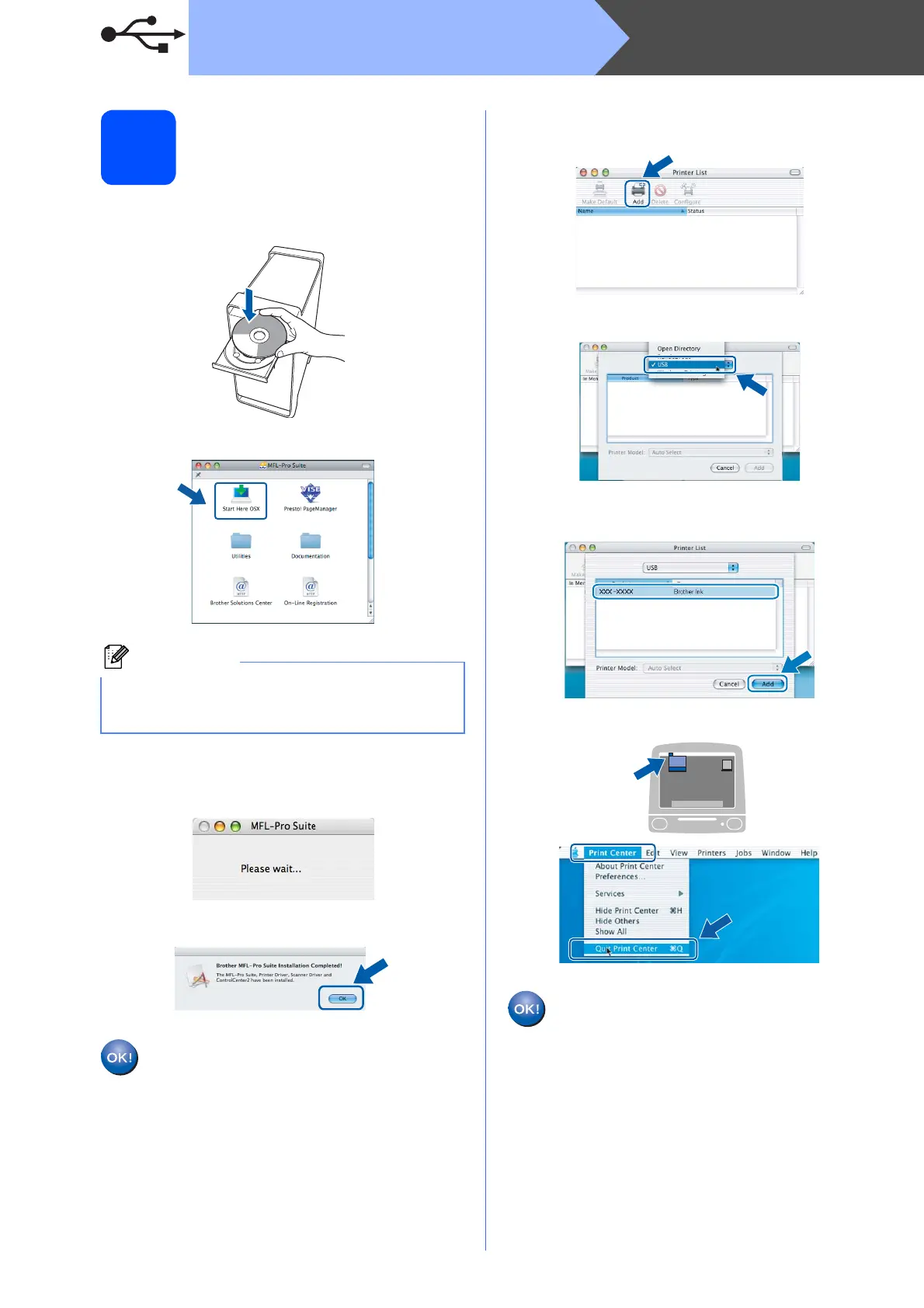
a Put the supplied CD-ROM into your CD-ROM
drive.
b Double-click the Start Here OSX icon to install.
c The Brother software will search for the Brother
device. During this time the following screen
will appear.
d When this screen appears, click OK.
For Mac OS
®
X 10.3.x or greater, the
installation of MFL-Pro Suite is now
complete.
Go to step 17 on page 19.
e For Mac OS
®
X 10.2.4 to 10.2.8 users,
click Add.
f Choose USB.
g Choose XXX-XXXX (where XXX-XXXX is your
model name), and then click Add.
h Click Print Center, then Quit Print Center.
The installation of MFL-Pro Suite is now
complete.
Go to step 17 on page 19.
Note
Please wait, it will take a few seconds for the
software to install. After the installation, click
Restart to finish installing the software.


 To Next Page
 Loading...