-18-
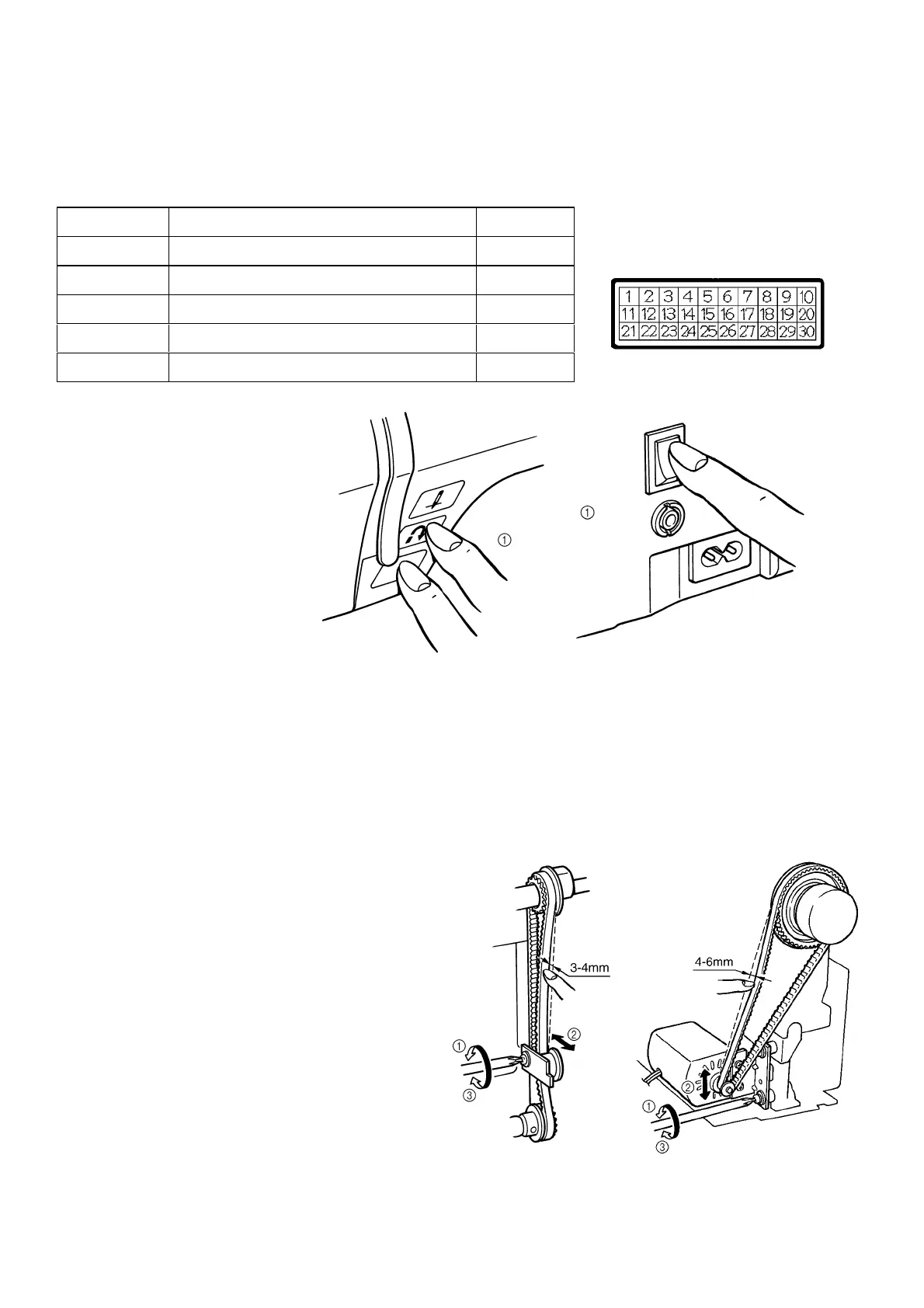
1. SEETING THE TEST MODE
BASIC TEST MODES
To set the test mode, turn on the power switch while holding down the start/stop button and backtack button
simultaneously. Numerals will appear on the touch panel. The respective test mode will be entered when the numeral
is pressed.
Test Mode No. Adjustment Item Page
2 Checking detection of fabric thickness 22
3 Pattern 24, 25
4 Needle down position 19
5 Timing of needle and rotary hook 19
6 Horizontal position of feed dog 21
The other test modes are used for factory adjustments.
2. TENSION OF MOTOR BELT AND TIMING BELT
STANDARD
There should be a 4-6 mm slack in the motor belt
when the center of the motor belt is pressed with a
force of 200g.
There should be a 3-4 mm slack in the timing belt
when it is pressed with a force of 200g.
ADJUSTMENT
Timing belt
1. Loosen the screw of the belt adjusting pulley.
2. Adjust the position of the belt adjusting pulley.
3. Tighten the screw of the belt adjusting pulley.
Motor belt
1. Loosen the two screws securing the motor holder.
2. Adjust the belt tension by moving the motor holder.
3. Tighten the two screws.




 To Next Page