-27-
19. NEEDLE THREADER (EXCHANGE)
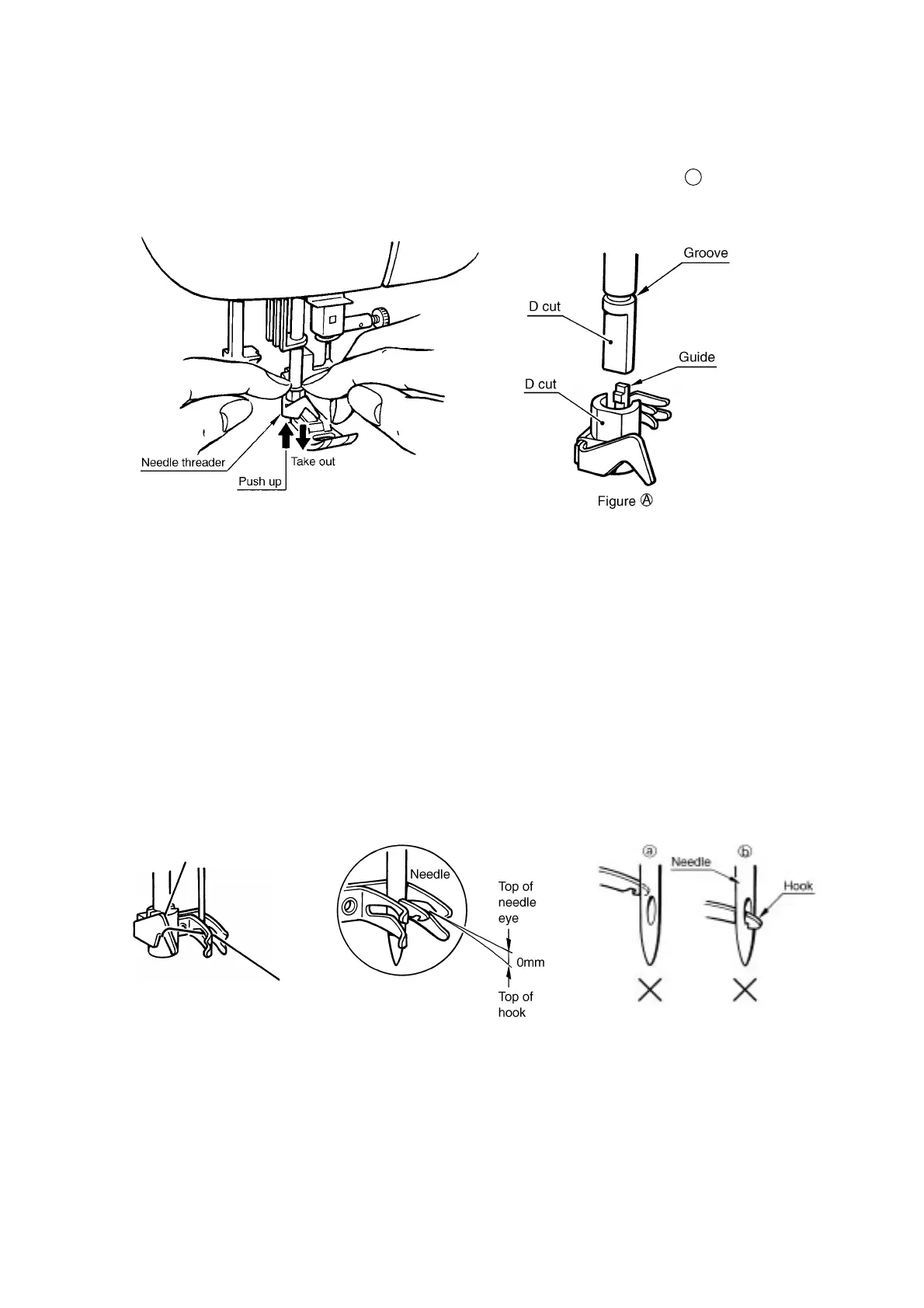
HOW TO EXCHANGE NEEDLE THREADER
1. Remove the needle and lower the presser foot.
2. Push down the needle threader and take it out.
3. Place a new one so that the guide is immediately under the groove as shown in figure A .
4. Push the needle threader all the way up so that the guide is fits into the groove.
20. NEEDLE THREADER
(CHECKING THE HOOK IN STANDARD POSITION)
STANDARD
1. The clearance between the top of hook and the top of needle eye is 0 mm.
2. Threading is possible when needle is located higher than 8 mm from the needle plate.
CHECK (refer to illustration)
Case A
Hook position is too high. (Hook hits needle and cannot go through needle eye.)
Case B
Hook position is too low. (Hook goes through needle eye but it catches bottom part of needle eye.)




 To Next Page