-22-
9. PRESSER BAR HEIGHT
STANDARD
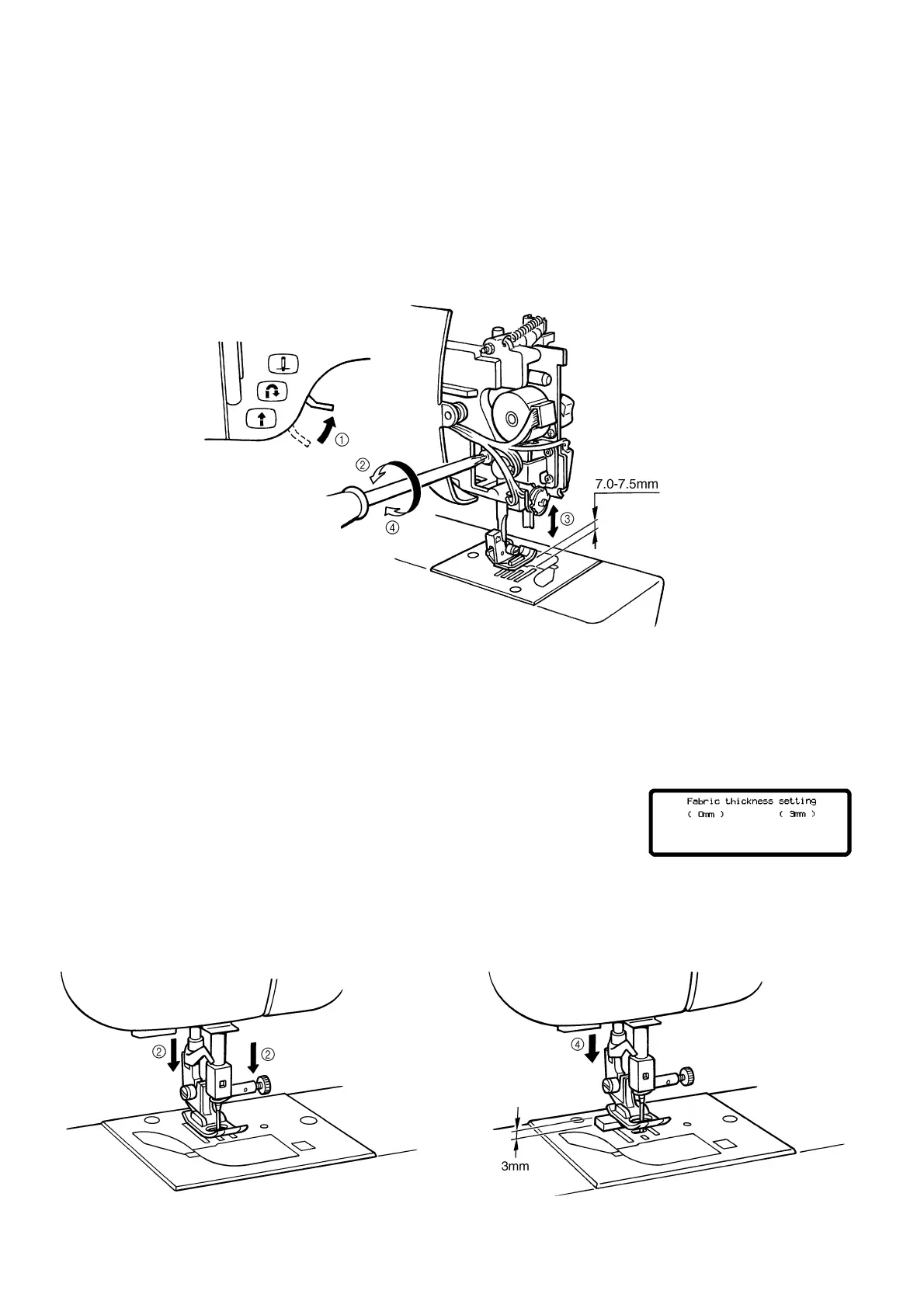
The clearance from the needle plate top to the bottom of the presser bar should be 7.0-7.5 mm.
ADJUSTMENT
1. Raise the presser foot lifter.
2. Loosen the screw of the presser bar guide bracket.
3. Adjust the height of the presser bar by moving it vertically.
4. Tighten the screw of the presser bar guide bracket.
NOTE: The presser foot should be parallel to the feed dog hole of the needle plate.
10. CHECKING DETECTION OF FABRIC THICKNESS
STANDARD
When the fabric thickness is set to 0 mm and 3 mm in test mode "2", the buzzer should sound twice if operation is
normal.
ADJUSTMENT
1. Select test mode "2".
2. Install the J presser foot and then lower the presser foot and set the needle
bar to the lowest position.
3. Press 0 mm on the display. (The buzzer should sound twice.)
4. Insert a spacer with a thickness of 3 mm beneath the J presser foot.
5. Press 3 mm on the display. (The buzzer should sound twice.)
NOTE: If the values read in steps (3) and (5) are normal, the buzzer will
sound twice each time. If they are not normal, the buzzer will sound
four times each time.




 To Next Page