EasyManua.ls Logo

Brother S-7200A - User Manual

Brother S-7200A
47 pages
Print Icon
To Next Page IconTo Next Page
Loading...
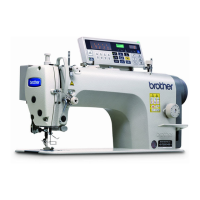
S-7200A
SINGLE NEEDLE DIRECT DRIVE
STRAIGHT LOCK STITCHER WITH THREAD TRIMMER

Other manuals for Brother S-7200A

Questions and Answers

  • R
    robert80Sep 12, 2025
    What does 'Err 13' mean on my Brother Sewing Machine?
    • J
      Juan WalkerSep 13, 2025
      If 'Err 13' appears, connector CN2 inside the control box might be disconnected. Insert the connector securely. Also, there might be a broken wire in the treadle connector cord, so replace the treadle unit.
  • D
    David WardAug 25, 2025
    Why are the upper and lower threads breaking on my Brother S-7200A Sewing Machine?
    • B
      brycegilbertAug 25, 2025
      If the upper or lower threads are breaking on your Brother Sewing Machine, several factors could be at play. First, ensure the needle isn't bent or broken; replace it if necessary. Double-check that the needle is correctly installed and the machine is properly threaded. Insufficient lubrication of the rotary hook can also cause this issue; add oil if the oil gauge is low. Also, check and adjust the upper and lower thread tension if they are too weak or too strong. Lastly, inspect the rotary hook, feed dog, and other parts for damage; smooth them or replace them if needed.
  • A
    Amanda MartinezAug 25, 2025
    Why is there a large degree of puckering (excess tension) when using my Brother S-7200A Sewing Machine?
    • C
      Chloe SullivanAug 26, 2025
      If you're experiencing a large degree of puckering (excess tension) with your Brother Sewing Machine, try the following: Weaken the upper and lower thread tensions as much as possible. Also, make the thread take-up spring tensions as weak as possible. Adjust the presser foot pressure and reduce the sewing speed using the sewing speed control keys.
  • J
    John NavarroSep 23, 2025
    What to do if nothing appears on the operation panel display of my Brother S-7200A?
    • J
      Joanna HallSep 23, 2025
      If nothing appears on the operation panel display of your Brother Sewing Machine, check if the power supply connector is disconnected from the control box and insert it securely. Also, verify that the operation panel connector inside the control box is connected properly.
  • D
    Daniel FrankSep 12, 2025
    What does 'Err 12' mean on my Brother S-7200A Sewing Machine?
    • Y
      yoconnorSep 12, 2025
      If 'Err 12' appears, the solenoid fuse F2 (5 A) might be blown. Replace the fuse. There could also be a problem with the control circuit board, so replace the control box.
  • G
    Gregory ClineSep 18, 2025
    Why is my Brother S-7200A incorrectly trimming the upper or lower thread?
    • F
      Frederick CombsSep 18, 2025
      If your Brother Sewing Machine is incorrectly trimming the upper or lower thread, ensure the needle is correctly installed. Also, the fixed or movable knife might be blunt, in which case you should replace them.
  • D
    Donald SimpsonSep 5, 2025
    What to do if my Brother S-7200A Sewing Machine does not operate at high speed?
    • S
      Sandra RichardsonSep 6, 2025
      If the machine does not operate at high speed, the sewing speed setting or backtack speed setting may be incorrect. Use the sewing speed control keys to set the high speed.
  • J
    James FrostSep 6, 2025
    What does “GREASEUP” flashing on the operation panel of my Brother Sewing Machine mean?
    • A
      Amber MillerSep 6, 2025
      Apply grease.
  • C
    Charles AvilaSep 18, 2025
    Why is there material slippage when using my Brother Sewing Machine?
    • A
      Antonio ThompsonSep 18, 2025
      Material slippage with your Brother Sewing Machine can occur if the presser foot pressure is too strong. Adjust the presser foot pressure to correct this.
  • Q
    qericksonAug 30, 2025
    What to do if loops appear in seam on my Brother Sewing Machine?
    • M
      Mark SantosAug 30, 2025
      If you find loops appearing in the seam of your Brother Sewing Machine, first check if the thread path is not smooth enough. If so, polish the thread path with a fine-grain file or sandpaper. Also, check if the bobbin isn't turning smoothly. Pull out the lower thread to ensure there's no slackness in the thread tension, and consider replacing the bobbin or bobbin case.

Summary

Safety Instructions and Meanings

Safety Indications and Meanings

Explains the meaning of safety indications and symbols used in the manual.

Safety Notes and Environmental Requirements

Sewing and Cleaning Safety Precautions

Sewing Safety

Outlines safety precautions and general guidelines for sewing operations.

Major Machine Parts and Safety Devices

Machine Specifications

Machine Lubrication Procedure

Lubrication for Specific Models

Details the lubrication procedure for specific machine specifications.

Gearbox Lubrication

Details the lubrication process for the machine's gearbox.

Connecting Electrical Cords

Connecting Sewing Machine Cords

Specific instructions on connecting the sewing machine cords.

Electrical Cord and Ground Wire Connections

Ground Wire Connection

Explains the procedure for connecting the ground wire for safety.

Test Operation and Treadle Use

Test Operation Procedure

Guides on how to perform a test operation of the machine using the treadle.

Pre-Sewing Preparation: Needle and Bobbin Case

Needle Installation

Step-by-step instructions for correctly installing the sewing machine needle.

Lower Thread Winding and Bobbin Case Installation

Winding Lower Thread

Provides instructions for winding thread onto the bobbin.

Installing Bobbin Case

Explains the correct method for inserting the bobbin case into the machine.

Upper Threading and Stitch Adjustment

Upper Threading Guide

Step-by-step guide on how to thread the upper thread through the machine.

Stitch Length Adjustment

Instructions on how to adjust the stitch length setting on the machine.

Operation Panel: Basic Functions Overview

Panel Keys and Displays

Identifies the keys and displays on the operation panel and their basic functions.

Operation Panel: Backtack Stitching

Backtack Stitch Operations

Guides on setting and performing start and end backtack stitches.

Operation Panel: Fixed Stitch Sewing

Fixed Stitch Sewing

Explains how to sew a fixed number of stitches using the operation panel.

Operation Panel: Name Label Sewing

Name Label Sewing

Details how to sew name labels using repeating stitch patterns.

Operation Panel: Pleat Presser Stitching

Pleat Presser Stitch Sewing

Explains the procedure for sewing pleat presser stitches.

Operation Panel: Advanced Functions Overview

Advanced Panel Key Functions

Identifies advanced operation panel keys and their functions.

Operation Panel: Advanced Settings

Needle Stop Position Adjustment

Details how to adjust the needle stop position using the operation panel.

Sewing Modes: Basic and Backtack

Basic Sewing

Basic steps to start and perform sewing operations.

Backtacking Operation

Explains how to perform backtacking during sewing.

Sewing Mode: Condensed Stitches

Condensed Stitch Sewing

Details how to sew condensed stitches and the necessary settings.

Thread Tension Adjustment

Adjusting Thread Tension

Provides instructions for adjusting both upper and lower thread tensions for optimal stitches.

Thread Tension and Presser Foot Adjustment

Presser Foot Pressure Adjustment

Explains how to adjust the presser foot pressure for different materials.

Daily Machine Cleaning

Daily Cleaning Routine

Outlines the daily cleaning tasks to maintain machine performance and longevity.

Grease Application Alert

Applying Grease When Notified

Guides on applying grease when the machine indicates it is needed.

Troubleshooting: General Sewing Problems

Troubleshooting: Stitch and Seam Issues

Troubleshooting: Thread and Trimming Issues

Troubleshooting: Mechanical and Power Issues

Troubleshooting: Operational and Display Errors

Troubleshooting: Specific Error Codes (4, 5, 8, 13)

Troubleshooting: Error Codes (100, 101) and Notifications

Brother S-7200A Specifications

General IconGeneral
TypeIndustrial Sewing Machine
ModelS-7200A
Stitch TypeLockstitch
Max. Sewing Speed5, 000 stitches per minute
Max Stitch Length4.5 mm
Needle Bar Stroke30.7 mm
Needle TypeDB×1 (#11) #9~#18
MotorDirect Drive Motor
Foot LiftBy hand: 5.5mm, By knee: 13mm
LubricationAutomatic oiling system

Related product manuals