EasyManua.ls Logo

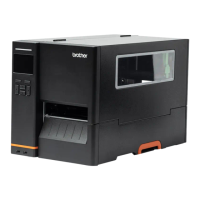
Brother TJ-4520TN - User Manual

Brother TJ-4520TN
93 pages
Print Icon
To Next Page IconTo Next Page
Loading...
User's Guide TJ-4420TN/TJ-4520TN/TJ-4620TN/TJ-4422TN/TJ-4522TN
TJ-4420TN/TJ-4520TN/TJ-4620TN
TJ-4422TN/TJ-4522TN
User's Guide (English)
© 2020 Brother Industries, Ltd. All rights reserved.
Version 04
ENG

Table of Contents

Other manuals for Brother TJ-4520TN

Questions and Answers

  • A
    Amber WestSep 10, 2025
    How to fix ribbon wrinkles on Brother Printer?
    • A
      annamaciasSep 12, 2025
      To address ribbon wrinkles on your Brother Printer, start by adjusting the Print Head tension using the Print Head Tension Adjustment Knob. If that doesn't resolve the issue, reinstall the ribbon and the label roll, ensuring they are correctly placed. Finally, adjust the print density/darkness to improve the print quality.
  • E
    Evan ArmstrongAug 23, 2025
    What to do if my Brother TJ-4520TN Printer shows 'Paper Jam'?
    • E
      Ernest MillerAug 23, 2025
      If your Brother Printer indicates a paper jam, first, calibrate the Gap/Black Mark Sensor. Next, ensure that the label size is set up correctly. Finally, carefully remove any jammed paper from inside the printer.
  • H
    heather75Aug 25, 2025
    What to do if my Brother Printer has blank labels with gray lines?
    • L
      lewiskrystalAug 25, 2025
      If your Brother Printer is producing blank labels with gray lines, the Print Head may be dirty, so clean it. Also, the Platen Roller might be dirty, so ensure you clean that as well.
  • T
    Tina CooperAug 26, 2025
    What to do if my Brother Printer shows 'No Paper'?
    • T
      Tamara HerreraAug 27, 2025
      If your Brother Printer displays a 'No Paper' message, first, install a new label roll if the current one has finished. If the issue persists, reinstall the label roll to ensure it's correctly placed. Additionally, calibrate the Gap/Black Mark Sensor.
  • C
    Christina KruegerAug 28, 2025
    What to do if my Brother Printer memory is full?
    • E
      ehuynhAug 28, 2025
      If your Brother Printer displays a 'Memory full' error, it indicates that the printer's DRAM/Flash/ Card memory is full. To resolve this, delete unused files from the DRAM/Flash/ Card memory.
  • V
    Victoria MurphyAug 29, 2025
    Why is my Brother TJ-4520TN producing poor print quality?
    • P
      Pamela MartinAug 29, 2025
      Poor print quality on your Brother Printer can arise from several factors. Ensure the ribbon and media are loaded correctly. Clean the Print Head, as dust or adhesive may have accumulated. Adjust the print density and print speed. Run a self-test to check the Print Head for damage, looking for missing dots in the test pattern. Verify that you are using compatible ribbon and media. Adjust the Print Head tension using the Print Head Tension Adjustment Knob. Also, make sure the Release Lever is locked in place.
  • A
    alexis93Sep 18, 2025
    Why can't I use my microSD card in my Brother TJ-4520TN?
    • M
      Maria BakerSep 18, 2025
      If your microSD card cannot be used in your Brother Printer, it might be damaged, so try using a different microSD card. Alternatively, the microSD card might not be inserted correctly, so reinsert it. The microSD card may be made by a non-approved manufacturer.
  • B
    benjaminlambSep 12, 2025
    What does 'Take Label' mean on my Brother TJ-4520TN Printer and how to resolve it?
    • C
      Cameron BrownSep 12, 2025
      The 'Take Label' message on your Brother Printer indicates that Peeler Mode is enabled. To resolve this, remove the label.
  • C
    Cassandra RodgersSep 8, 2025
    How to resolve incorrect printing position of small labels on Brother TJ-4520TN?
    • S
      Stephen CopelandSep 8, 2025
      If the printing position of small labels is incorrect on your Brother Printer, the media sensor sensitivity may not be set correctly, so calibrate the sensor sensitivity again. Also, the label size may be incorrect, so set the correct label size and gap size. Finally, fine-tune the Shift Y setting. If using the BarTender software, set the Vertical Offset in the driver.
  • N
    Natasha BarberSep 5, 2025
    How to resolve irregular printing on Brother TJ-4520TN Printer?
    • S
      silvajasmineSep 5, 2025
      If your Brother Printer is exhibiting irregular printing, it may be in Hex Dump Mode. Turn the printer off and on to skip the Dump Mode. Also, the printer’s RS-232 communication may not be set correctly, so ensure the printer's RS-232 settings are properly configured.

Brother TJ-4520TN Specifications

General IconGeneral
Print TechnologyThermal Transfer / Direct Thermal
Print Resolution300 dpi
ConnectivityUSB, Serial, Ethernet, USB Host
Ribbon Core1 inch (25.4 mm)
CutterOptional
PeelerOptional
Maximum Print Width4.09 inches (104 mm)
Memory256 MB RAM, 64 MB Flash
Media TypeFanfold
Media Thickness0.0028 to 0.0079 inches (0.07 to 0.2 mm)
Ribbon Width4.33 inches (110 mm)
Operating Temperature41°F - 104°F (5°C - 40°C)

Related product manuals