8.3.2
Replacing the activated charcoal cleaning filter
Personnel:
n
Operator
L WARNING! Risk of electrical shock if the power
plug is not disconnected!
1.
Switch off humidifier and disconnect power plug.
2.
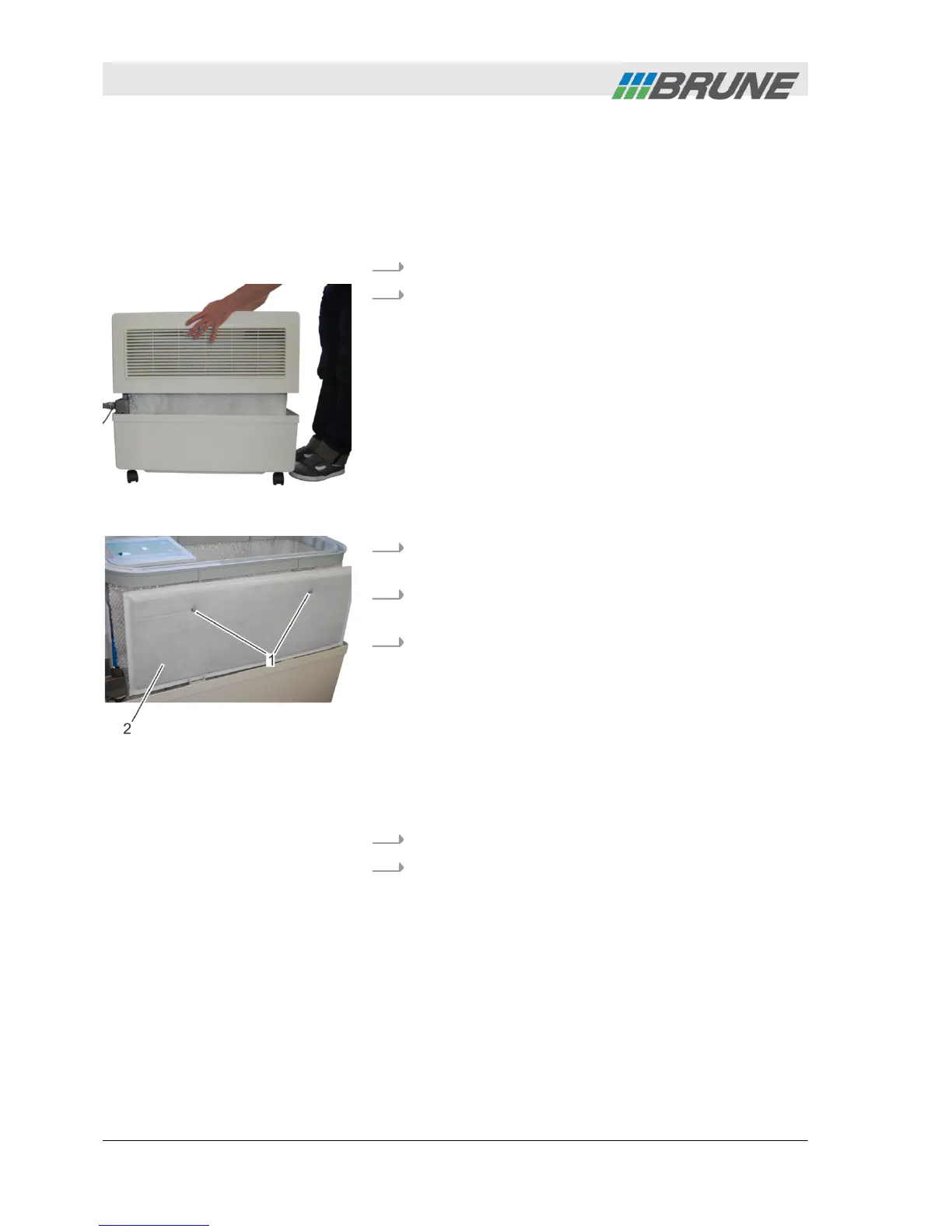
Lift the cover of the humidifier upwards and place
to the side (Fig. 60).
3.
Remove plastic sleeves from the retaining lugs of
the clamping bracket (Fig. 61/1).
4.
Remove old activated charcoal cleaning filter
(Fig. 61/2).
5.
Hook the new activated charcoal cleaning filter on
the retaining lugs. Heed the following:
n The filter must not be kinked or bent sharply.
n The flat side of the filter is pointing towards the
device.
n Ensure that the retaining lugs of the filter are at
the same distance from each other as the holes
of the filter. If required, adjust the width of the
filter bracket by carefully bending.
6.
Reattach plastic sleeves.
7.
Replace cover of humidifier.
Fig. 60: Remove cover
Fig. 61: Remove plastic sleeves
Accessories
2013-11-04Evaporation Humidifier B500 Professional70



 To Next Page