17
If you experience any problems, please call the Helpline on 0808 100 6554*
Sensitivity
You can change the sensitivity of your BT Baby Monitor 100
to determine how much noise your baby must make before
the sound is heard at the Parent unit.
There are 5 different levels.
Level 1 is the least sensitive setting (shown by two green
LEDs) and will require your baby to make a loud noise before
the sound is heard at the Parent unit.
Level 2 to 4 correspond to progressively quieter baby noises
that are required before the sound is heard at the Parent unit.
Level 5 is the most sensitive setting (shown by five green and
one red LED), and any noise made by your baby (no matter
how quiet) will be heard at the Parent unit.
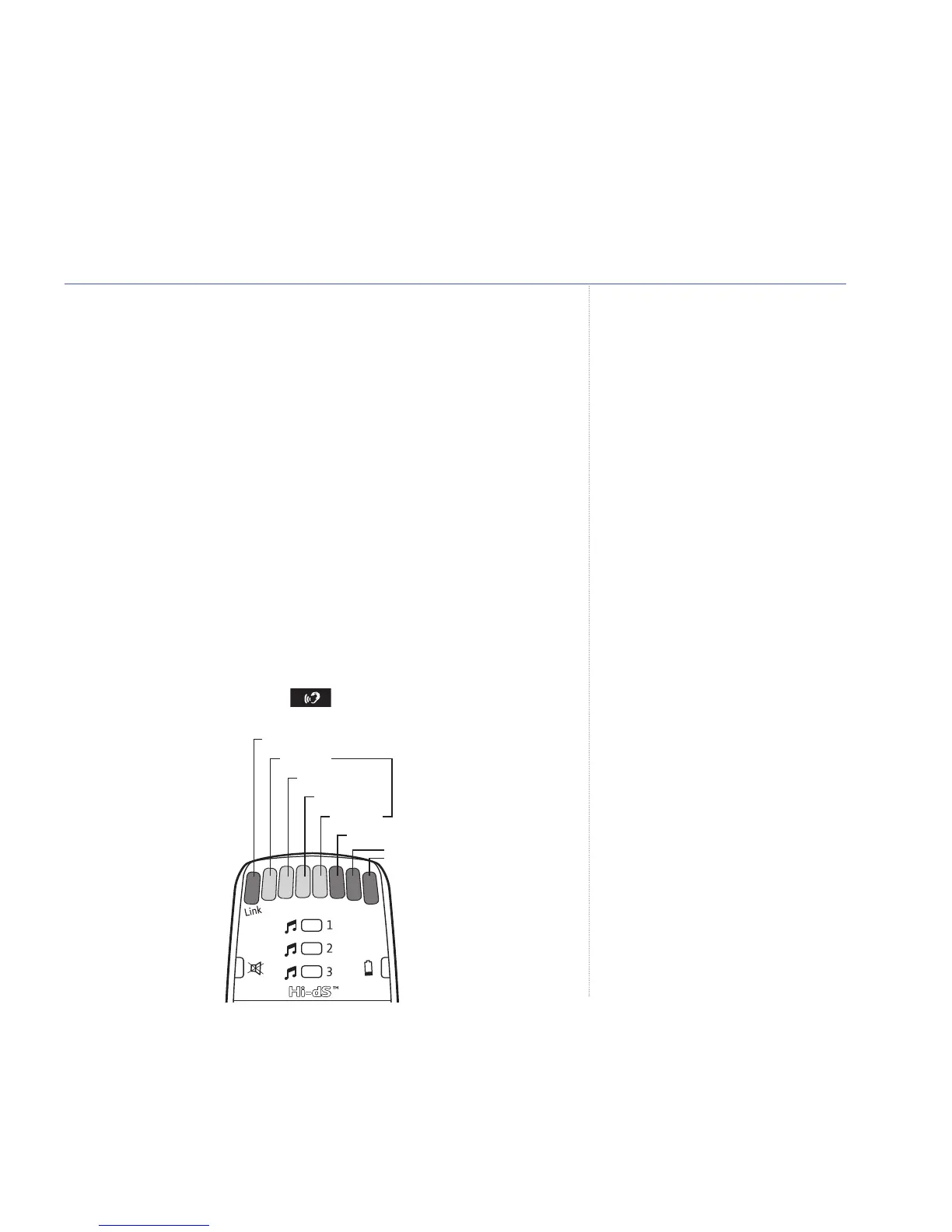
Sensitivity levels 1-5 are indicated by the number of LEDs
illuminated after pressing .
Using your BT Baby Monitor 100
If you set the sensitivity level too low,
only louder sounds in the baby’s room
will be picked up and communicated
back to you via the Parent unit.
The Unit will not pick up quieter
background noises.
The 5 sensitivity level LED indicators
star
t at the second LED on the
Parent unit. The first LED is the link
status indicator.
LED Link indicator = Green or red LED
Level 1
Level 2
Level 3
Level 4
Level 5 = R
ed LED
Red LEDs
Green LEDs



 To Next Page