EasyManua.ls Logo

Bticino 3550 - Page 77

Bticino 3550
Print Icon
To Next Page IconTo Next Page
To Previous Page IconTo Previous Page
Loading...
77
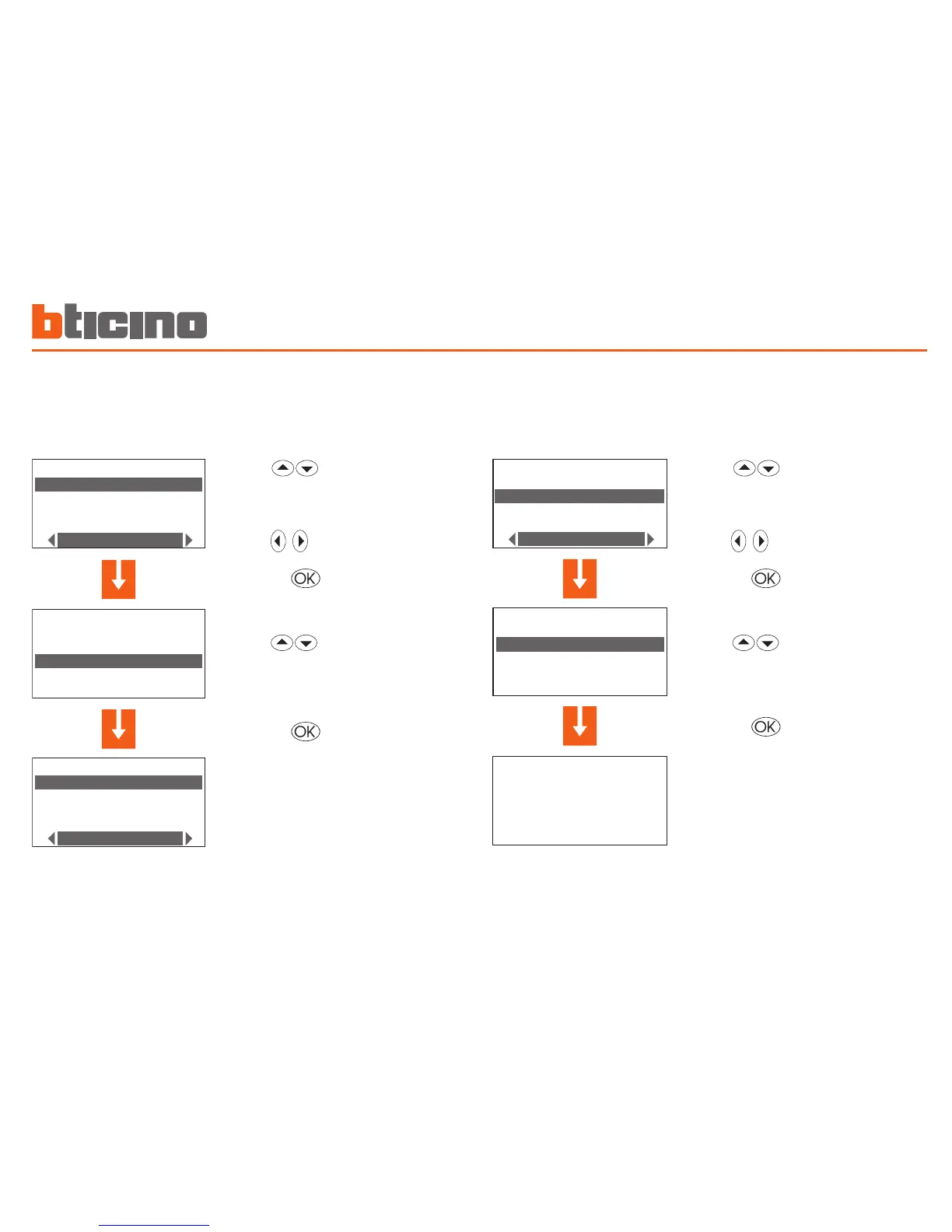
Copy a zone
This function lets you copy the daily profile programmed for one zone
to another zone.
Z ON E S E LE C T IO N
Z on e 1
Z on e 2
C op y f r om
Z ON E S E LE C T IO N
Z on e 1
Z on e 2
C op y f r om
Z ON E S E LE C T IO N
Z on e 1
Z on e 2
C op i a d a
Select the zone to copy into
(E.g.: Zone 1)
Select the Copy from function
Press the key to confirm
Select the zone to copy from
(E.g.: Zone 2)
Press the key to confirm
Copy a day
This function lets you copy a previously programmed daily profile to
another day.
C OP Y F R OM
M on d a y
T ue s d ay
W ed n e sd a y
T hu r s da y
E xa m p le
C op y
f ro m : M on d a y
t o: T u e sd a y
C HO I C E DA Y
M on d a y
T ue s d ay
W ed n e sd a y
C op y f r om
C HO I C E DA Y
M on d a y
T ue s d ay
W ed n e sd a y
M od i f y
C HO I C E DA Y
M on d a y
T ue s d ay
W ed n e sd a y
C op y f r om
Select the day to copy into
(E.g.: Tuesday)
Select the Copy from function
Press the key to confirm
Select the day to copy from
(E.g.: Monday)
Press the key to confirm
The display shows the following
message:
Copy
from: Monday
to: Tuesday
Programming 5

Other manuals for Bticino 3550