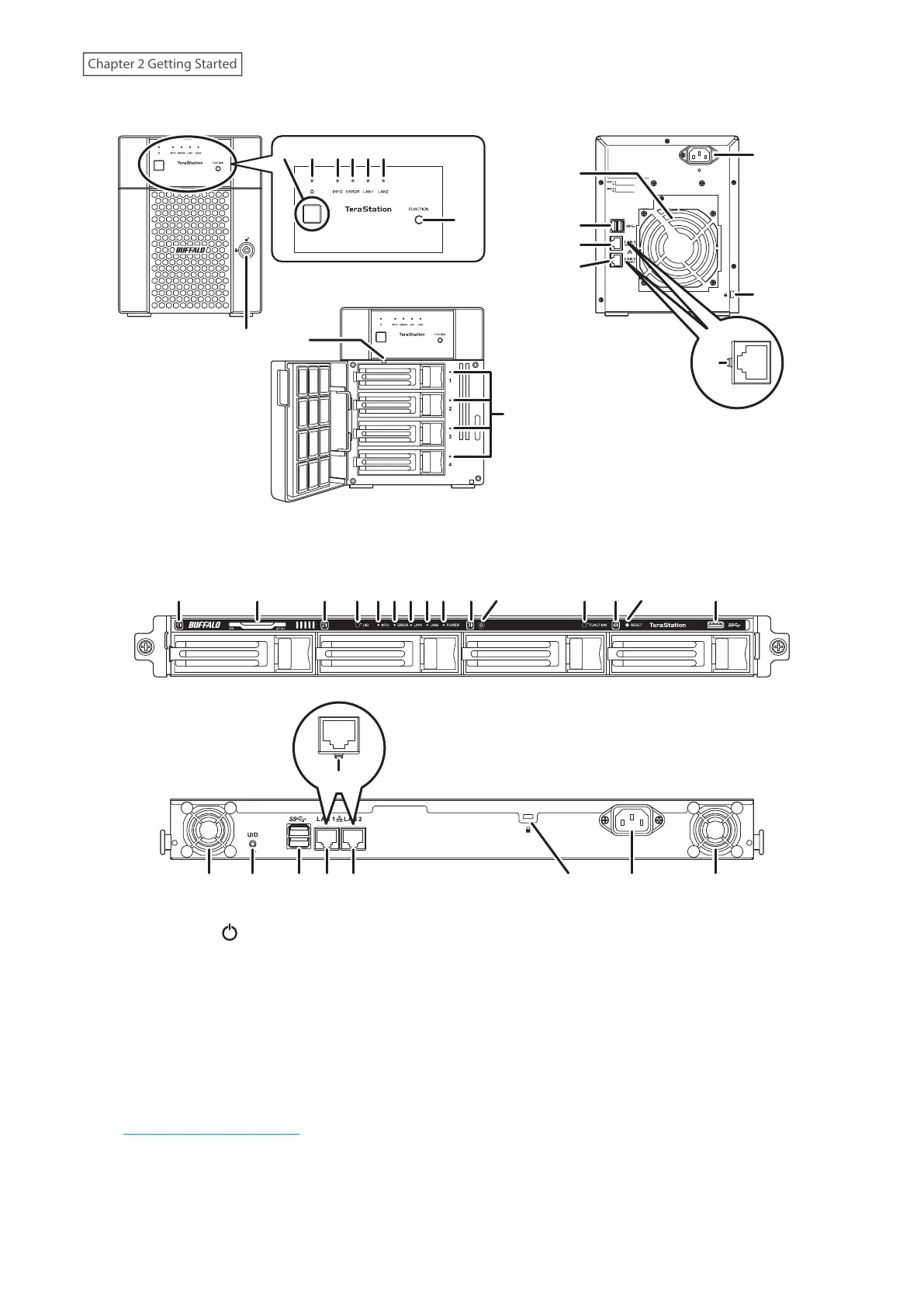
TS3410DN
8
12
13
14
15
16
11
10
9
19
7
2
3 4 5 61
TS3410RN
10 17 10 18 3456 10 1710 9122
19
1 Power Button ( )
To power on the TeraStation, connect the power cable and wait for 10 seconds, then press the power button.
To power off the TeraStation, press and hold down the power button for three seconds.
If the TeraStation beeps, pressing and holding this button for a short period will stop the beeping.
2 Power LED
For the TS3210DN and TS3410DN TeraStation models, the LED glows green when the TeraStation is on. For the
TS3410RN TeraStation model, the LED glows white when the TeraStation is on.
Note: If the LED continues to blink for longer than 15 minutes instead of turning into a solid glow, refer to the
“Power LED Keeps Blinking” section in chapter 11 for more details.
3 Info LED
If there is a status message, the info LED will light up amber. Check the Settings interface or NAS Navigator2 to
see the status message.
13
Chapter 2 Getting Started













 To Next Page