© 2014 ITW Renovation & Remodeling, a Division of Illinois Tool Works Inc.8
Operating the Air Scrubber
Determining Operating Speed
The BuildClean HEPA 360° Air Scrubber is equipped
to produce a maximum air ow of 600 cubic feet per
minute (CFM).
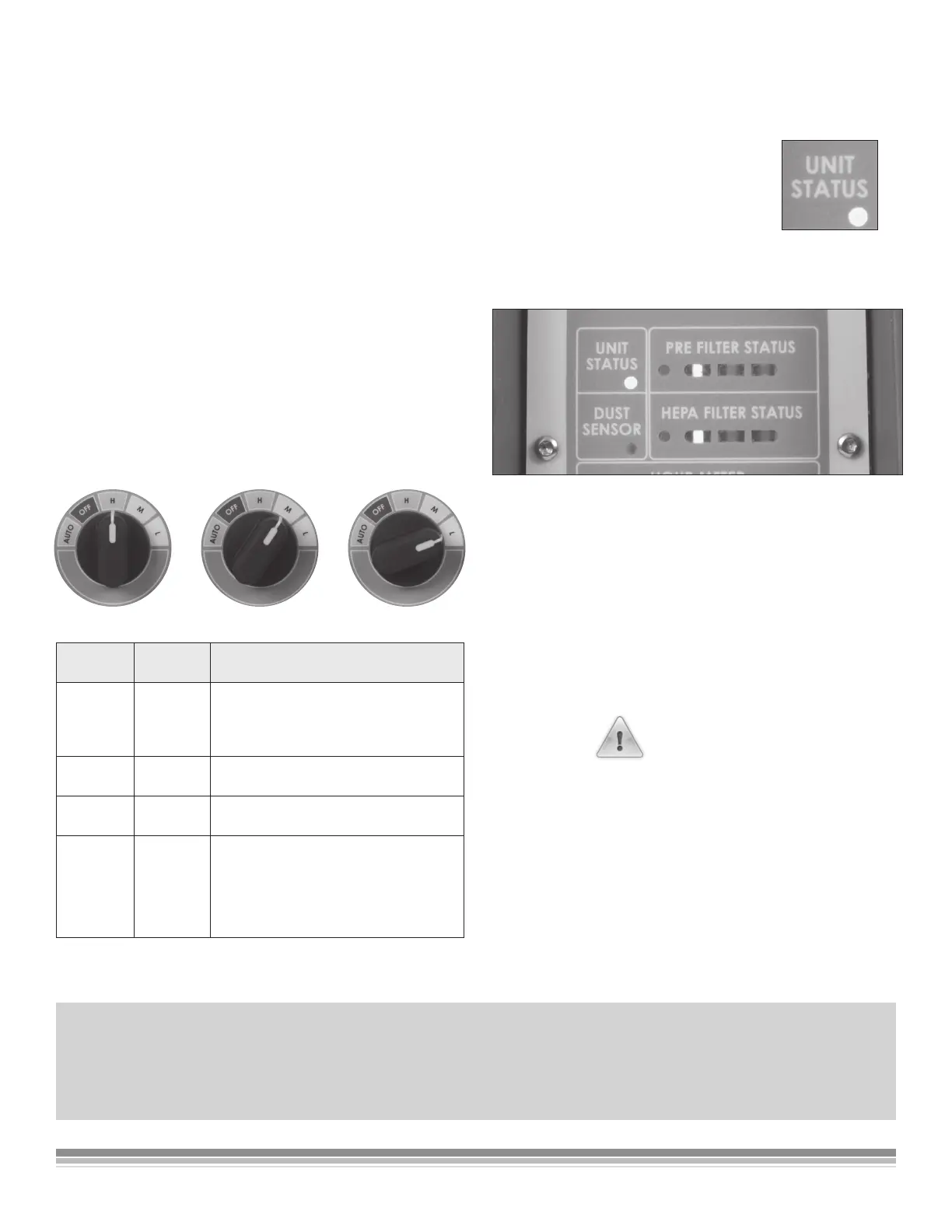
The HEPA 360º Air Scrubber has three speeds:
H (High 600 CFM),
M (Medium 400 CFM),
L (Low 200 CFM)
Plus an automatic setting in which the fan will
automatically adjust to the optimum speed based on
the results of the air sampling. Select the speed that
best suits your needed level of dust control. Rotate
the speed control knob to the desired speed setting,
Speed
Setting
Air
Speed
Recommended Use
HIGH 600 CFM Maximum performance; use during
the points of greatest dust genera-
tion, such as demolition and drywall
sanding.
MEDIUM 400 CFM Ideal speed for everyday dust collec-
tion on the job site.
LOW 200 CFM Lowest performance setting; use to
remove light dust.
AUTO 200 TO
600 CFM
For times and jobs where you desire
limited interaction with the air scrub-
ber - speed adjusts based upon the
amount of dust present in the air.
Power Status Display
Unit Status – Green light when unit
has been turned on at the Main
Power Switch at the rear of the
air scrubber.
Filter Status Display
Green Lights - “GO” -
lters are clean and unit is ready to operate.
Yellow Lights - “CAUTION” - lters are getting dirty.
The unit will continue to operate. Once the lters
reach full capacity the lights will turn red.
Red Lights - “STOP” –
Replace the noted lter.
DANGER
Failure to clean and replace the pre-lter will result in
a shortened life of the HEPA lter.
Auto Dust Sensor Status
Red light indicates that the Auto Dust Sensor needs
to be cleaned. To clean the dust sensor, unplug the
unit and use compressed air to blow dust out of the
opening to the Auto Dust Sensor.
NOTICE
While operating the lter performance test will occur every 60 minutes. During this test you will hear the
air scrubber fan ramp up to maximum speed and run for 15 seconds.


 To Next Page