19
exterior lights will turn o.
Automatic Accessory O: When your M Series cover is
closed spa accessories, including jets, water features, controls,
and interior lighting will turn o. Exterior lights will turn o
according to the automated light timer.
Cloud Control 2 App Notications: If your spa is connected
to the Bullfrog Spas CloudControl 2 smartphone application
opening your M Series cover will create a push notication on
your connected smart device alerting you that the cover has been
opened.
Closing your M Series cover will create a push notication on
your smart device alerting you that your cover has been closed.
Audio System Controls (Optional)
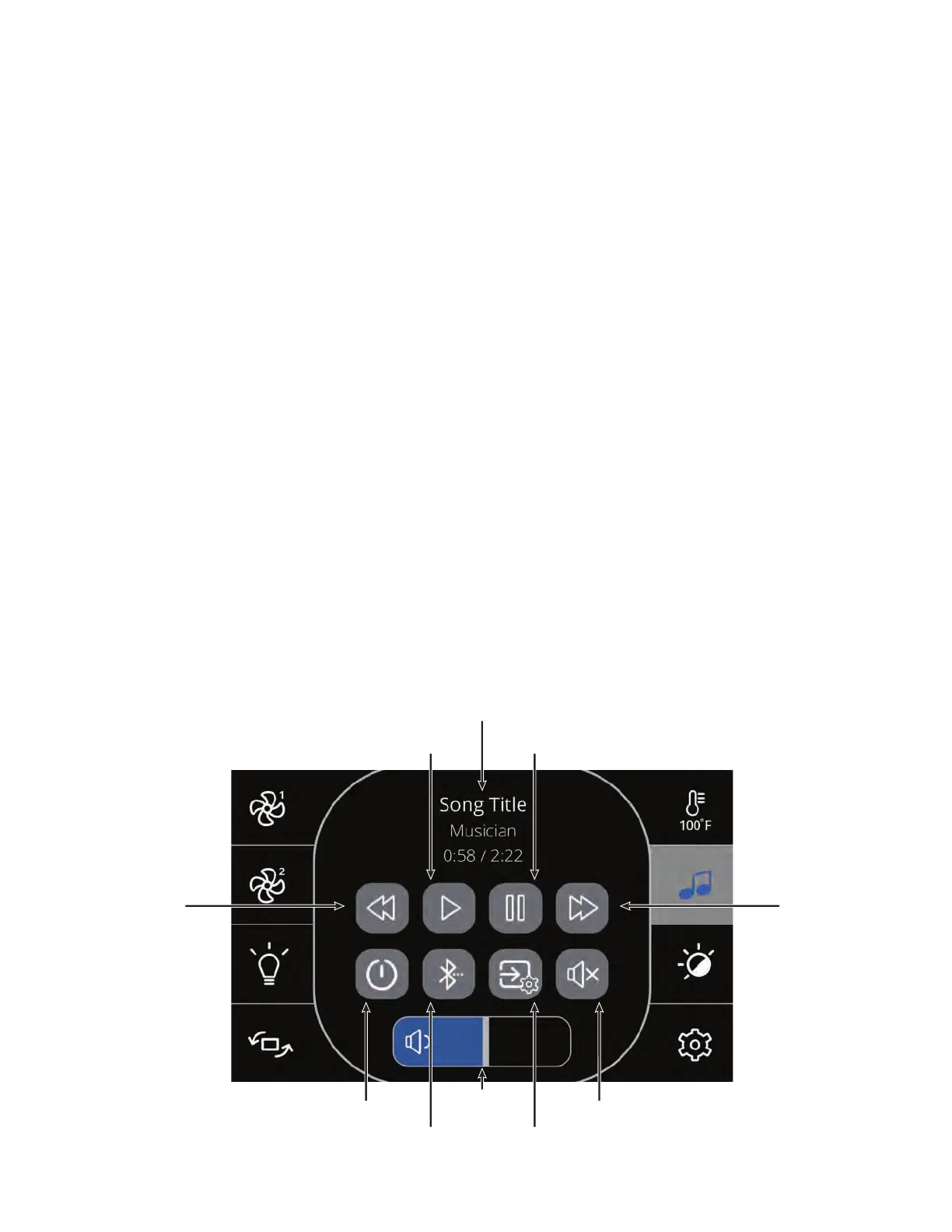
Press the Audio icon to access “in.stream 2” player controls.
If you are using a device with Bluetooth technology, it must be
connected for functions to work. Use code 5555 to pair.
Speakers settings: Move the sliders to adjust the Balance, Fader
and Subwoofer settings. e Fader and Subwoofer sliders will
only appear in the Speakers menu if the corresponding speakers
are available.
Source menu: To change the audio source, simply tap on the
“Audio Settings” menu and select desired audio source or device.
Note that only the sources available on the M Series, A Series or
STIL Audio will be displayed in the source menu.
Connect Bluetooth: e rst time you use your Bluetooth device
with an M Series, A Series or STIL Audio system you must rst
“pair” or connect your device to the spa audio system according
to the standard functionality of your specic device.* Each device
must be connected separately. Use code 5555 to pair.
Disconnect Bluetooth: If a device with Bluetooth technology
is connected to the M Series, A Series or STIL Audio, you can
disconnect it by pressing the Disconnect button at the bottom
of the screen. Doing so will also prevent the audio system from
automatically reconnecting to this specic device until it has been
reconnected using the device itself.
For proper function, place your Bluetooth device within 20 feet (6
meters) of your spa. e device should have “line of sight” to the
spa control panel / equipment door area.
NOTE: Certain house construction materials and other
obstructions can impair Bluetooth connectivity. You may need to
experiment with where to place your device for best results.
Track / Song Down
Volume
Slider
Track / Song Up
Power
Pause
Play
Mute
Bluetooth
Indicator
Audio
Settings



 To Next Page