Page 47
PROGRAMMING THE BREWER (cont.)
PROGRAMMING FUNCTIONS - LEVEL 2 (cont.)
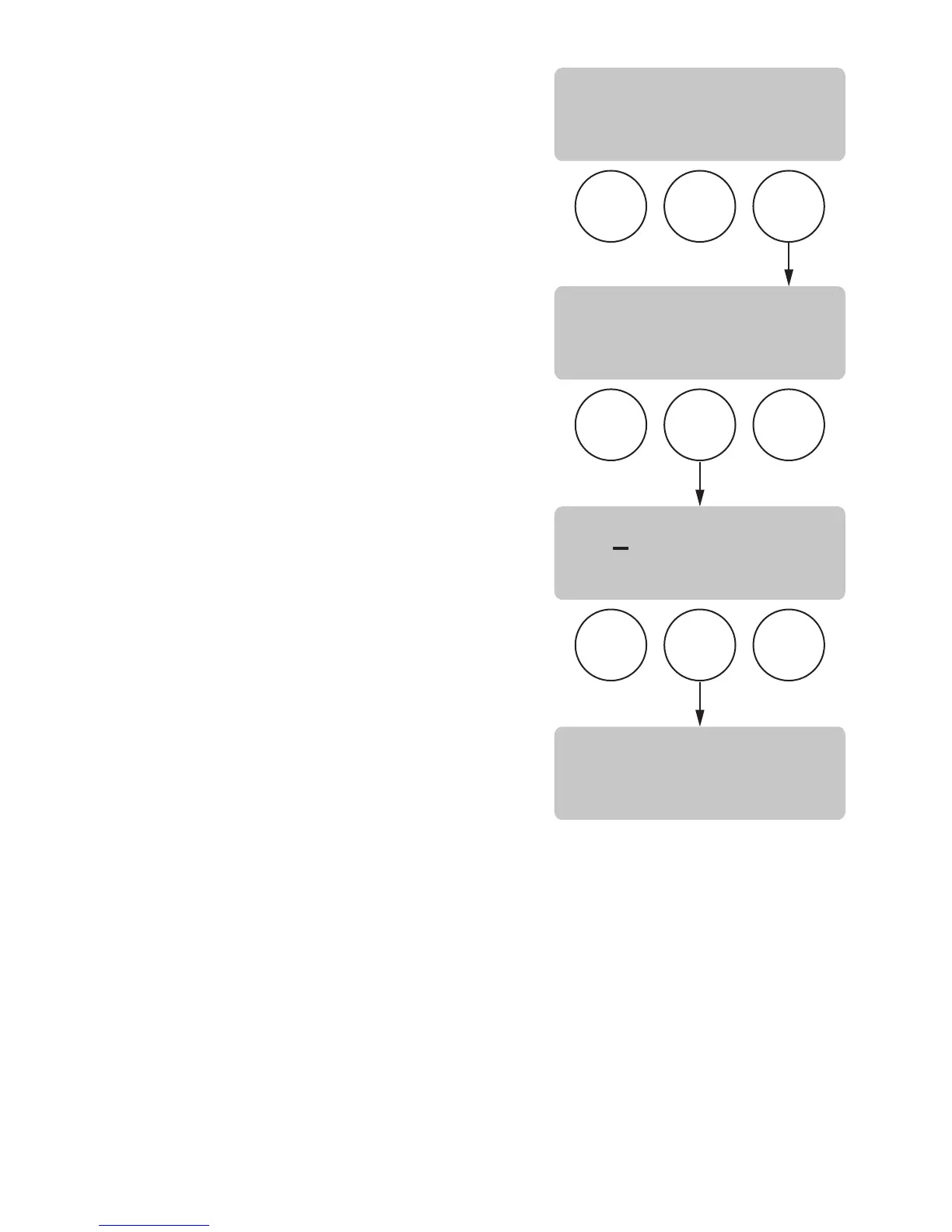
SERVICE NUMBER
This function allows the operator to enter in the tele-
phone number to call if service is needed. The service
number will be displayed anytime there is a fault mes-
sage displayed (SeeTroubleshooting on page 56).
Procedure to enter the service number:
1. Press and hold the right hidden button until the
display reads SET LANGUAGE. Press the right
hidden button until the display reads:
ENTER SERVICE #?
2. Press and release YES. The display will now read
SCROL THRU #'S NEXT ->NEXT NUMBER, followed
by 000-000-0000. Up to 16 characters are avail-
able.
3. Press the SCROL button to scroll through the num-
bers. When the desired number is shown, press
and release NEXT to move to the next digit in the
phone number.
4. Repeat Step 3 until the entire number is entered.
5. Press and release DONE. The display will now read
SERVICE TOOLS?
P3049
BREW
A
BREW
B
BREW
C
BREW
A
BREW
B
BREW
C
BREW
A
BREW
B
BREW
C
ENTER SERVICE #?
NO YES
SCROL THRU #'S
NEXT->NEXTNUMBER
SERVICE TOOLS?
NO YES
000-000-0000
SCROL DONE NEXT
37077 071206



 To Next Page