18
For any help concerning set up and use of your TV please call the Customer Helpline: 0871 2000 463
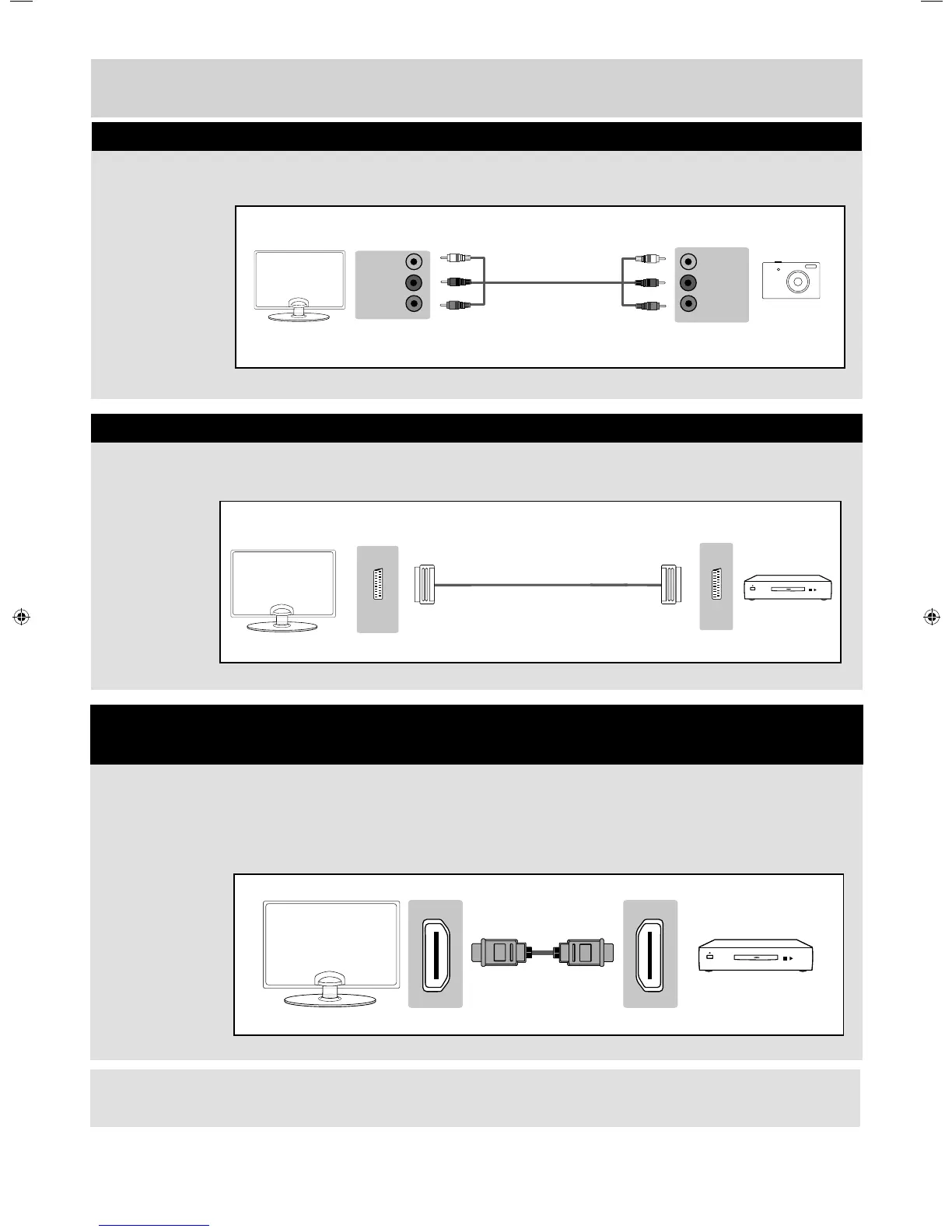
L (white)
R (red)
Video
(Yellow)
L (white)
R (red)
Video
(Yellow)
Connections
Source should be set to Composite / AV
A HDMI cable can output both video and audio and enables you to enjoy digital-quality video and audio
with minimal loss of quality.
Source should be set to the corresponding HDMI Port (HDMI 1, HDMI 2, etc)
Connecting a Camcorder, Camera or Games Console
Connecting a High Defi nition (HD) Device
Option 1 - via HDMI to HDMI cable
Note: This model TV can not be used as a PC/laptop monitor via HDMI input. The HDMI Input is provided to view
digital content with compatible external devices..
SCARTSCART
Source should be set to SCART
Connecting a DVD Player/Recorder, Video Recorder or Cable/Satellite Box
User Guide - Bush -32-149 BUS-MAN-0012.indd Sec1:18User Guide - Bush -32-149 BUS-MAN-0012.indd Sec1:18 10/30/2014 2:04:02 PM10/30/2014 2:04:02 PM



 To Next Page