19
For any help concerning set up and use of your TV please call the Customer Helpline: 0871 2000 463
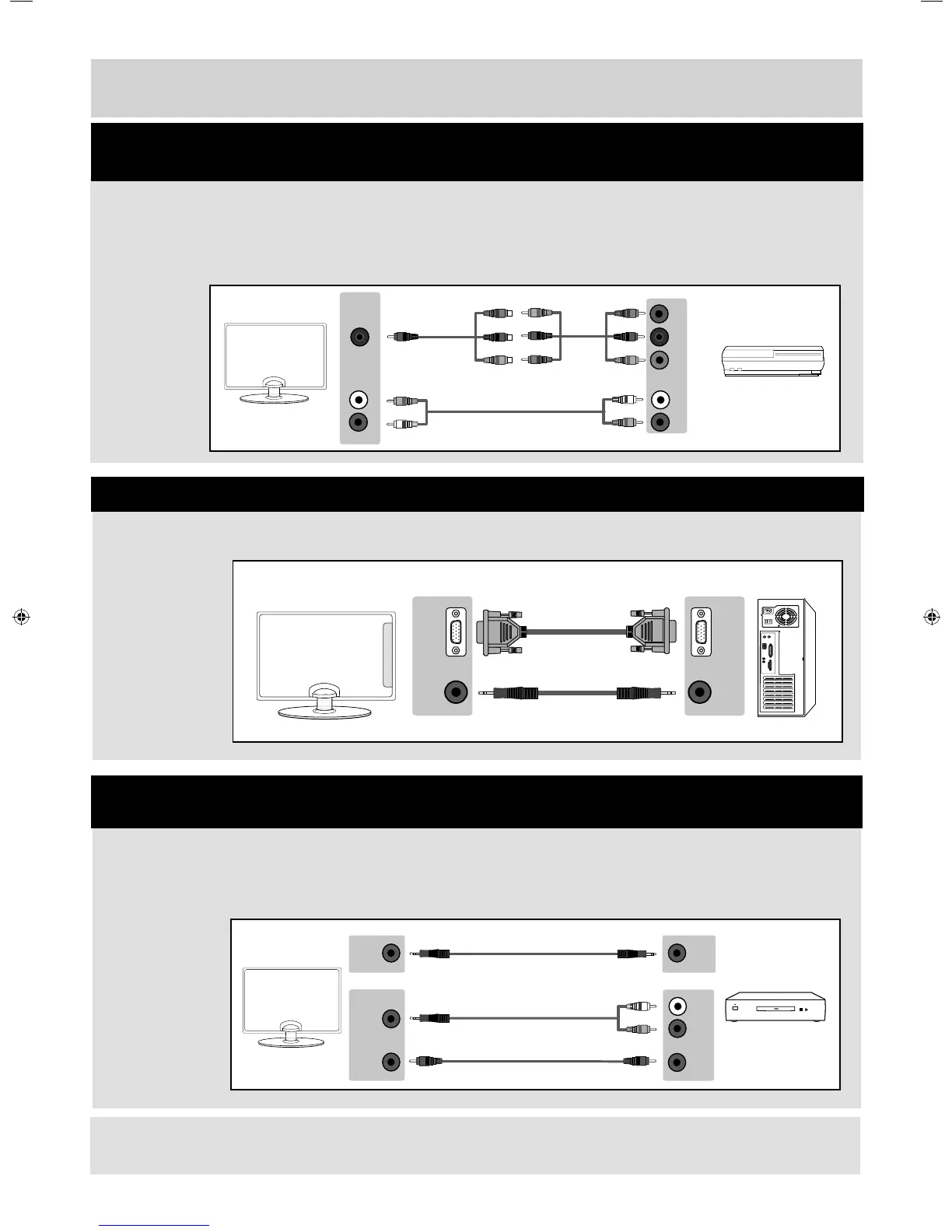
VGA/PC
IN
VGA/PC
OUT
VGA/PC
(AUDIO
IN)
AUDIO
OUT
Mini
YPbPr
Y
PB
PR
L
R
L
R
Connections
Source should be set to VGA/PC
If you are supplied with a cable from the device which has RED, GREEN, BLUE, RED & WHITE
connectors you must connect via Component (for picture) and by phono cable (for sound).
TV Source should be set to Component / YPbPr
Connecting a High Defi nition (HD) Device
Option 2 - via Component cable
Connecting to a device with VGA/PC output (Laptop or Desktop Computer)
3.5mm
EARPHONE
3.5mm
EARPHONE
OPTION 1 for 3.5mm EARPHONE Output
OPTION 2 for 3.5mm EARPHONE Output
COAXIAL
OUT
COAXIAL
IN
3.5mm
AUDIO
IN
L
R
When connecting via the TV’s 3.5mm Earphone output, this will disable the TV speakers.
There are two options to connect a device via the 3.5mm Earphone Output.
Connecting to an external audio device (Amplifi ers, Surround Sound,
Sound Bars etc)
Note: Connecting cables are shown for example only and may not be included. Please check ‘What Is Included In
The Box’ page.
User Guide - Bush -32-149 BUS-MAN-0012.indd Sec1:19User Guide - Bush -32-149 BUS-MAN-0012.indd Sec1:19 10/30/2014 2:04:02 PM10/30/2014 2:04:02 PM


 To Next Page