Getting Started
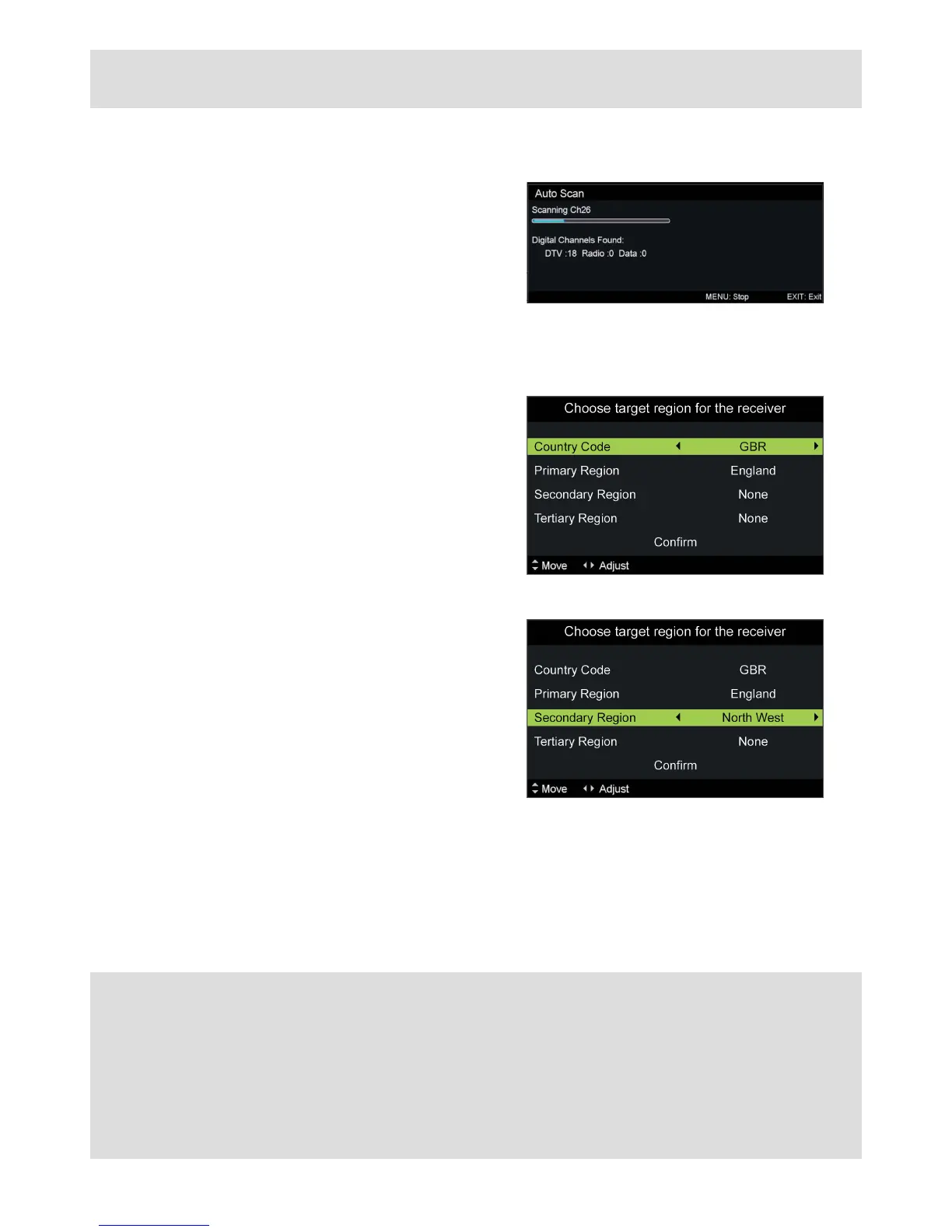
Tuning progress will be shown
As the progress bar moves along any channels
found will be indicated.
If you are in a mixed-signal area the region
selector screen will be shown.
This allows you to select which local transmitter
you would like to tune to.
Country Code
Choose from countries found.
Press◄►toadjust
Press▼tocontinue
Primary Region
Choose from tuning regions found
Press◄►toadjust
Press▼tocontinue
Secondary Region
Choose from main local transmitters found
Press◄►toadjust
Press▼tocontinue
Tertiary Region
Choose from local transmitters found
Press◄►toadjust
Press▼tocontinue
Conrm
Press►orOK to complete
Once tuning has completed the TV will revert to
therstchannelfound.
That’s it, you’re done!
No signal?
Missing channels?
Picture breaking up?
Sounds like an aerial issue...
Digital Freeview requires a fairly strong, high quality aerial signal to work fully: a professionally installed outdoor aerial system is
recommended.
An indicator of an inadequate aerial signal is the picture and/or sound breaking up, channels missing, or no channels found at all.
If tuning to a satellite system, such as Sky, remember to choose ATV as the Auto Scan type.



 To Next Page