12
Getting Started
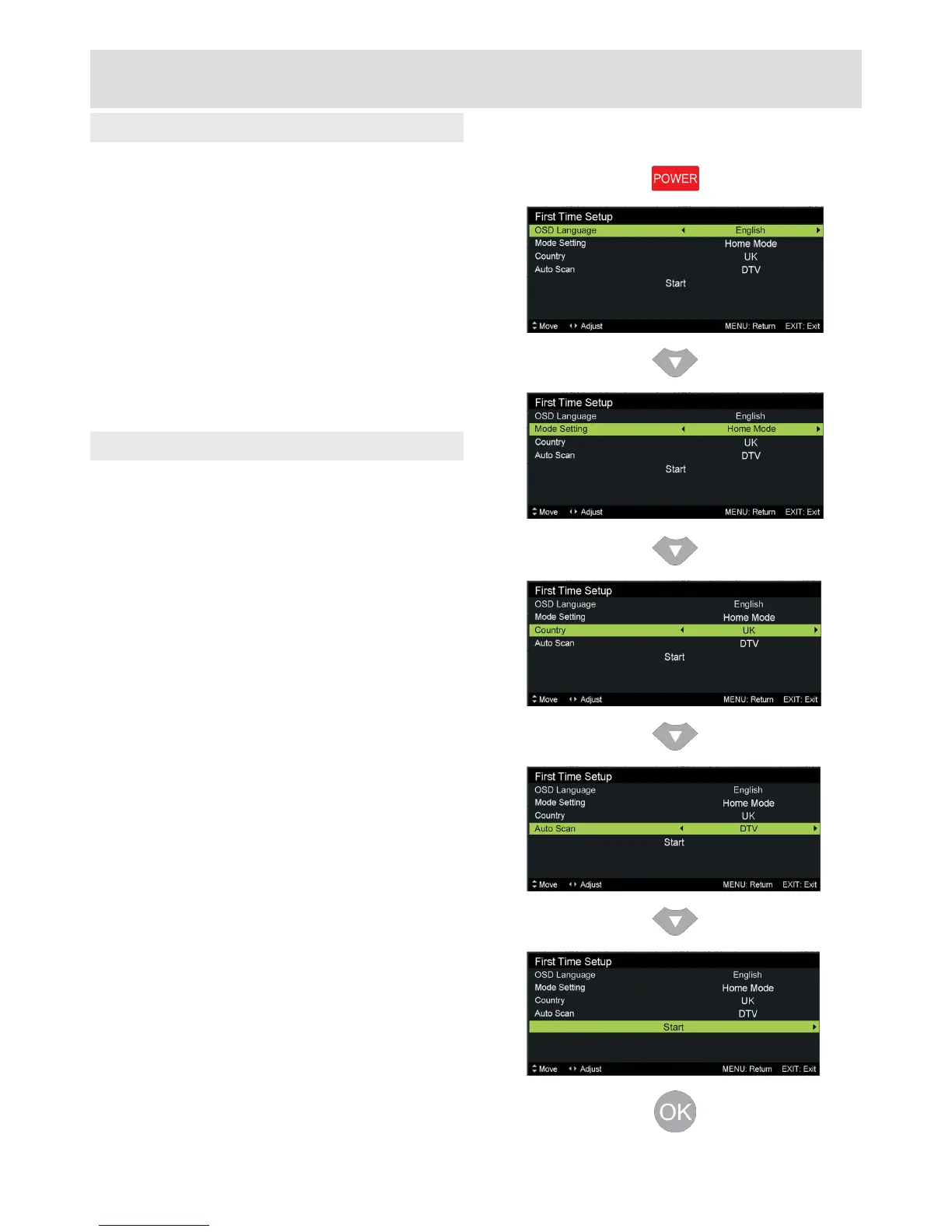
Switchingonforthersttime
Once you have mains power and an aerial
connected, you are ready to switch your TV on
and complete the setup and tuning:
• Press POWER button on remote control or TV
• LED on front of TV should turn from RED to
GREEN
• Welcome message will be displayed, press
OK to continue
OSD Language
Choose on-screen display language
Press◄►toadjust
Press▼tocontinue
Mode Setting
Choose Home Mode for normal viewing,
choose Store Mode for bright environments
Press◄►toadjust
Press▼tocontinue
Country
Press◄►toadjust
Press▼tocontinue
Auto Scan
Choose DTV for digital Freeview, choose ATV
for other systems, such as Sky
Press◄►toadjust
Press▼tocontinue
Start
Press►orOK to begin the automatic tuning
First Time Setup



 To Next Page