Product SupportProduct Support
Fitting the base stand
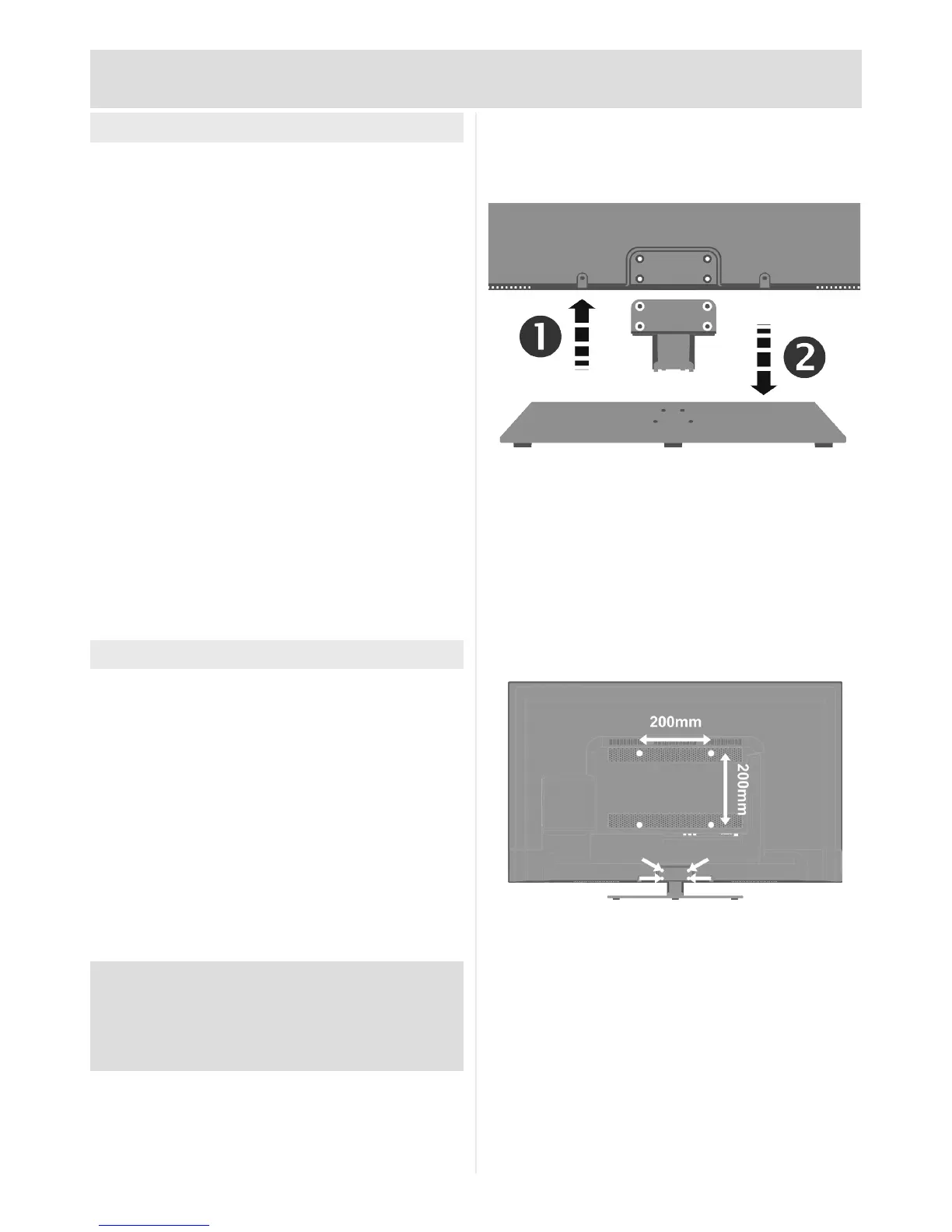
To minimise packaging the stand is packed
separately as two parts.
Before you begin, check all the stand parts are
included:
1 x Stand base
1 x Stand stem
4 x Base screws (short)
4 x Stem screws (long)
• Place TV, screen down, on a suitable scratch-
free surface.
• Insert the base stem into base of cabinet and
secure using supplied screws (x 4)
• Locate the base onto the 4 screw mounts.
• Once in position use the supplied screws (x 4)
to secure.
Wall Mounting
Requires VESA 200 x 200mm mounting kit with
M6 bolts (not supplied)
• Place TV, screen down, on a suitable scratch-
free surface
• Remove screws (x 4) at top of base stem and
carefully remove stand
• Locate the mounting holes on rear of TV
andtbracketaccordingtomanufacturer’s
instructions
Argos Ltd. accepts no responsibility for any damage
caused to, or by, incorrect mounting of the wall
bracket.
Pay close attention to the manufacturer’s instructions.



 To Next Page