4
Switching on your radio for the first time
1a Mains Adaptor (supplied with the package)
Connect the mains adaptor to the DC power socket on the rear of the radio
1b Battery (not supplied)
Open the battery door and insert 6 x “AA” size batteries.
NOTE: Insert batteries correctly. Pay attention to the +/- polarities
2 Extend the telescopic aerial as far as it can go.
3 Slide the Power ON/OFF switch to ON to turn on the radio.
The radio will automatically tune and operate the quick scan.
During scan mode, the LCD will display a slide bar that indicates the progress of the
scan, and the amount of radio stations that have been found so far. Once the scan
has nished, the radio will select the rst alphanumeric station.
NOTE: The name of the found group of DAB radio stations will be displayed on the
bottom half of the display.
Memory
When you power up the radio again, the radio plays the same mode (DAB or FM) as
the last operation.
Welcome to
Digital Radio
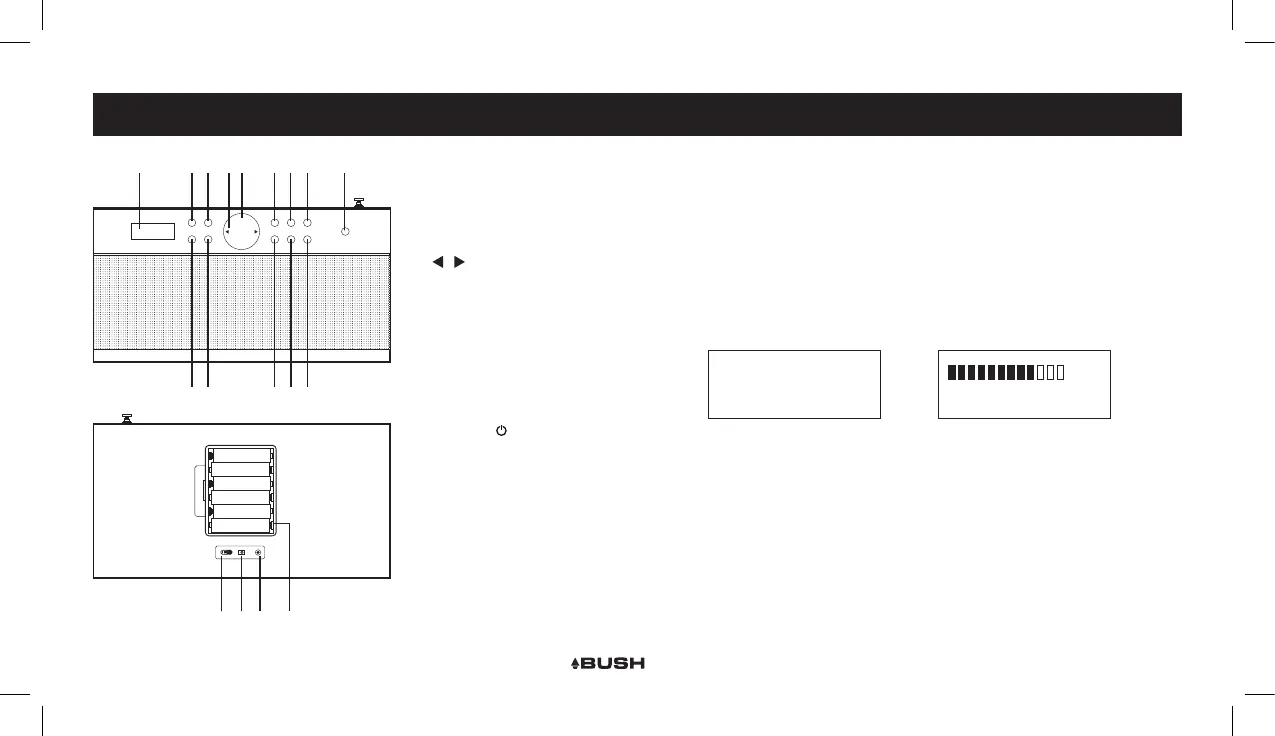
GENERAL OPERATIONCONTROLS & FUNCTIONS
1 2
4 6 7 8 10 12 14
1 2
3 5 9 11 13
4 6 7 8 10 12 14
15 16 17 18
1. LCD display
2. DAB/FM button
3. INFO/MENU button
4. BACK/SCAN
5. ENTER button
6. / buttons
7. VOLUME +/- controls
8. 1/6 preset button
9. 4/9 preset button
10. 2/7 preset button
11. 5/10 preset button
12. 3/8 preset button
13. PRESET button
14. SLEEP / button
15. POWER switch
16. DC power input
17. EARPHONE output
18. Battery compartment



 To Next Page